Chapter 01
Copyright and Publication Notice
Copyright © 2026 Sagar Debnath. All rights reserved.
No part of this publication may be reproduced, stored in a retrieval system, distributed, transmitted, or adapted in any form or by any means without the prior written permission of the author, except for brief quotations used for academic review, citation, or other uses permitted by law.
The original narrative, technical analysis, project methodology, tables, revised architecture diagrams, testing interpretation, and presentation contained in this manuscript are the intellectual property of Sagar Debnath. Microsoft, Windows Server, Microsoft 365, Active Directory, Outlook, Microsoft Authenticator, TP-Link, Lenovo, HP, Canon, Epson, Swann, GoDaddy and other third-party names, screenshots, logos and trademarks remain the property of their respective owners and are included only for identification, technical discussion and educational evidence.
This manuscript is a thesis-style engineering case study developed from practical coursework completed at Techskill Institution. It may be used as a professional portfolio publication. Submission to a journal, conference or academic repository may require additional formatting, peer review, permissions, originality screening and disclosure in accordance with the target venue’s policies.
Chapter 02
Declaration of Authorship and Technical Work
I, Sagar Debnath, declare that the infrastructure planning, Windows Server deployment, Active Directory configuration, Microsoft 365 administration, testing activities, screenshots and project evidence presented in this work were completed as part of my practical mini project at Techskill Institution.
The manuscript has been expanded from the original project record into a professional engineering case study. Editorial and document-production assistance was used to organise, clarify and polish the presentation. The implementation evidence, technical decisions and project outcomes remain grounded in my actual work. Where the paper recommends improvements beyond the original laboratory implementation, those recommendations are explicitly identified as proposed future or production-state enhancements.
For security and professional practice, live passwords and reusable credentials are intentionally excluded. Any personal names or example identities shown are retained only because they form part of the educational scenario and implementation evidence.
Signed: Sagar Debnath
Date: 2026
Chapter 03
Dedication
This work is dedicated to my family, whose encouragement has supported my education, professional growth and ambition to build meaningful technology. It is also dedicated to every learner who has discovered that confidence is built not by avoiding difficult systems, but by configuring, testing, breaking, troubleshooting and rebuilding them until understanding becomes practical ability.
Chapter 04
Acknowledgement
I sincerely acknowledge Techskill Institution for providing the project scenario and the practical learning environment in which this infrastructure was developed. The project challenged me to think beyond a single server task and to consider the complete technology requirements of a new educational organisation: people, devices, identity, communication, connectivity, permissions, security, cost and future growth.
I also acknowledge the value of hands-on experimentation. Several of the strongest lessons in this project came from verifying whether permissions behaved as expected, confirming that a client could join the domain, observing password-policy enforcement, and testing Microsoft 365 services from an end-user perspective. Those moments transformed configuration steps into engineering evidence.
Chapter 05
Preface: From a Mini Project to an Engineering Case Study
When I began this project, the brief appeared straightforward: plan the technology for a new business college, configure a server, create users and groups, share folders, connect a client computer, and set up Microsoft 365. The deeper I went, however, the more I understood that enterprise infrastructure is not a collection of isolated products. It is a system of relationships. A user account must belong to the correct group; the group must receive the correct permission; the device must resolve the domain; the network must carry the traffic; the security policy must be enforced; and the administrator must be able to prove that each part works.
The StarTech Business College scenario gave me the opportunity to follow that chain from the beginning. The organisation had a name and an office, but no operational technology. I had to think as an IT engineer: identify the people and rooms, calculate endpoints, select equipment, design a network, build a domain, separate departments, create resources, test access, establish Microsoft 365 communication and introduce multifactor authentication.
This paper does not pretend that a laboratory deployment is identical to a production rollout. Instead, it presents the laboratory work honestly, evaluates its strengths and limitations, and develops it into a stronger production blueprint. That distinction is important. Real engineering is not only the ability to show what worked; it is the ability to recognise what would need to change before an organisation relied on the system every day.
The most meaningful outcome of the project was therefore not a single screenshot. It was the development of an end-to-end way of thinking: understand the business, design the architecture, implement carefully, validate from the user’s perspective, document the evidence, and improve the design after review.
Chapter 06
Abstract
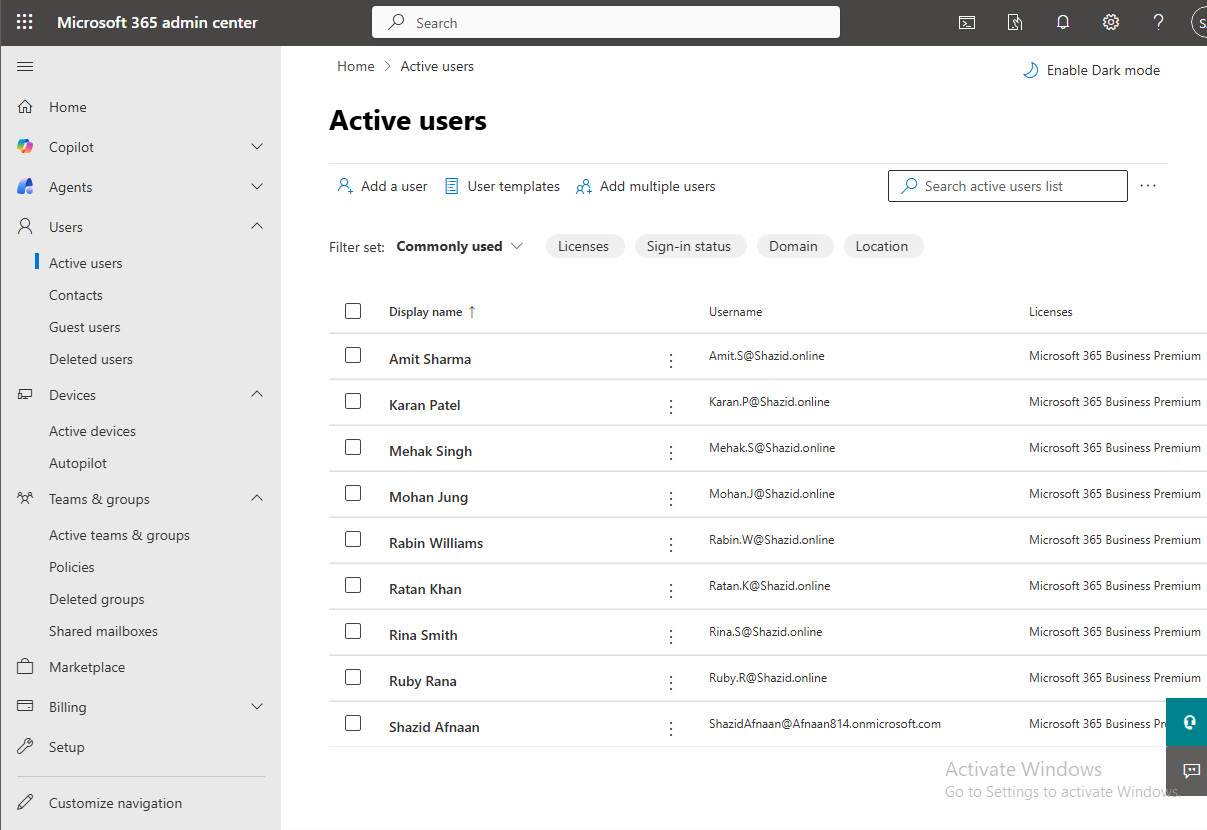
Modern educational institutions require a dependable technology foundation to support administration, teaching, identity management, communication, shared resources and security. This thesis-style engineering case study presents the planning, implementation and evaluation of a hybrid enterprise IT environment for StarTech Business College, a simulated educational organisation with two classrooms and eight staff members. The practical work was completed at Techskill Institution and expanded into a structured technical publication.
The project combined business requirements analysis, equipment planning, network design, Windows Server 2022 deployment, Active Directory Domain Services, DNS, organisational units, departmental security groups, user provisioning, shared folders, access control, Group Policy, password-policy enforcement, client domain joining, Microsoft 365 onboarding, a demonstration custom domain, distribution lists, shared mailboxes, Microsoft Authenticator multifactor authentication, Office installation, Outlook signatures, mailbox forwarding and automatic replies. Implementation outcomes were validated through screenshots and direct functional tests, including successful domain authentication, permitted access to an authorised departmental share, denial of access to an unauthorised share, and rejection of a password that did not satisfy the configured minimum length.
The case study distinguishes between components that were implemented in the laboratory and those that were proposed for the production site. A critical engineering review identifies capacity and resilience limitations in the initial physical design, particularly the mismatch between a 24-port switch and an environment containing sixty classroom computers plus staff devices, printers, phones, wireless and CCTV endpoints. A revised production architecture is therefore proposed using managed switching, increased structured cabling capacity, network segmentation, redundant domain services, enterprise backup, endpoint management, stronger identity controls and Australian cyber-security guidance.
The result is a practical and evidence-based model showing how a small educational organisation can move from an empty office to a centrally managed enterprise environment. The work demonstrates the author’s hands-on capability in systems administration, networking, identity security, cloud administration, testing, documentation and reflective engineering analysis.
Keywords: Windows Server 2022; Active Directory Domain Services; Microsoft 365; Microsoft Entra ID; educational technology; network architecture; Group Policy; multifactor authentication; file permissions; systems administration.
Chapter 07
Executive Summary
StarTech Business College was presented as a newly registered business that had rented premises in the Sydney CBD but had not yet deployed technology. The proposed organisation included a reception area, an administration office, a teachers’ room, marketing and accounting functions, a director, and two classrooms containing thirty computers each. The original brief required a complete technology plan and a working server-based environment.
The delivered laboratory solution established the core of that environment. A Windows Server system was prepared with Active Directory Domain Services and DNS. The STBC.LOCAL domain structure was organised into departmental organisational units. Users and departmental security groups were created, shared folders were established under C:\STBC DATA, permissions were assigned to groups, Group Policy was configured, and a minimum password length of ten characters was enforced. A client device was joined to the domain and tested with the Rabin Williams account. The user could access the authorised Admin folder, exchange a file through the share, and was denied access to the Marketing folder. This provided direct evidence that the permission model was functioning.
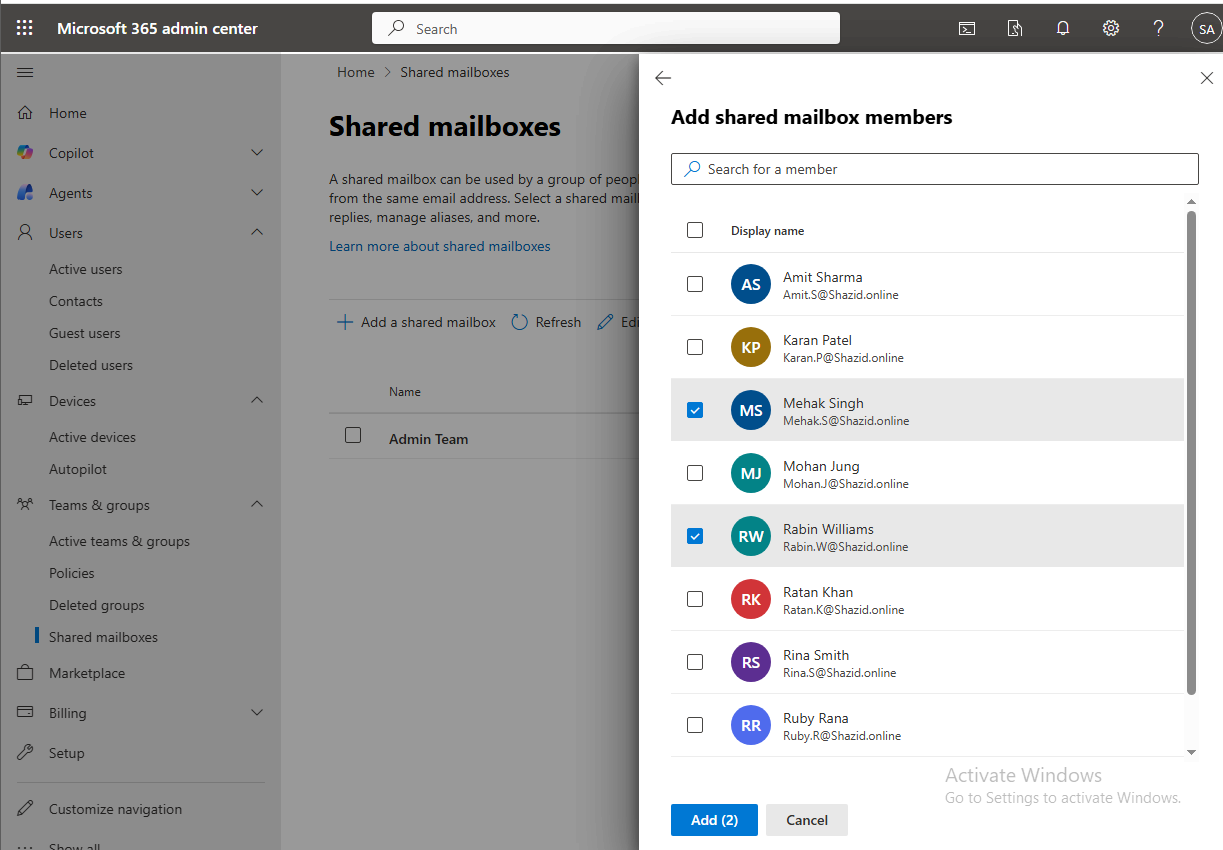
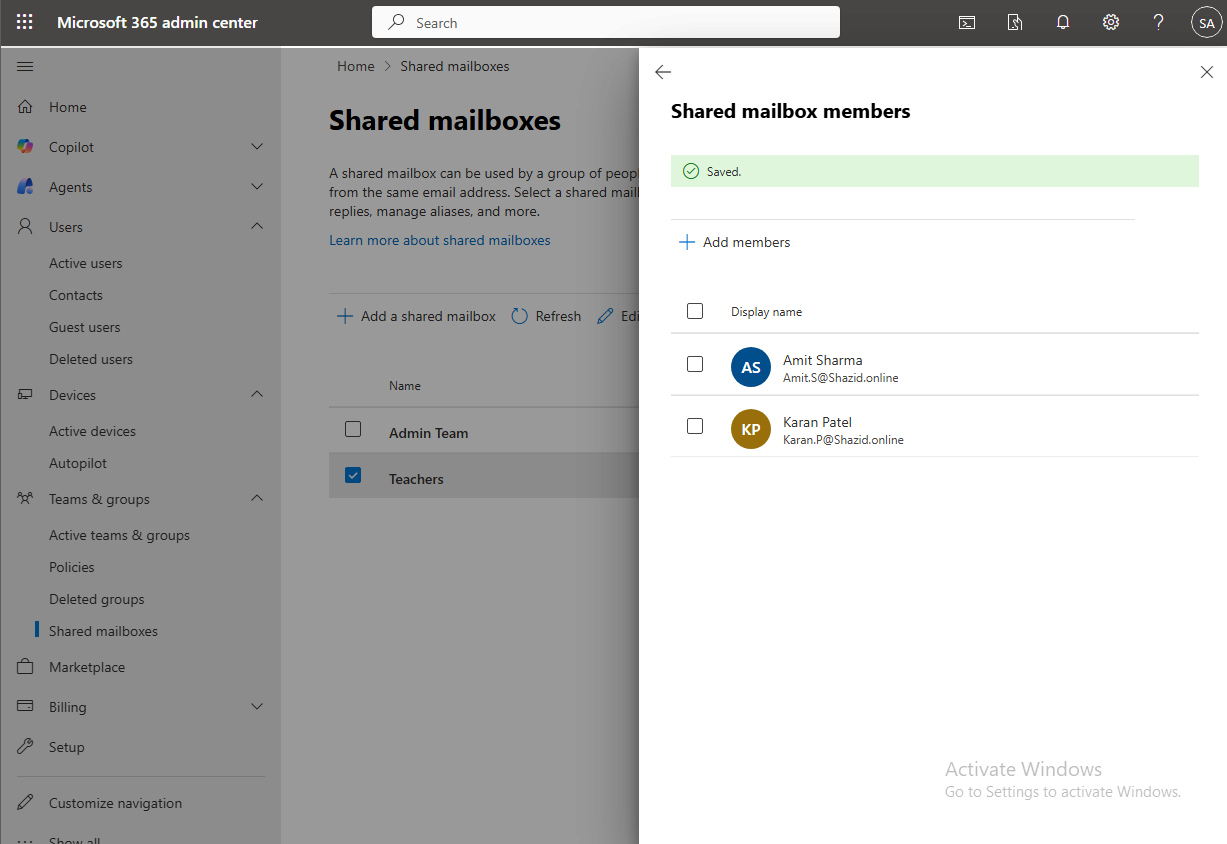
The second part of the project extended the environment into Microsoft 365. The demonstration domain sagar.online was connected, users were onboarded, shared mailboxes for the Admin and Teachers teams were created, distribution lists were configured, multifactor authentication was enabled, Microsoft Authenticator was registered using number matching, Office applications were installed, and Outlook communication features were tested. The final result was a hybrid learning environment in which on-premises identity and file services were complemented by cloud communication and stronger sign-in security.
The engineering review concludes that the logical implementation was successful, but the original production network estimate requires expansion. A single 24-port switch cannot support the stated number of endpoints. The revised design recommends approximately 96 to 120 structured-cabling terminations, managed PoE switching, VLAN separation, two ceiling-mounted wireless access points, a business firewall, UPS protection, a secondary domain controller, centralised backup, Microsoft Intune, Defender, Conditional Access, Windows LAPS and documented disaster-recovery testing.
| Central conclusion The project successfully demonstrated the identity, permission, communication and validation workflow of an enterprise environment. Its strongest professional value comes from the combination of real implementation evidence and an honest production-readiness assessment. |
Chapter 08
Contents at a Glance
Chapter 1 — Introduction
Chapter 2 — Business Context and Requirements
Chapter 3 — Methodology and Project Governance
Chapter 4 — Procurement and Cost Planning
Chapter 5 — Physical and Logical Network Architecture
Chapter 6 — Windows Server and Core Services
Chapter 7 — Active Directory Design and Identity Management
Chapter 8 — File Services, Permissions and Group Policy
Chapter 9 — Client Integration and Functional Validation
Chapter 10 — Microsoft 365 Domain and User Administration
Chapter 11 — Shared Communication Services in Exchange Online
Chapter 12 — Multifactor Authentication, Office and Outlook
Chapter 13 — Security Assessment and Australian Alignment
Chapter 14 — Testing, Results and Engineering Evaluation
Chapter 15 — Production Roadmap and Future Development
Chapter 16 — Conclusion
References
Appendix A — Original Equipment and Cost Schedule
Appendix B — User, Group and Access Matrix
Appendix C — Validation Test Register
Appendix D — Complete Original Project and Screenshot Evidence
Chapter 09
Abbreviations
| Abbreviation | Meaning |
|---|---|
| AD DS | Active Directory Domain Services |
| ASD | Australian Signals Directorate |
| CCTV | Closed-Circuit Television |
| DHCP | Dynamic Host Configuration Protocol |
| DNS | Domain Name System |
| GPO | Group Policy Object |
| IAM | Identity and Access Management |
| MFA | Multifactor Authentication |
| NBN | National Broadband Network |
| NTFS | New Technology File System |
| OU | Organisational Unit |
| PoE | Power over Ethernet |
| RBAC | Role-Based Access Control |
| STBC | StarTech Business College |
| UPS | Uninterruptible Power Supply |
| VLAN | Virtual Local Area Network |
| ZTA | Zero Trust Architecture |
CHAPTER 1
Chapter 10
Introduction
1.1 Background
An educational institution may appear to operate through classrooms, teachers, reception and administration, yet each of those functions depends on an underlying digital environment. Staff require secure accounts, reliable communication, access to departmental information and consistent devices. Classrooms require connectivity at scale. Management requires visibility and control. The institution must also be able to add future students without redesigning the entire environment.
The project documented in this paper began from an intentionally blank starting point. StarTech Business College had registered its business name and rented office space in the Sydney CBD, but had not purchased equipment, installed data cabling, deployed a server or created cloud services. The role of the IT engineer was therefore broader than installation. It involved translating an organisational scenario into technical requirements and then building enough of the environment to prove that the design worked.
1.2 Problem Statement
Without centralised identity and access management, each computer would operate as an isolated device. User accounts would be inconsistent, departmental data could be exposed to the wrong staff, password standards would be difficult to enforce, and onboarding would require repeated manual configuration. A flat physical network would also become difficult to scale once sixty classroom computers, staff devices, printers, phones, Wi-Fi and CCTV were connected.
The engineering problem was therefore to design a manageable infrastructure that could support the immediate organisation while remaining understandable, secure and expandable. The project needed to demonstrate not only that services could be configured, but that users received the correct access and were denied access where appropriate.
1.3 Aim and Objectives
The aim was to design, implement and evaluate a secure hybrid enterprise IT infrastructure for a small educational institution using Windows Server, Active Directory and Microsoft 365.
- Identify the technology, connectivity, endpoint, printing, classroom, wireless, CCTV and professional-service requirements of the college.
- Develop a physical and logical network design that connects the server, staff, classrooms and supporting systems.
- Deploy a Windows Server domain environment with AD DS and DNS.
- Create organisational units, departmental groups, users and a future Students group.
- Implement departmental file shares and group-based access control, including director-level access requirements.
- Create and apply a Group Policy password standard.
- Join a client device to the domain and validate authentication, authorised access and access denial.
- Configure Microsoft 365 users, shared communication services and multifactor authentication.
- Document the implementation with screenshots and evaluate production-readiness, limitations and future improvements.
1.4 Research Questions
- How can a new educational institution establish centralised identity, access and communication using a practical hybrid architecture?
- Does group-based permission design reliably separate departmental resources in the implemented environment?
- What evidence demonstrates that the domain, Group Policy and Microsoft 365 controls operate as intended?
- Which changes are required to move the laboratory design toward a resilient production deployment?
1.5 Scope and Delimitations
The laboratory scope included Windows Server configuration, AD DS, DNS, OUs, users, groups, shared folders, permissions, Group Policy, client domain joining, Microsoft 365 user and mailbox administration, MFA, Office installation and Outlook configuration. Procurement planning covered internet, server hardware, endpoints, monitors, printers, phones, network devices, structured cabling, Wi-Fi, projectors, CCTV and consultation services.
The project did not provide evidence of a fully cabled production site, redundant switching, a secondary domain controller, enterprise backup, firewall policy, VLAN implementation, Intune enrolment, security monitoring or disaster-recovery testing. These items are therefore evaluated as recommendations rather than represented as completed work.
1.6 Significance of the Work
The value of the project lies in its end-to-end character. It links business analysis to technical implementation, and technical implementation to user-centred validation. The work shows that a secure system is not proven by configuration screens alone. It is proven when the right user can sign in, reach the right resource, fail to reach the wrong resource, satisfy the required authentication controls and communicate through the organisation’s cloud services.
CHAPTER 2
Chapter 11
Business Context and Requirements
2.1 Organisational Scenario
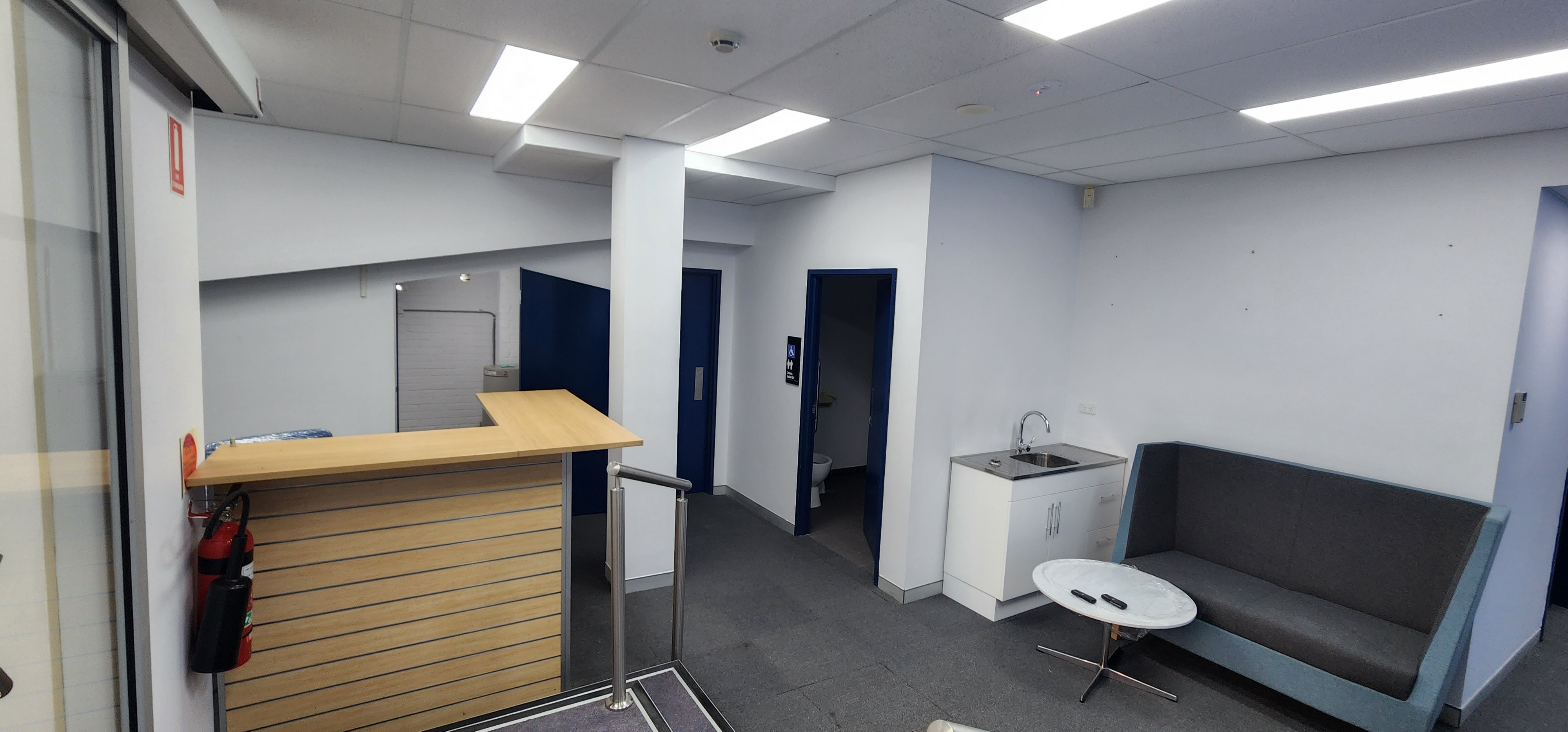
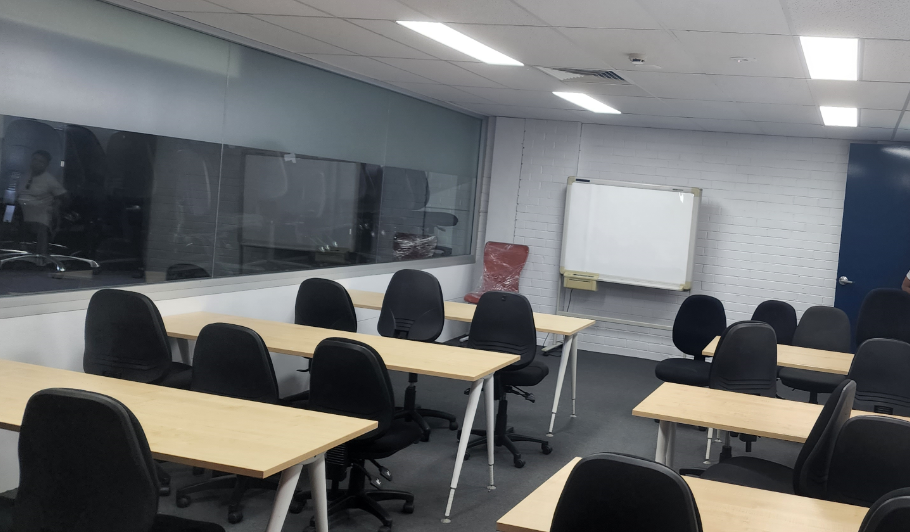
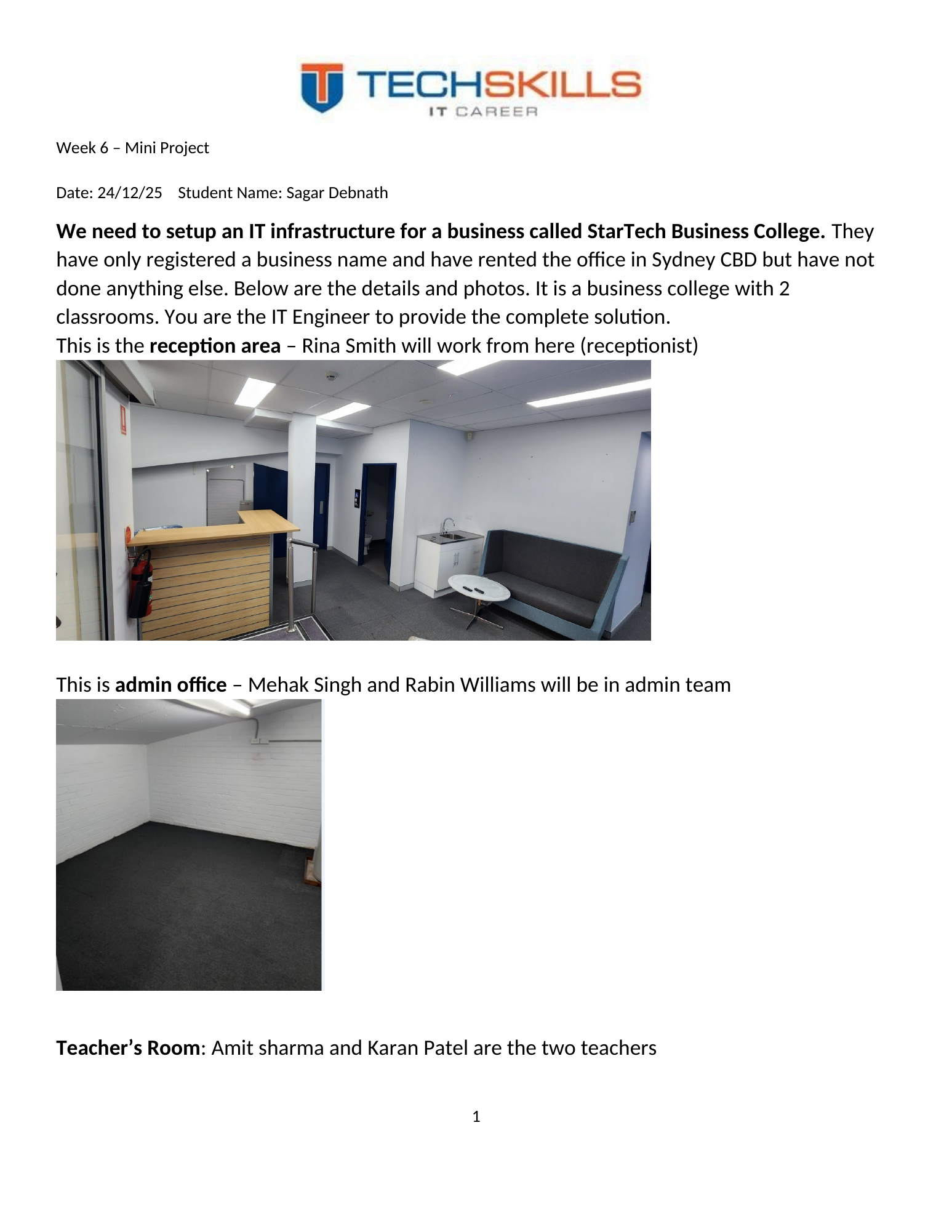
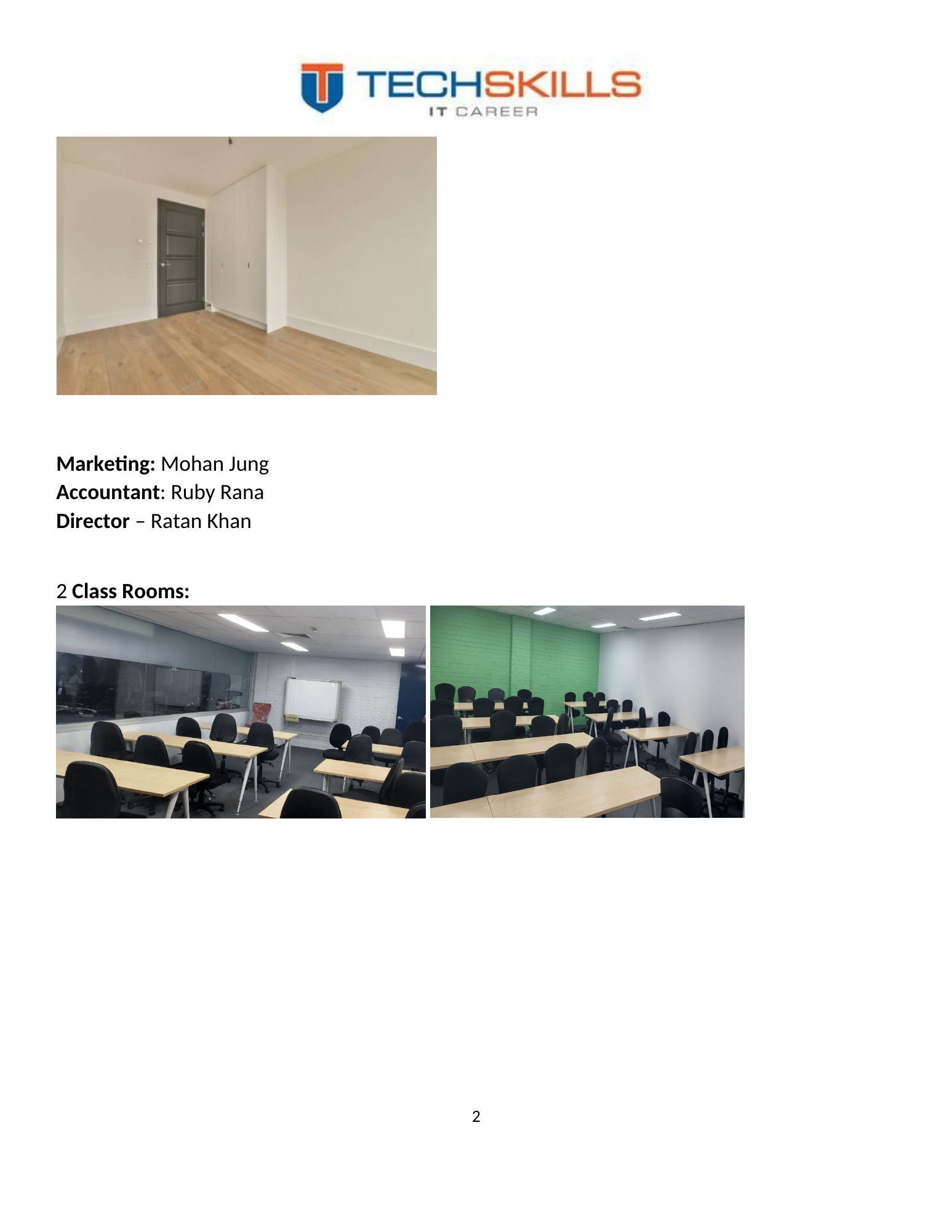
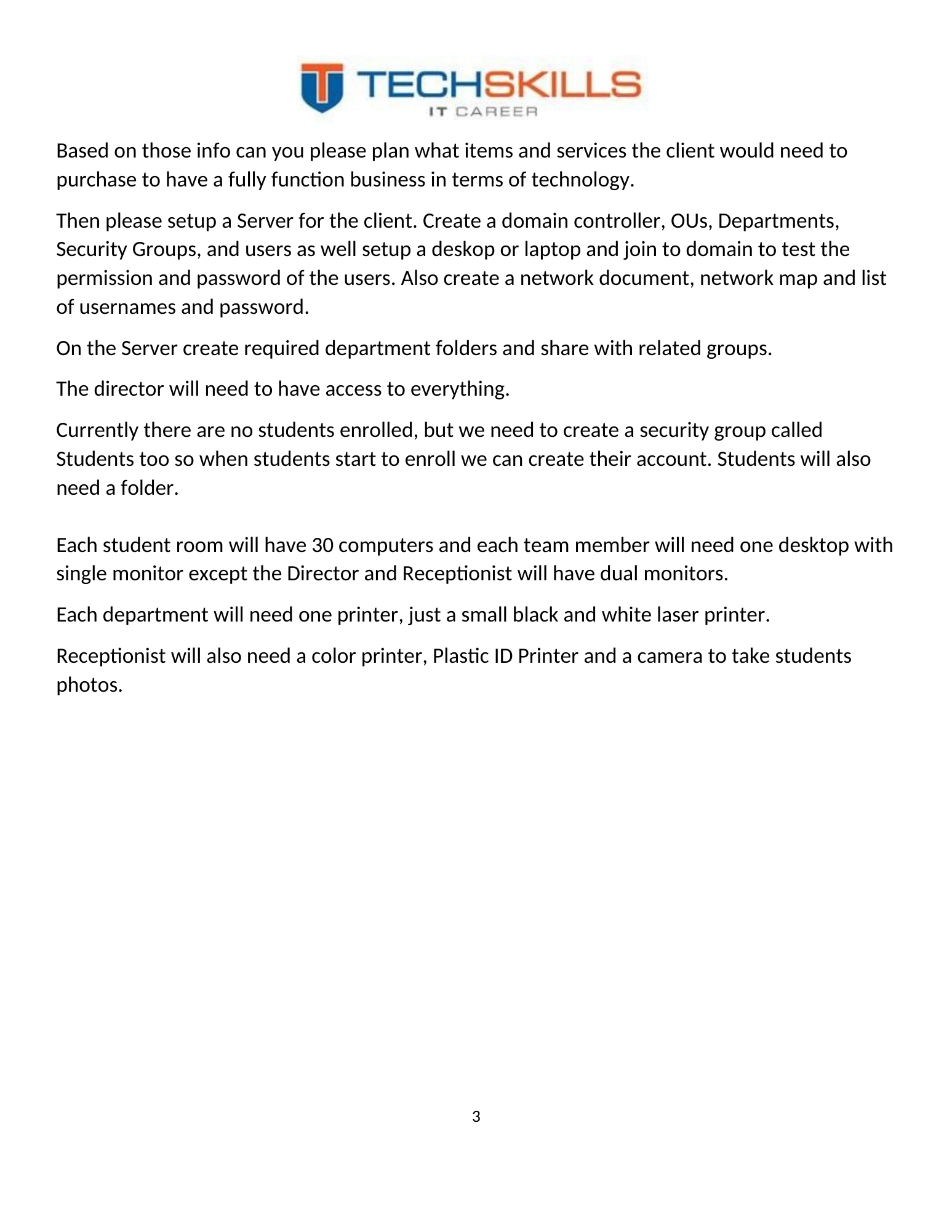
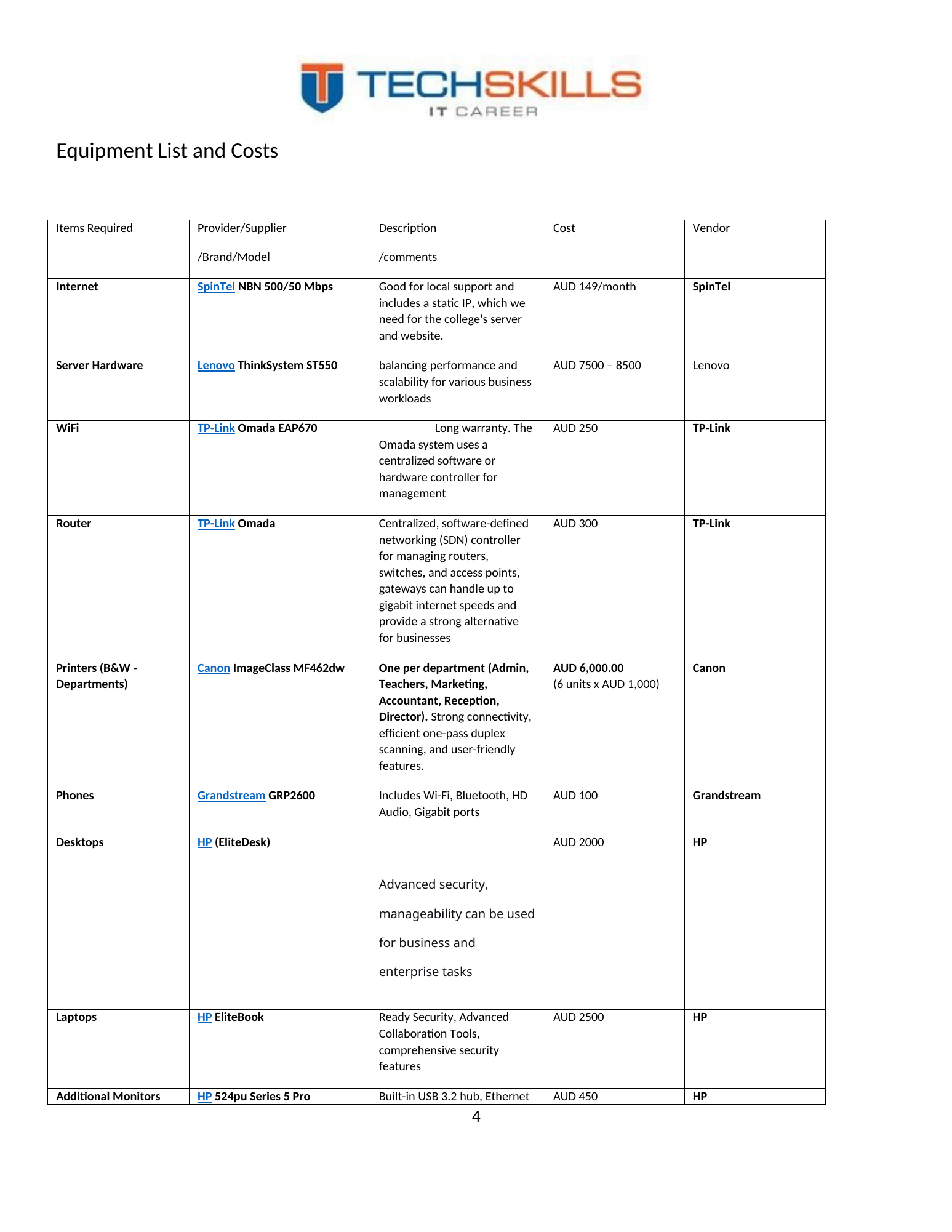
StarTech Business College was modelled as a newly established education provider with two classrooms and a compact administrative structure. The physical premises included reception, an administration office, a teachers’ room and two teaching spaces. This layout influenced device quantities, cabling, printer placement, Wi-Fi coverage, CCTV positioning and the location of the communications rack.
Figure 1. Reception area provided in the project scenario.
Figure 2. Administrative office proposed as the location for staff and the communications rack.
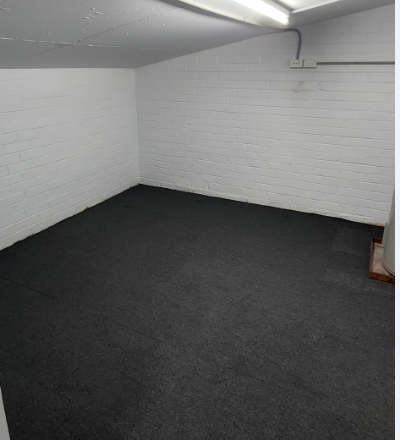
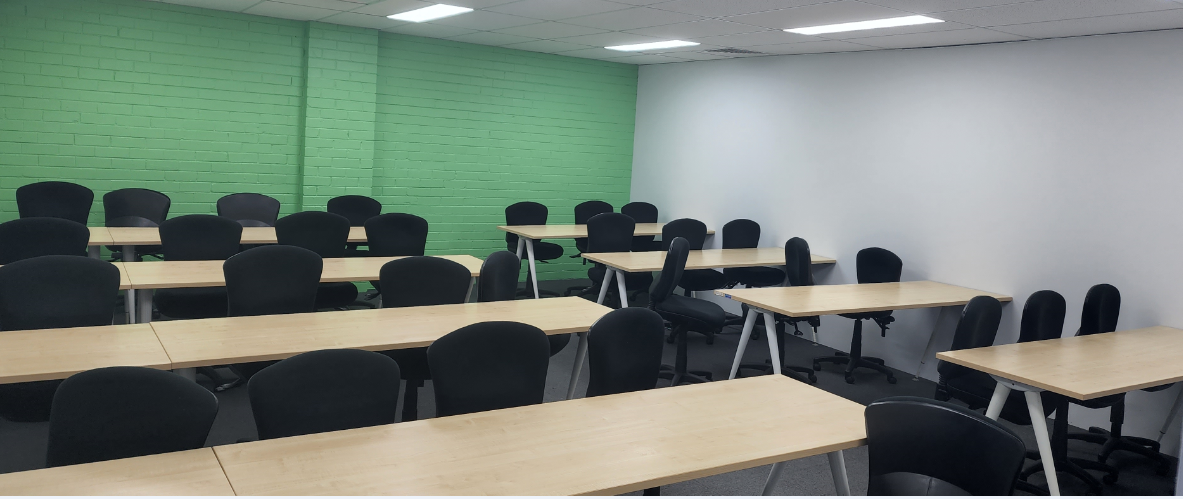
Figure 3. Classroom environment requiring thirty computers and a projector.
Figure 4. Second classroom environment with the same high-density endpoint requirement.
2.2 People and Departmental Structure
| Department | Scenario users | Primary technology need |
|---|---|---|
| Reception | Rina Smith | Student enquiries, enrolment support, front-desk communication and ID/photo services |
| Administration | Mehak Singh; Rabin Williams | General administration and access to the Admin departmental share |
| Teachers | Amit Sharma; Karan Patel | Teaching resources, classroom operations and Teachers shared mailbox |
| Marketing | Mohan Jung | Marketing documents and external communications |
| Accounts | Ruby Rana | Financial and accounting data requiring restricted access |
| Director | Ratan Khan | Executive oversight and access to all departmental resources |
| Students | Future accounts | Pre-created group and folder structure for later enrolments |
2.3 Functional Requirements
- Central authentication for staff users and future students.
- Departmental organisational units and security groups.
- Department-specific shared folders with least-privilege access.
- Full resource access for the director, implemented through controlled group membership rather than individual exceptions wherever possible.
- A password standard applied centrally through Group Policy.
- Client devices capable of joining the domain and receiving domain authentication.
- Microsoft 365 accounts, group communication, shared mailboxes and multifactor authentication.
- Sufficient wired and wireless connectivity for staff, classrooms, printers, projectors, phones and CCTV.
2.4 Non-Functional Requirements
A usable business system must meet qualities that are not visible in a simple feature list. The design therefore considered manageability, scalability, security, availability, supportability and documentation. Centralised administration was preferred because it reduces repetitive work and creates consistent control. Group-based permissions were preferred over individual access entries because staff roles change over time. Spare cabling and switching capacity were considered essential because an educational organisation is likely to add devices, rooms, cameras or students.
2.5 Requirement Traceability
| Requirement | Project response | Status |
|---|---|---|
| Central identity | AD DS domain, OUs, groups and users | Implemented and evidenced |
| Name resolution | DNS role with domain services | Implemented and evidenced |
| Department data | C:\STBC DATA and group permissions | Implemented and tested |
| Password control | Minimum password length of 10 | Implemented and tested |
| Client integration | Domain join and domain logon | Implemented and tested |
| Cloud identity | Microsoft 365 user onboarding | Implemented and evidenced |
| Team communication | Shared mailboxes and distribution lists | Implemented and evidenced |
| Strong sign-in | Microsoft Authenticator MFA | Implemented and tested |
| Physical connectivity | Cabling, switching, Wi-Fi, CCTV plan | Designed; production deployment not evidenced |
CHAPTER 3
Chapter 12
Methodology and Project Governance
3.1 Applied Engineering Case-Study Method
The project followed an applied engineering case-study method. The organisation’s scenario was first decomposed into users, locations, endpoints, services and risks. A proposed bill of materials and network map were then prepared. The technical environment was implemented in stages, beginning with server networking and roles, continuing through directory structure and file permissions, and concluding with client and Microsoft 365 validation.
This approach is appropriate for infrastructure work because it connects design intent with observable evidence. Each stage produced an artefact: an equipment schedule, network diagram, server configuration, OU hierarchy, user and group structure, shared folder, GPO, client test or cloud configuration. The screenshots function as an engineering record rather than decoration.
3.2 Implementation Phases
- Business discovery: interpret the rooms, staff roles, classrooms and growth requirements.
- Procurement planning: select candidate internet, server, endpoint, print, network, CCTV and classroom technologies.
- Architecture: produce a network diagram and addressing concept.
- Core server build: configure IP networking and install AD DS and DNS.
- Directory build: create the STBC OU, departments, groups and users.
- Resource control: create departmental shares, assign permissions and configure Group Policy.
- Client validation: join a device, sign in as a domain user, test authorised access, test denial and test the password standard.
- Cloud administration: connect the demonstration domain, create users, shared mailboxes, distribution lists and MFA.
- End-user validation: install Office, configure Outlook, add shared mailboxes, set forwarding and automatic replies.
- Engineering review: compare the laboratory design with the capacity, resilience and security expected in production.
3.3 Evidence and Validation Strategy
Evidence was collected through screenshots taken immediately after configuration or during functional testing. The evidence was assessed using three questions: what does the screenshot show, what control or requirement does it validate, and what limitation remains? This method avoids the common reporting weakness of presenting a screenshot without explaining its engineering meaning.
3.4 Risk and Change Control
In a live deployment, infrastructure changes would be managed through an approved change record, maintenance window, implementation plan, rollback plan and post-change validation. The laboratory project was smaller, but the same discipline is reflected in the staged sequence. Identity and permissions were created before client testing; cloud users were onboarded before Outlook services were tested; and the final review separates completed work from proposed improvements.
| Professional practice The paper intentionally avoids publishing passwords. A network document may record usernames and account ownership, but reusable credentials should be stored in an approved password-management system rather than embedded in a thesis, spreadsheet or diagram. |
CHAPTER 4
Chapter 13
Procurement and Cost Planning
4.1 Original Procurement Schedule
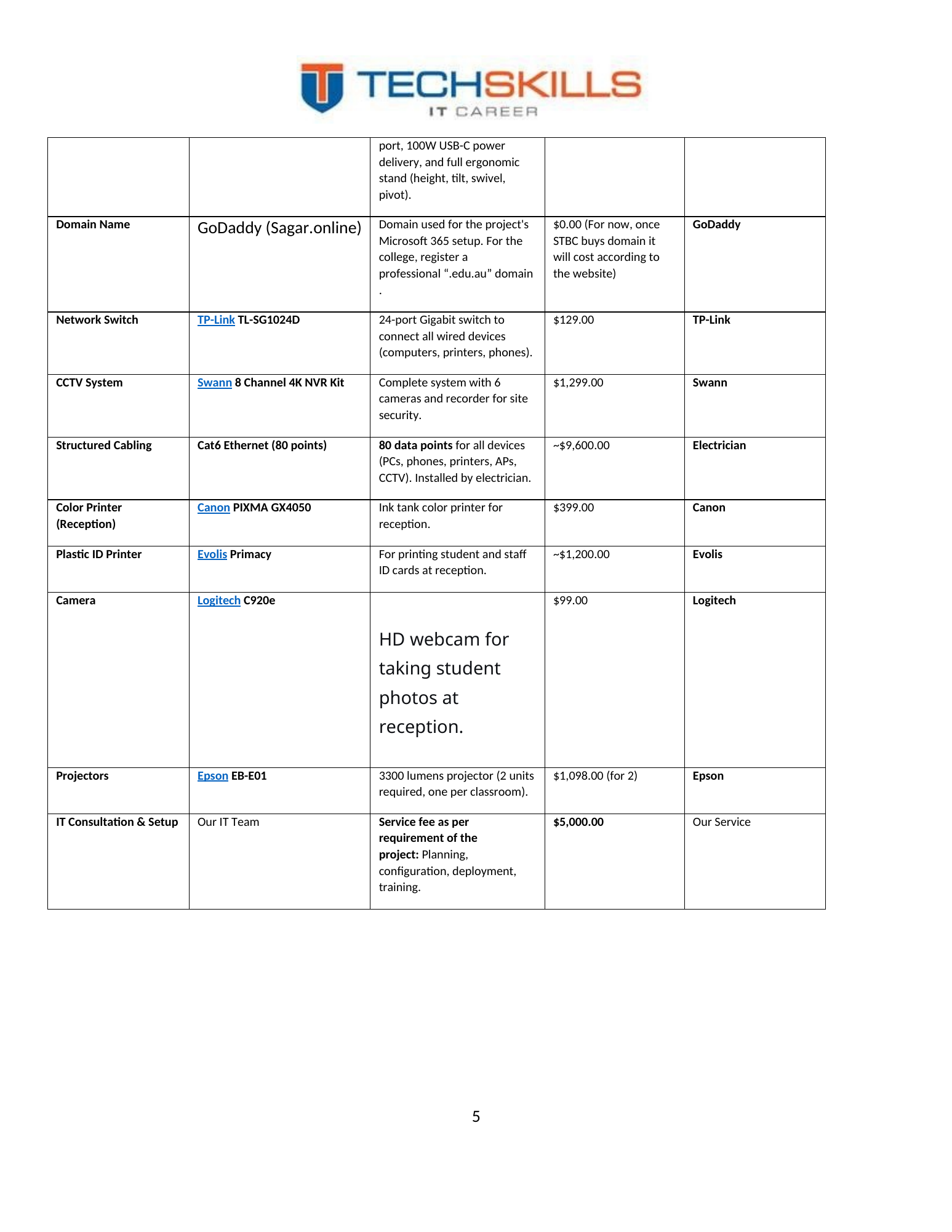
The original project evaluated a broad set of products and services: an NBN business connection, Lenovo server hardware, TP-Link Omada networking, HP endpoints and monitors, Canon printers, Grandstream phones, a Swann CCTV system, Cat6 structured cabling, an Evolis ID printer, a Logitech camera, Epson projectors and a professional consultation fee. This was an important step because the technical environment cannot operate without a coordinated procurement plan.
| Category | Original selection | Recorded estimate | Purpose |
|---|---|---|---|
| Internet | SpinTel NBN 500/50 Mbps | AUD 149/month | Static-IP-capable business connection proposed |
| Server | Lenovo ThinkSystem ST550 | AUD 7,500–8,500 | Performance and expansion for business workloads |
| Wi-Fi | TP-Link Omada EAP670 | AUD 250 | Centralised wireless management |
| Router | TP-Link Omada gateway | AUD 300 | Business gateway and controller ecosystem |
| B&W printers | Canon ImageClass MF462dw, six units | AUD 6,000 total | One per department |
| Phones | Grandstream GRP2600 | AUD 100 each | Business VoIP handset |
| Desktop | HP EliteDesk | AUD 2,000 each | Business endpoint |
| Laptop | HP EliteBook | AUD 2,500 each | Portable business endpoint |
| Monitor | HP 524pu | AUD 450 each | Additional displays for reception and director |
| Switch | TP-Link TL-SG1024D, 24-port | AUD 129 | Initial wired-network selection |
| CCTV | Swann 8-channel 4K NVR kit | AUD 1,299 | Six cameras and recorder |
| Cabling | Cat6, 80 data points | Approx. AUD 9,600 | Installation by electrician |
| Reception colour printer | Canon PIXMA GX4050 | AUD 399 | Colour documents |
| ID-card printer | Evolis Primacy | Approx. AUD 1,200 | Student and staff ID cards |
| Photo camera | Logitech C920e | AUD 99 | Student ID photographs |
| Projectors | Epson EB-E01, two units | AUD 1,098 total | One per classroom |
| Professional services | Planning, deployment and training | AUD 5,000 | Consultation and implementation |
The recorded prices reflect the project period and are not presented as current market quotations. Before procurement, the college would need formal supplier quotes, warranty confirmation, licensing validation, installation scope, freight, tax and ongoing support costs.
4.2 Quantity and Capacity Review
The original schedule contains a useful product list but mixes unit prices and total prices. It also requires a capacity review. The scenario contains sixty classroom computers and eight staff computers before printers, phones, projectors, access points, cameras, the server and network infrastructure are counted. A single 24-port switch cannot provide direct wired connectivity for that environment.
| Endpoint class | Indicative quantity | Engineering note |
|---|---|---|
| Classroom desktop computers | 60 | Dedicated Cat6 outlet per PC |
| Staff desktop computers | 8 | Dedicated Cat6 outlet; dual monitors do not require extra data points |
| Department B&W printers | 6 | Network outlet per printer |
| Reception colour printer | 1 | Network outlet recommended |
| ID-card printer | 1 | USB or network depending selected model |
| IP phones | 8 | Can use switch pass-through to reduce wall outlets, but still consume PoE switch ports |
| Projectors | 2 | Wired control/streaming recommended where supported |
| Wireless access points | 2 | Two ceiling APs recommended after survey; PoE |
| CCTV cameras | 6 | PoE or direct NVR PoE ports |
| CCTV NVR | 1 | Rack network connection |
| Server | 1 | At least two network interfaces recommended |
| Infrastructure and spare capacity | 10–20 | Uplinks, management, growth and maintenance |
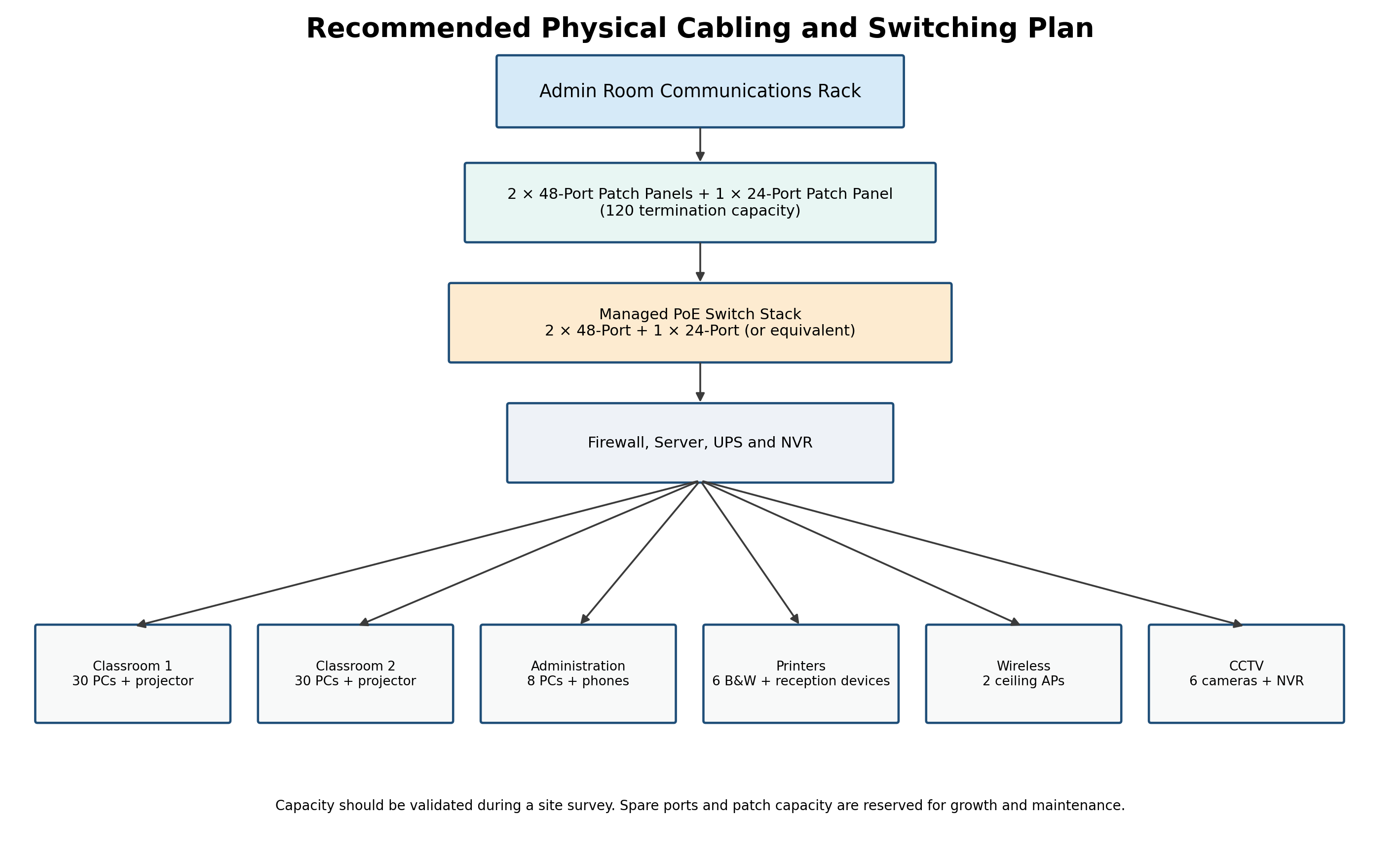
A revised physical plan should provide approximately 96 to 120 terminated data points, depending on whether IP phones share a cable path with PCs and whether CCTV cameras connect directly to PoE ports on the NVR. Two 48-port patch panels plus one 24-port patch panel create 120 termination positions and allow sensible spare capacity. Switching should use managed PoE equipment sized to the final port count rather than a single unmanaged 24-port device.
4.3 Initial and Ongoing Costs
The business case must distinguish capital expenditure from recurring expenditure. Initial costs include server hardware, endpoints, monitors, printers, projectors, rack components, switches, firewall, access points, CCTV, structured cabling, installation and professional services. Recurring costs include internet, Microsoft 365 licensing, domain renewal, cloud backup, endpoint security, remote monitoring, warranty extensions, support and equipment replacement.
| Procurement recommendation Before ordering, complete a room-by-room site survey and produce a port schedule. The final bill of materials should specify quantity, unit price, total price, warranty, licensing, support term, installation owner and acceptance test for every line item. |
CHAPTER 5
Chapter 14
Physical and Logical Network Architecture
5.1 Original Network Concept
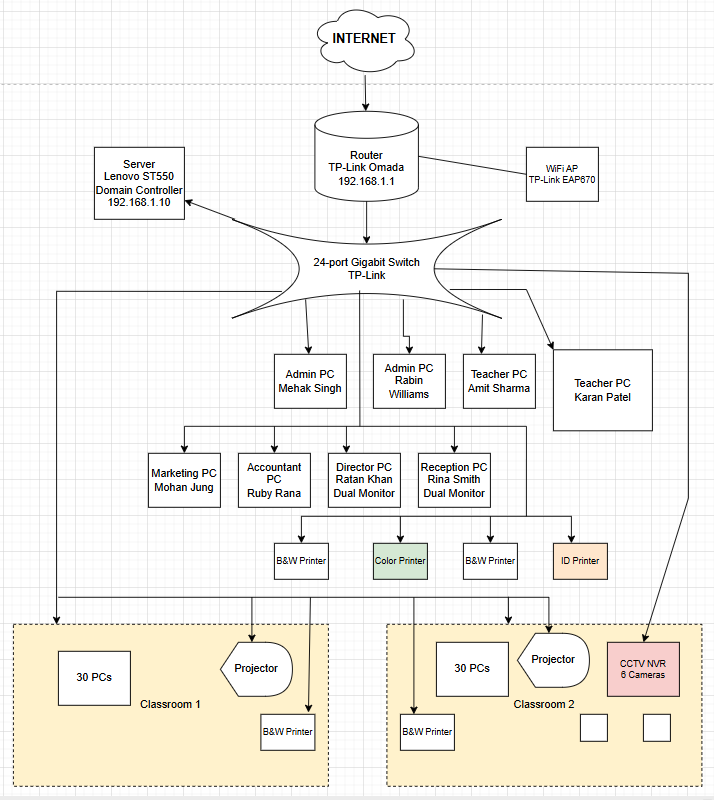
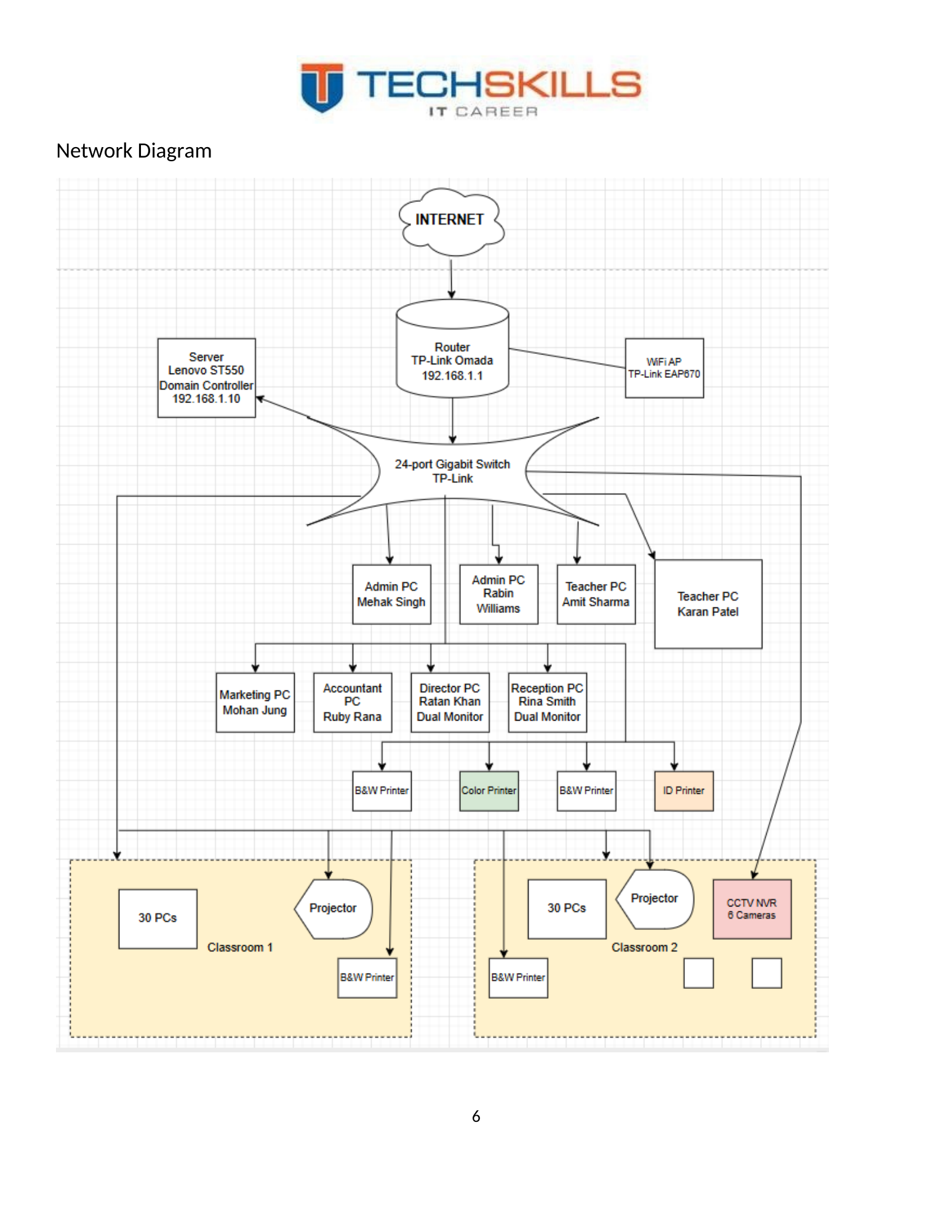
The original network diagram placed the internet connection at the top, followed by a TP-Link Omada router at 192.168.1.1, a 24-port switch, a Lenovo ST550 domain controller at 192.168.1.10, a TP-Link EAP670 wireless access point, staff computers, printers, two classrooms and a six-camera CCTV system. The diagram successfully communicated the relationship between core infrastructure and business areas.
Figure 5. Original network diagram developed for the StarTech Business College project.
5.2 Laboratory Addressing
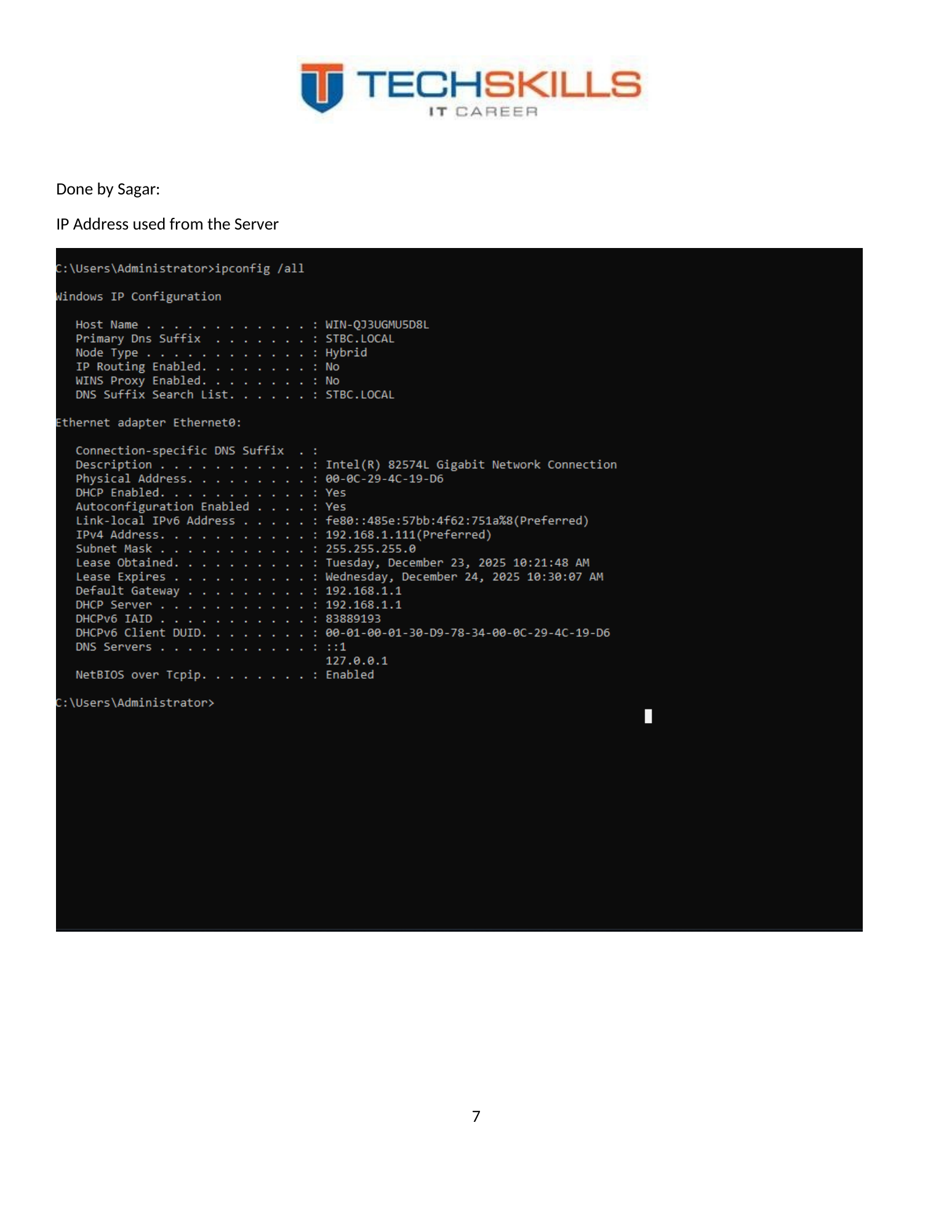
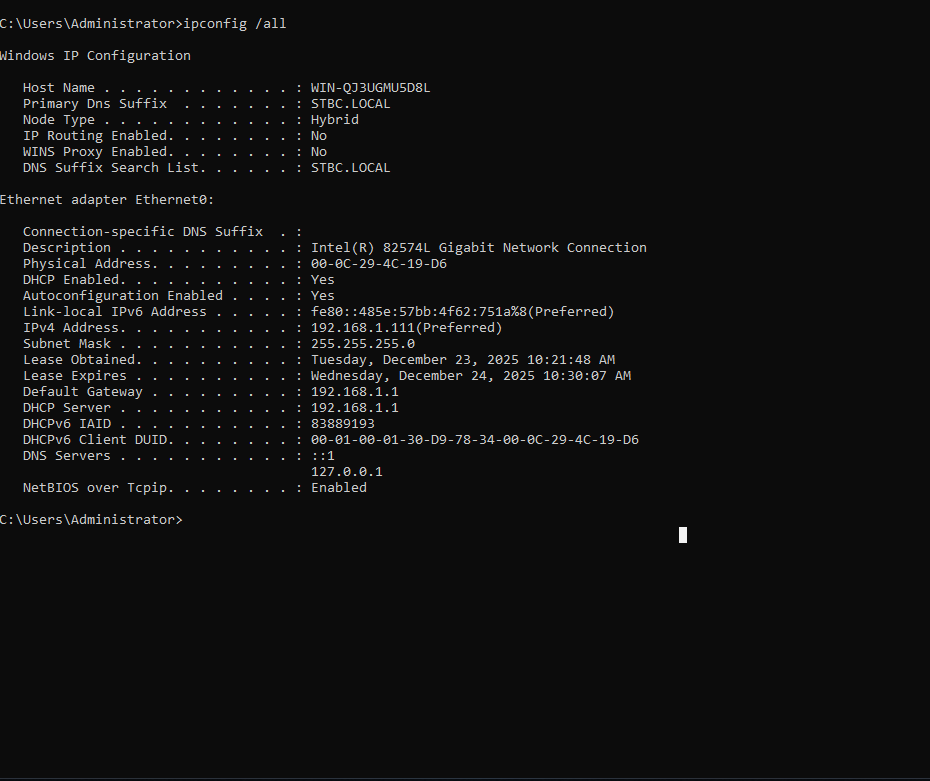
The laboratory evidence shows the STBC.LOCAL DNS suffix, a 192.168.1.0/24 network, a default gateway and DHCP server at 192.168.1.1, and an address of 192.168.1.111 on the captured system. The project diagram reserved 192.168.1.10 for the domain controller. This addressing model was sufficient for the practical exercise, although a production environment should use a documented reservation plan and separate security zones.
Figure 6. IP configuration evidence showing the STBC.LOCAL suffix and 192.168.1.0/24 laboratory network.
5.3 Recommended Production Logical Architecture
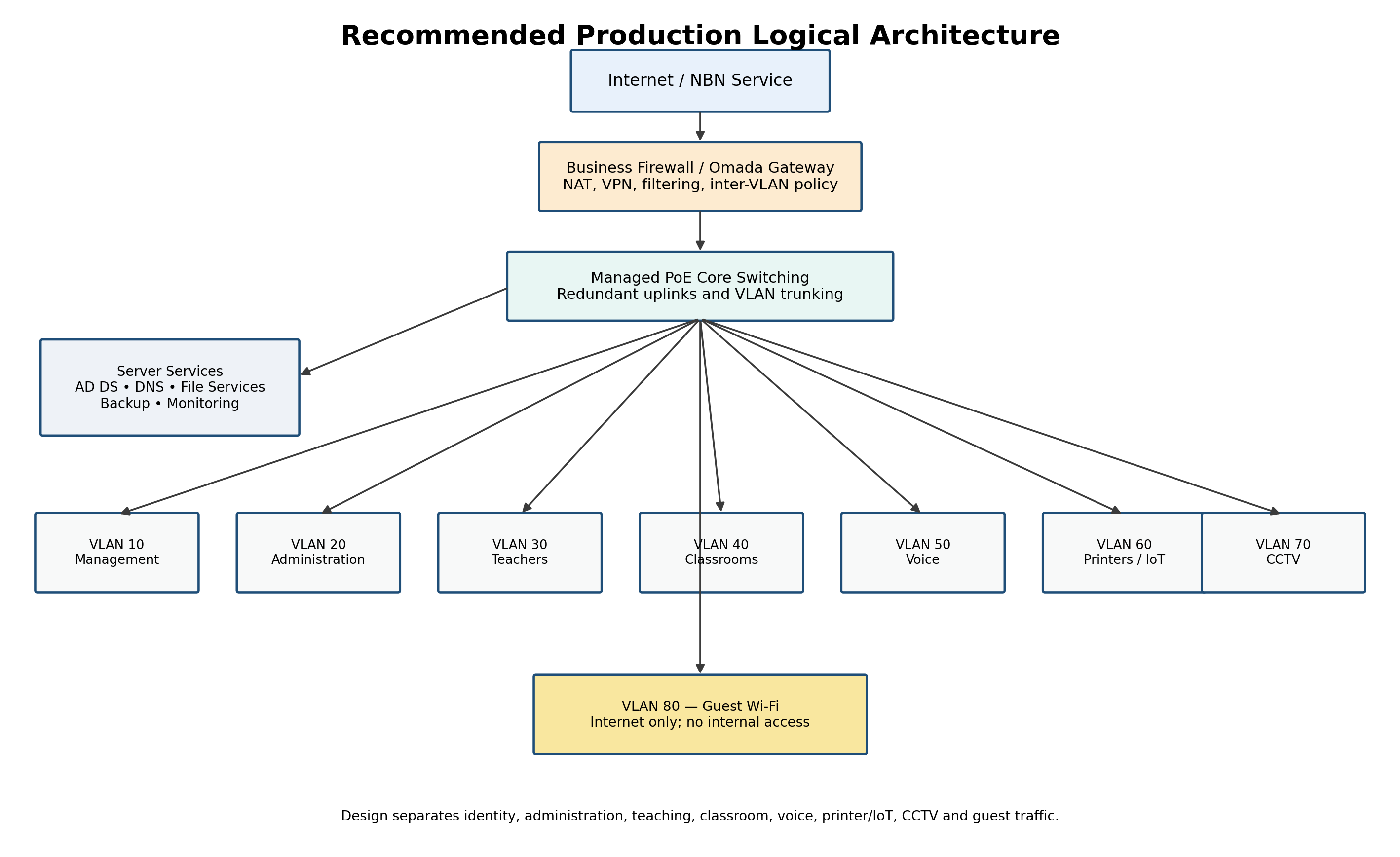
A production environment should not place administration, classrooms, phones, printers, CCTV and guest wireless devices in one unrestricted broadcast domain. The revised architecture uses VLANs to create policy boundaries. The firewall or routing layer controls communication between zones, while the managed switch stack carries tagged VLANs to access switches and wireless access points.
Figure 7. Recommended production logical architecture with security and operational segmentation.
| VLAN | Zone | Example assets | Policy intent |
|---|---|---|---|
| 10 | Management | Switches, access points, hypervisor, UPS and management interfaces | Restricted to authorised IT administrators |
| 20 | Administration | Reception, admin, accounts, marketing and director devices | Access based on role and server permissions |
| 30 | Teachers | Teacher endpoints and teaching administration | Separated from student classroom traffic |
| 40 | Classrooms | Sixty student/classroom PCs | Internet and approved learning services; restricted lateral access |
| 50 | Voice | IP phones | Prioritised QoS and limited signalling/media paths |
| 60 | Printers/IoT | Printers, projectors and approved devices | Restricted management and print paths |
| 70 | CCTV | Cameras and NVR | No general access to business LAN |
| 80 | Guest Wi-Fi | Visitors and personal devices | Internet only |
5.4 Recommended Physical Architecture
The communications rack may be located in the administration room, as proposed in the original project, provided that the room is lockable, ventilated, protected from water and not used as uncontrolled storage. The rack should contain the patch panels, managed PoE switches, firewall, server, NVR, cable management, UPS and environmental monitoring. A qualified cabler should install, label and certify every Cat6 run.
Figure 8. Recommended rack, patch-panel and endpoint capacity for the production site.
5.5 Availability and Resilience
The laboratory used a single domain controller and a single network path. In production, the college should avoid single points of failure where the cost is justified. A second domain controller, tested system-state backup, redundant storage, UPS runtime, monitored internet service and spare switch capacity would significantly reduce operational risk. Resilience does not require an unnecessarily complex data centre, but it does require recovery options that have been documented and tested.
CHAPTER 6
Chapter 15
Windows Server and Core Services
6.1 Server Role
The Windows Server platform formed the central control plane of the laboratory environment. Its primary functions were to host Active Directory Domain Services, provide DNS for the domain, store departmental data, enforce Group Policy and authenticate client users. Microsoft describes AD DS as a directory service that stores directory data and makes it available to network users and administrators (Microsoft, 2025a).
6.2 Network Preparation
A domain controller requires stable addressing and dependable name resolution. The project documented the server and gateway addressing in the network map and captured the system IP configuration. In production, the server address should be statically configured or reserved, DNS should point to the domain DNS service, time synchronisation should be verified, and the server name should follow an approved naming convention.
6.3 AD DS and DNS Installation
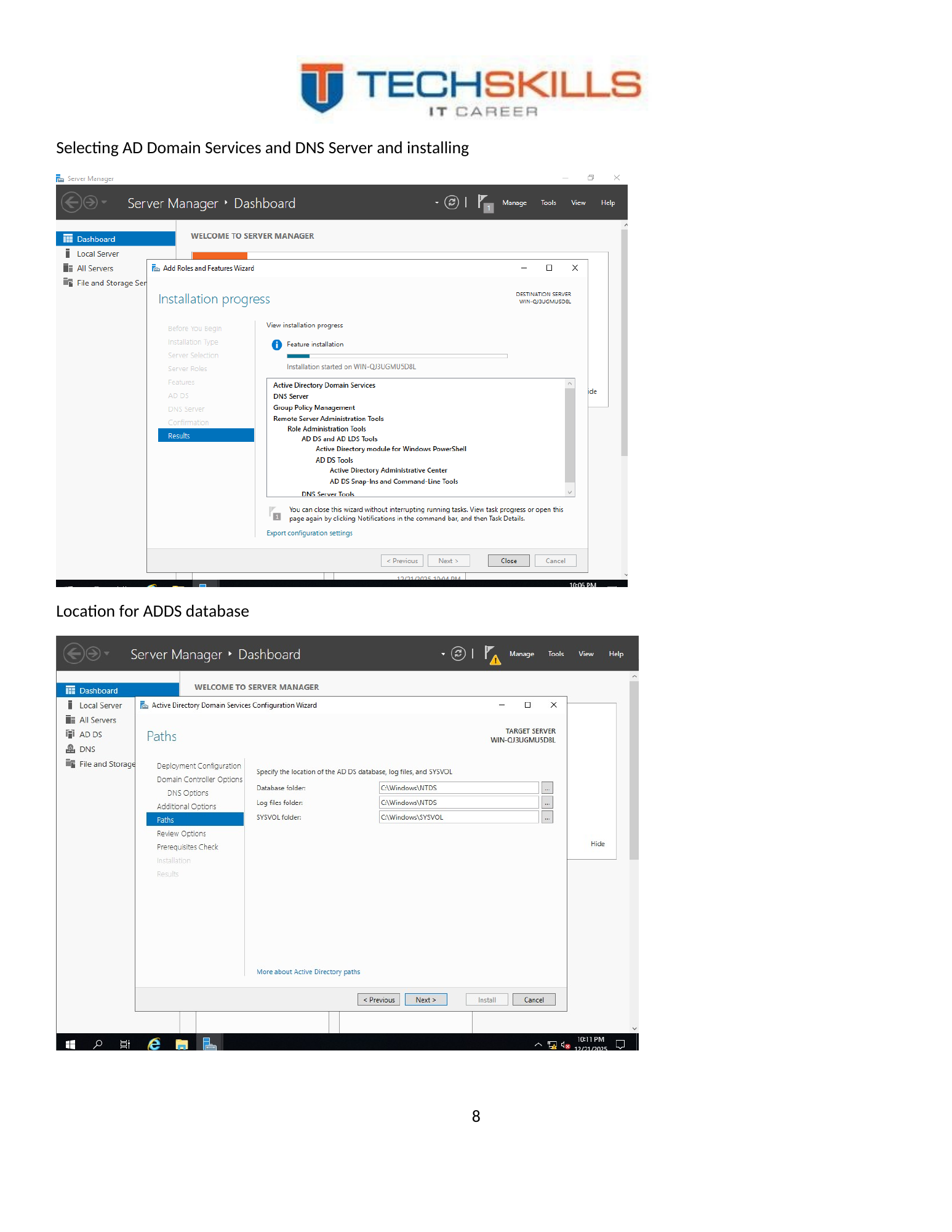
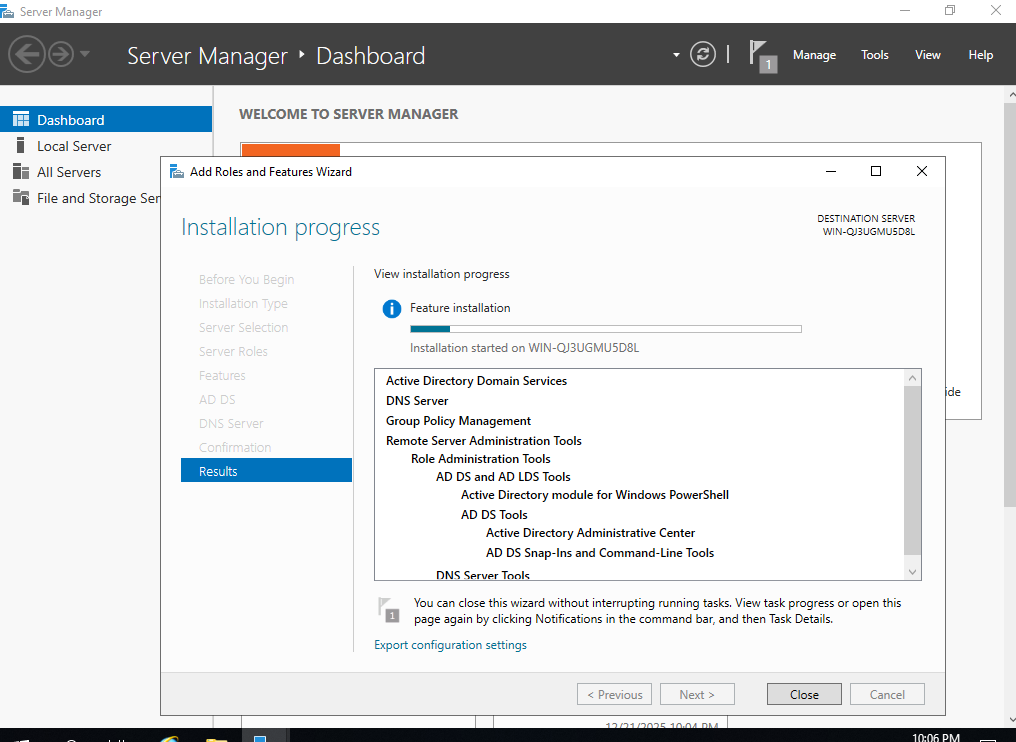
The Server Manager Add Roles and Features workflow was used to select Active Directory Domain Services and DNS Server. DNS is fundamental to AD DS because clients use DNS records to locate domain controllers and domain services. Microsoft’s Windows Server guidance states that AD DS relies on DNS name resolution so clients can locate domain controllers and controllers can communicate (Microsoft, 2025b).
Figure 9. Server Manager role selection for Active Directory Domain Services and DNS Server.
Figure 10. Installation and promotion workflow for the domain services environment.
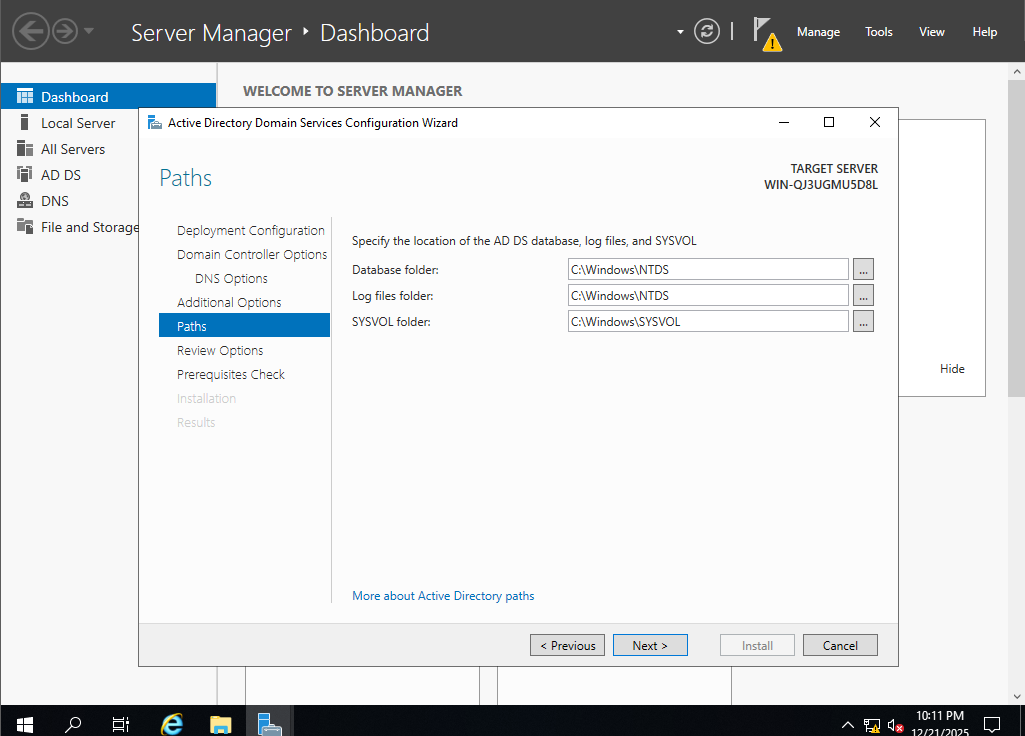
6.4 Directory Database Location
The project also documented the location stage for the AD DS database, log files and SYSVOL. In a production server with suitable storage, separating operating-system, database, log and data workloads can improve recovery and performance management. For the laboratory, the default or selected local locations were sufficient to demonstrate the deployment process.
6.5 DNS and DHCP Distinction
DNS was installed with AD DS. The captured IP configuration shows that DHCP addressing was supplied by the gateway at 192.168.1.1. This distinction matters: the project implemented Windows DNS, while the gateway provided address leases. A production design could retain firewall-based DHCP or move DHCP to Windows Server, but the service owner, reservations, exclusions, failover and recovery process should be documented. This paper does not represent Windows DHCP as implemented because the submitted evidence does not demonstrate that role.
6.6 Operational Baseline
- Install supported updates and firmware before production use.
- Use a dedicated administrator account rather than daily user credentials.
- Disable or restrict unnecessary services and inbound firewall rules.
- Configure monitored backups, including system state for domain controllers and versioned backup for file data.
- Document server name, IP address, roles, storage, warranty, recovery steps and administrative ownership.
- Protect the server and network devices with a UPS and graceful shutdown procedure.
CHAPTER 7
Chapter 16
Active Directory Design and Identity Management
7.1 Domain and Organisational Model
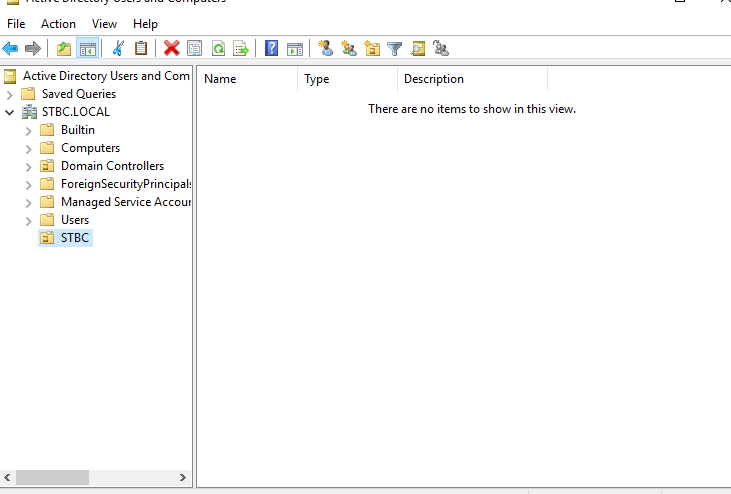
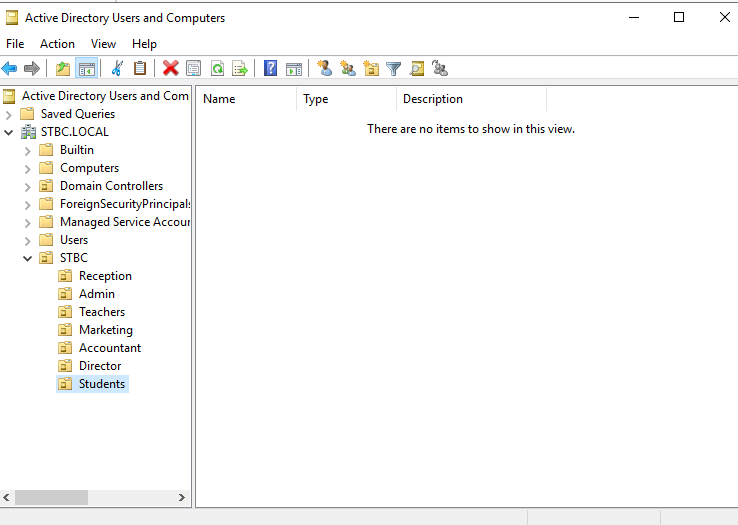
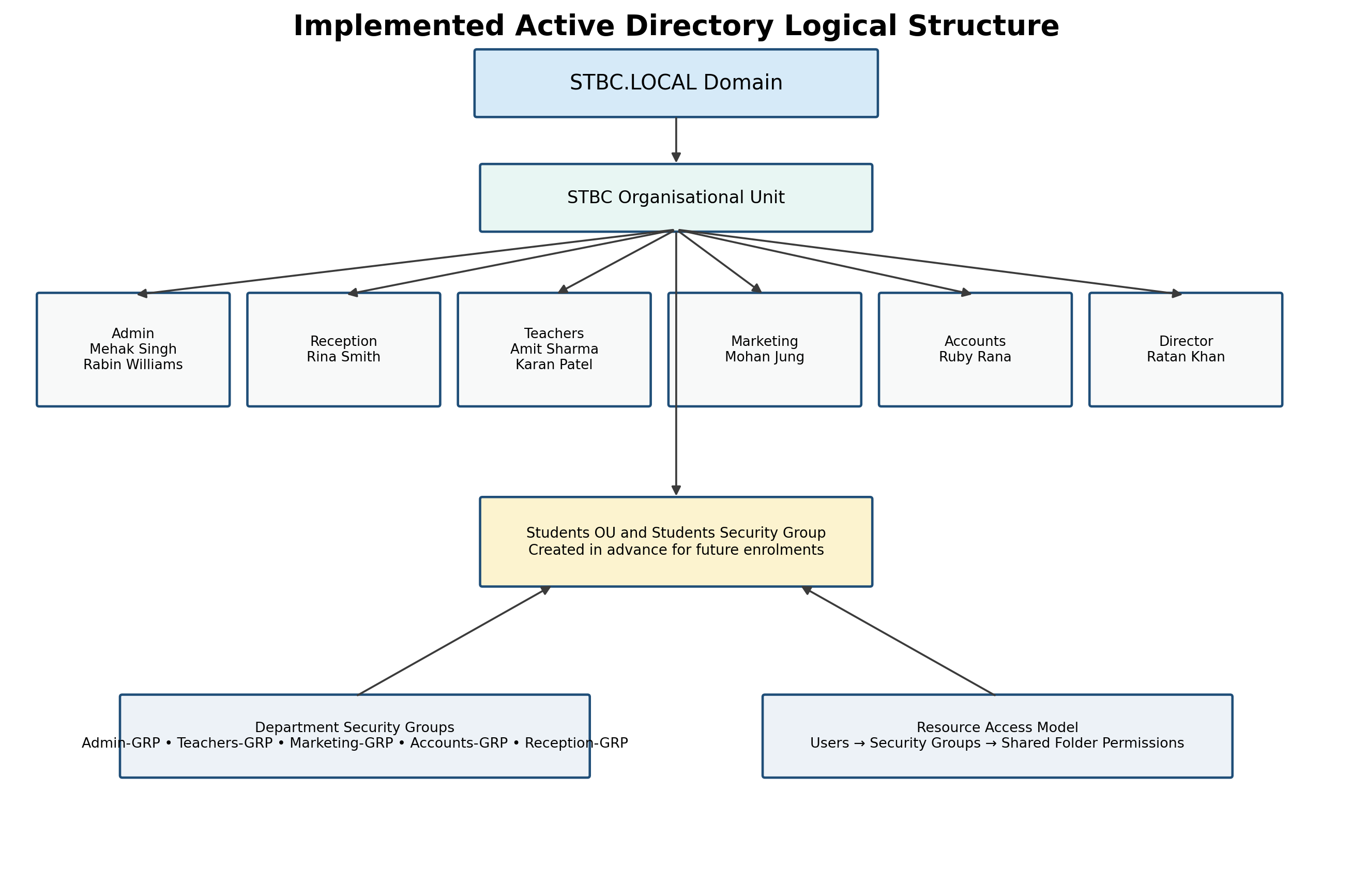
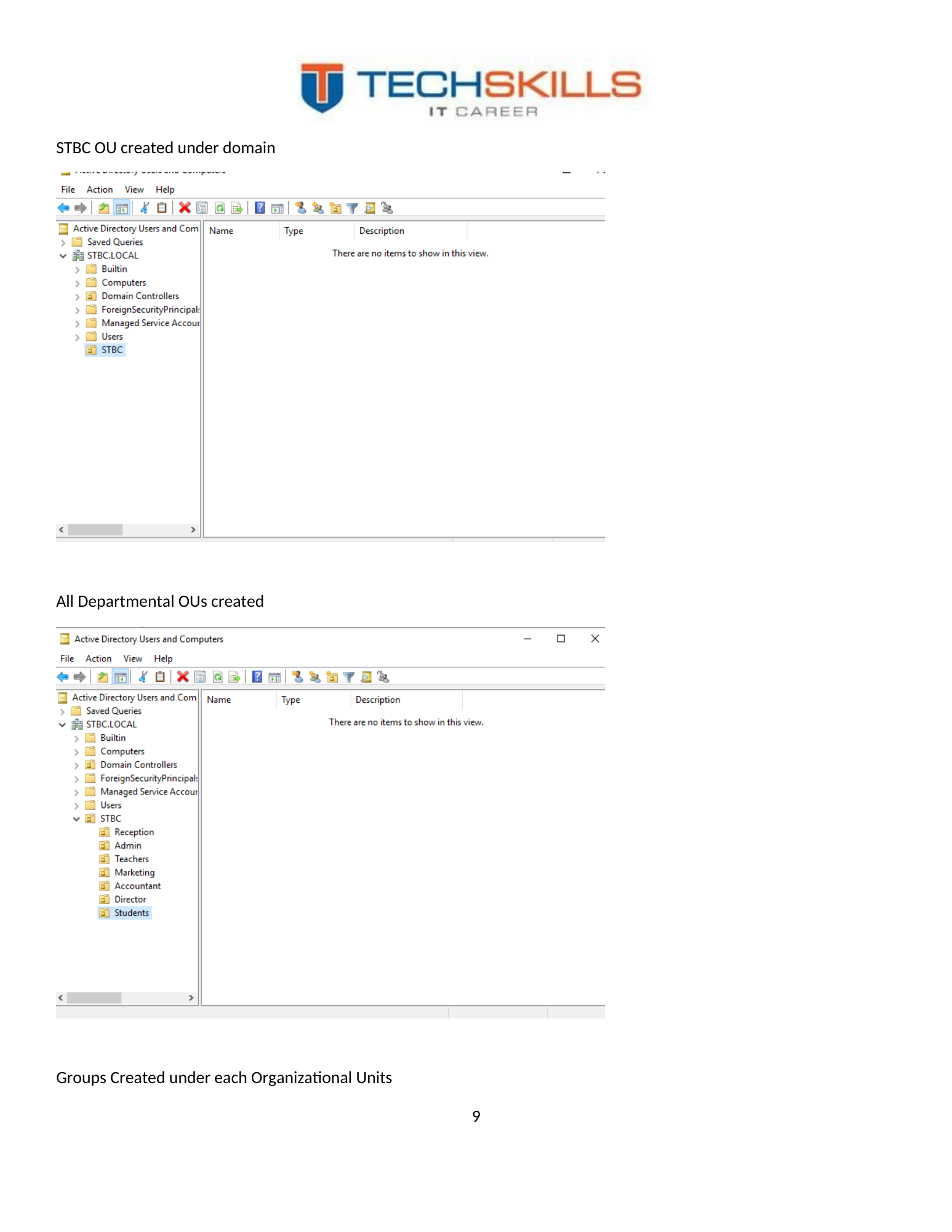
The implemented domain was STBC.LOCAL. Under the domain, a top-level STBC organisational unit was created, followed by departmental OUs. This allowed the directory to reflect the business structure and created a foundation for delegated administration and Group Policy targeting. Microsoft identifies OUs as key containers for organising directory objects, delegating control and applying Group Policy (Microsoft, 2026a).
Figure 11. Creation of the top-level STBC organisational unit.
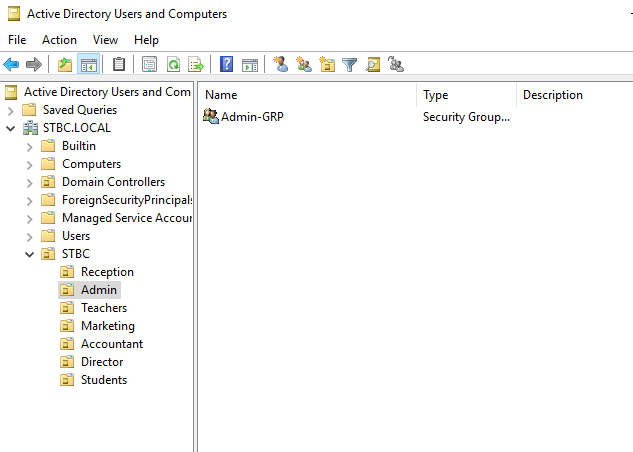
Figure 12. Departmental organisational units created beneath the STBC structure.
Figure 13. Logical interpretation of the implemented AD structure and group-based resource model.
7.2 Security Groups
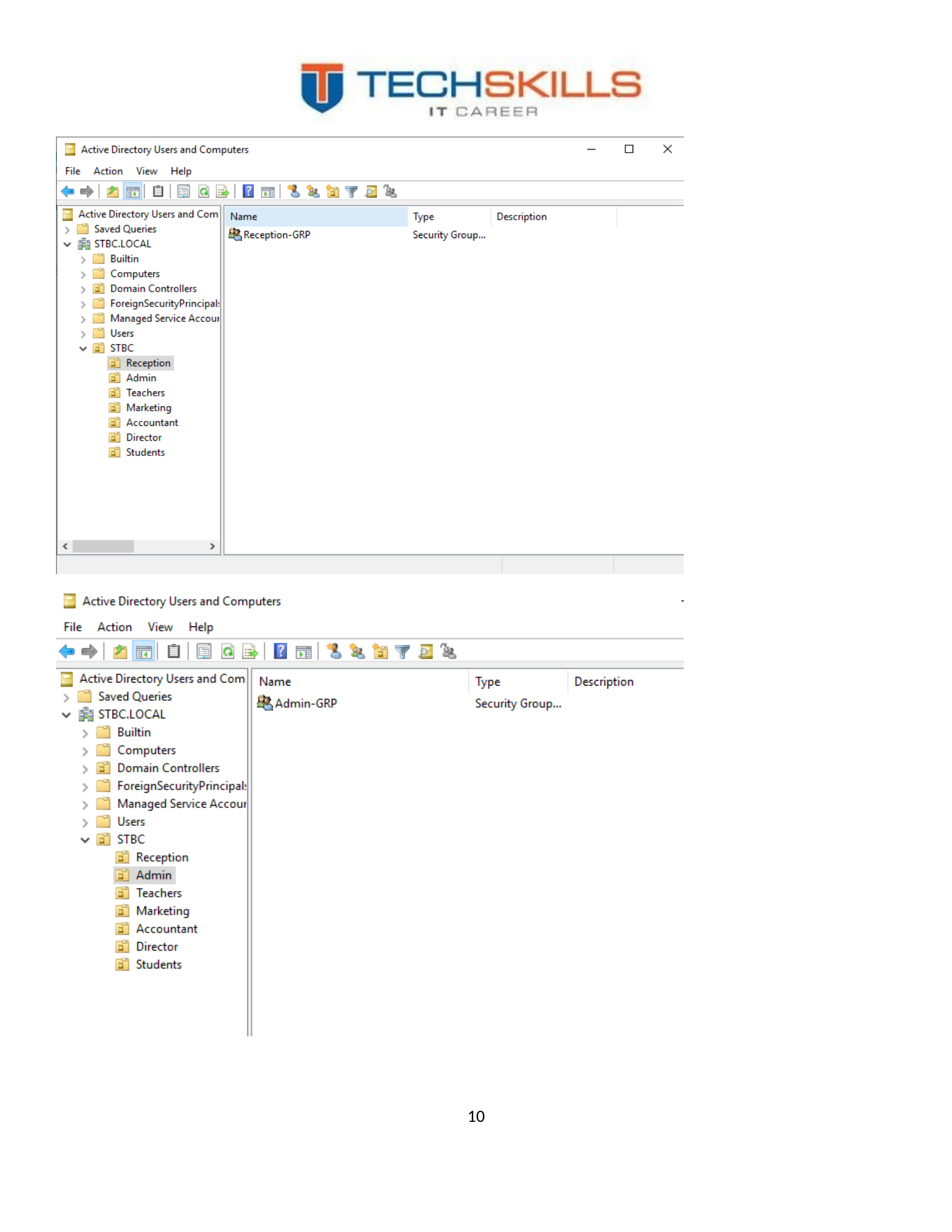
Departmental security groups were created under the organisational structure. The central design principle was that permissions should be assigned to groups, while users receive access by joining the correct group. This is more maintainable than granting permissions directly to individual users because staff changes can be handled by updating membership rather than rebuilding access-control lists.
Figure 14. Departmental groups created within the Active Directory structure.
7.3 User Accounts
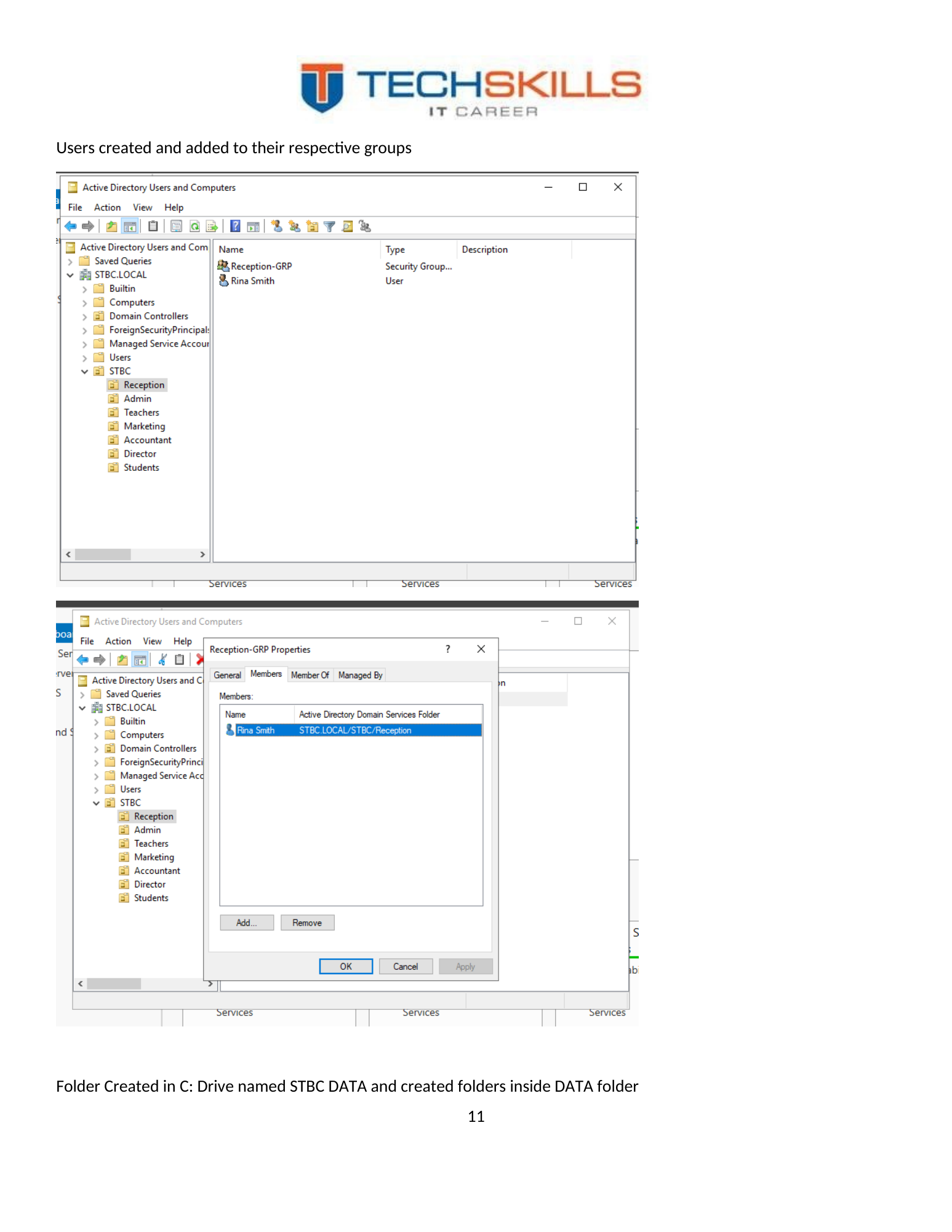
User accounts were created for the scenario staff and added to their respective groups. The future Students security group was also included before enrolments began. This demonstrated forward planning: a scalable directory is designed not only for current users, but for predictable lifecycle events such as student intake, staff transfers and departures.
Figure 15. Staff user accounts created and associated with the directory structure.
| Identity | Department/role | Access assignment |
|---|---|---|
| Rina Smith | Reception | Reception-GRP |
| Mehak Singh | Administration | Admin-GRP |
| Rabin Williams | Administration | Admin-GRP |
| Amit Sharma | Teachers | Teachers-GRP |
| Karan Patel | Teachers | Teachers-GRP |
| Mohan Jung | Marketing | Marketing-GRP |
| Ruby Rana | Accounts | Accounts-GRP |
| Ratan Khan | Director | Director access and approved membership across required resource groups |
| Future students | Students | Students-GRP |
7.4 Director Access
The brief required the director to access all departmental folders. The most maintainable approach is to create a Director-Access group and nest it into the resource groups or assign it explicit rights at the share and NTFS layers. Direct permissions on the Ratan Khan user account should be avoided where possible. Group-based executive access makes the entitlement visible, reviewable and removable.
7.5 Naming and Lifecycle Standards
A production directory should define a naming convention for usernames, groups, computers and service accounts. It should also define who approves access, how joiners are provisioned, how staff transfers are reviewed, how leavers are disabled, and how dormant accounts are identified. The mini project established the technical structure; formal lifecycle governance would be the next operational layer.
| Domain-name recommendation STBC.LOCAL worked for the laboratory. For a new production deployment, a routable subdomain such as ad.startechbusinesscollege.edu.au would generally provide cleaner alignment with the organisation’s verified public namespace and hybrid identity strategy. |
CHAPTER 8
Chapter 17
File Services, Permissions and Group Policy
8.1 Departmental File Structure
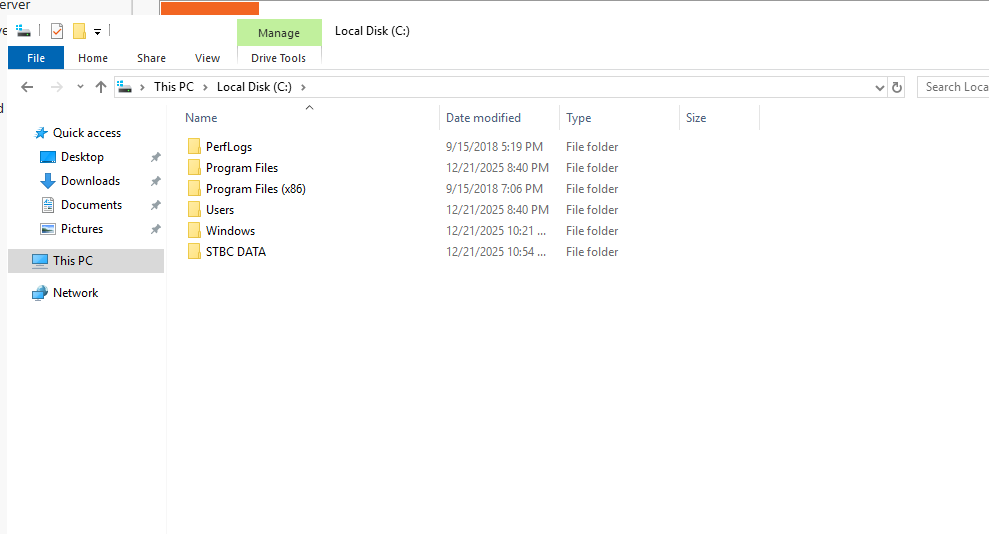
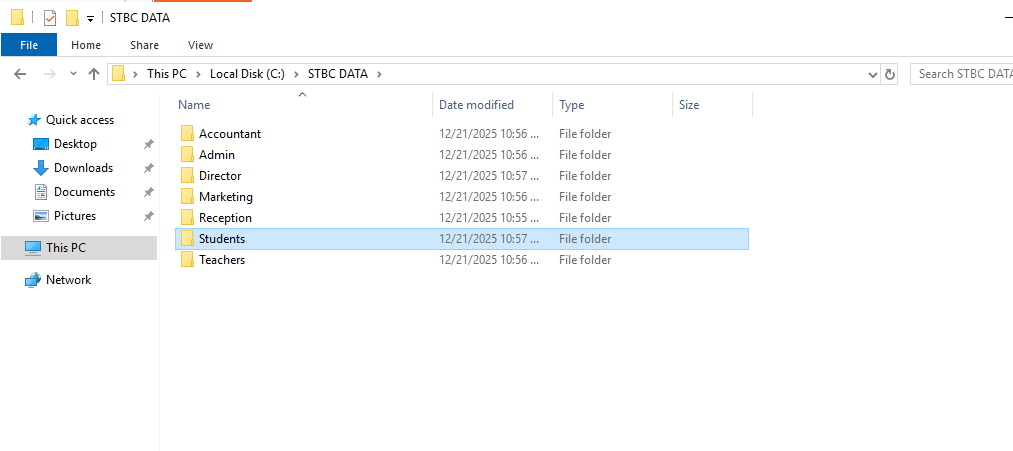
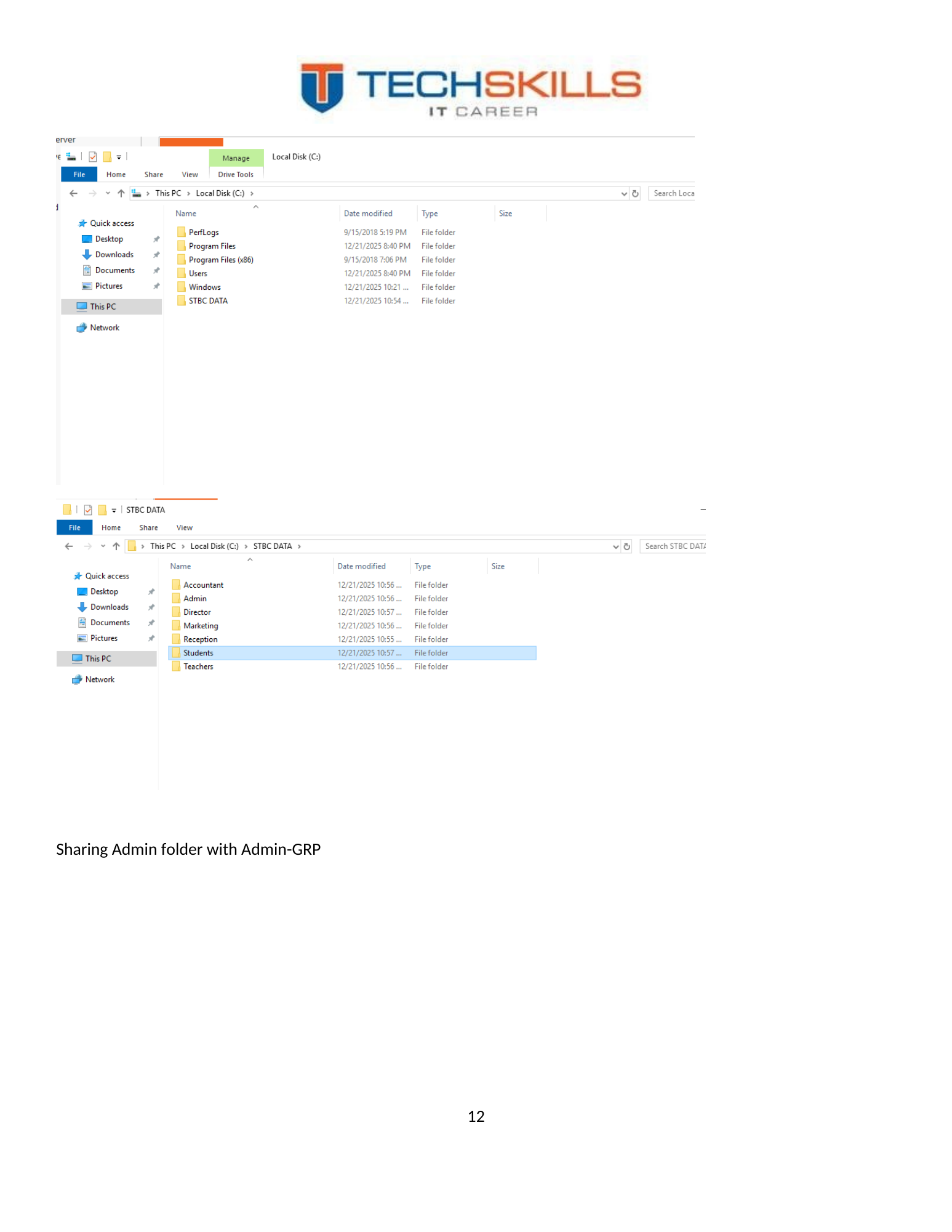
A root folder named C:\STBC DATA was created, with subfolders for the college’s departments and future students. This structure translated the organisational model into a practical resource model. The value of the design was not the folder names alone, but the relationship between folders and security groups.
Figure 16. Departmental folders created beneath C:\STBC DATA.
8.2 Share and NTFS Permissions
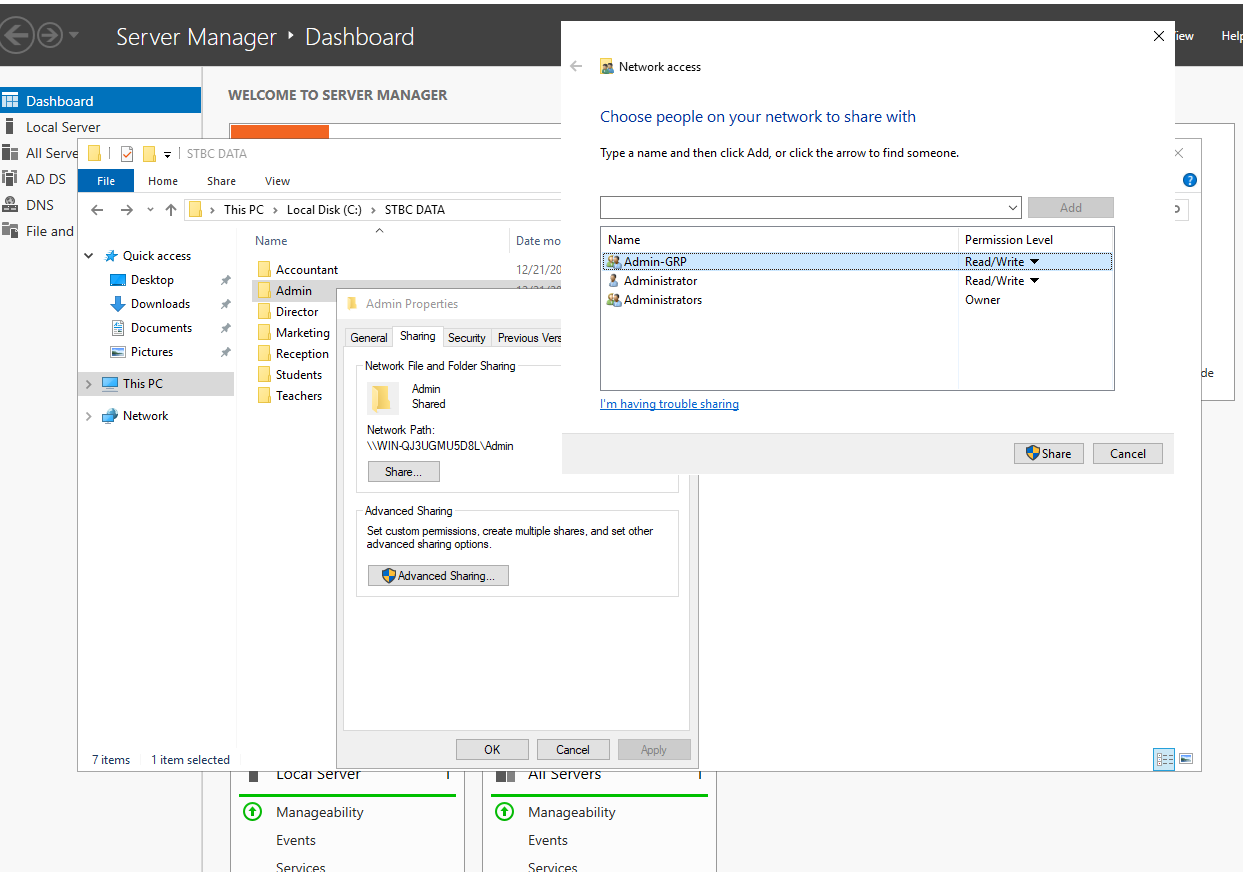
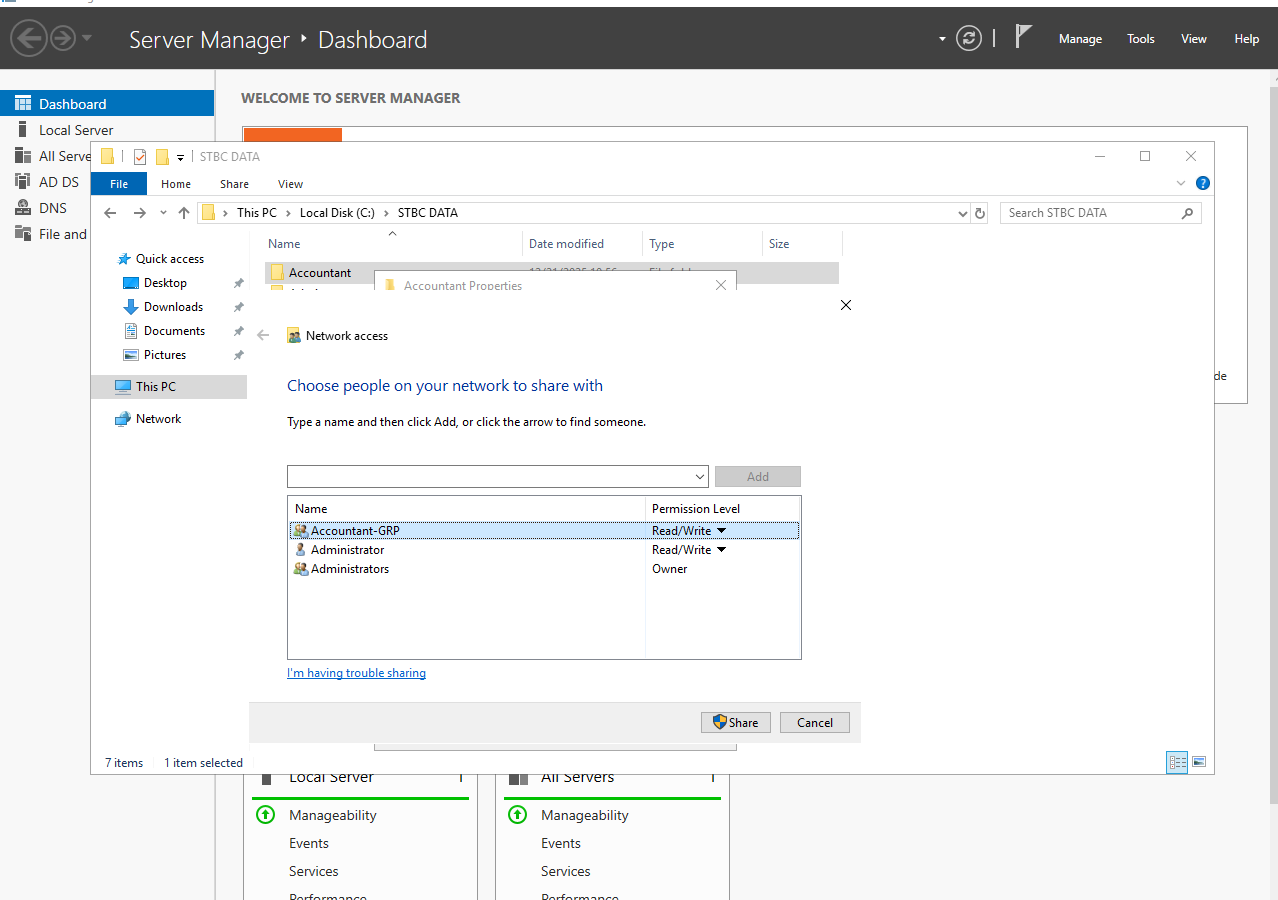
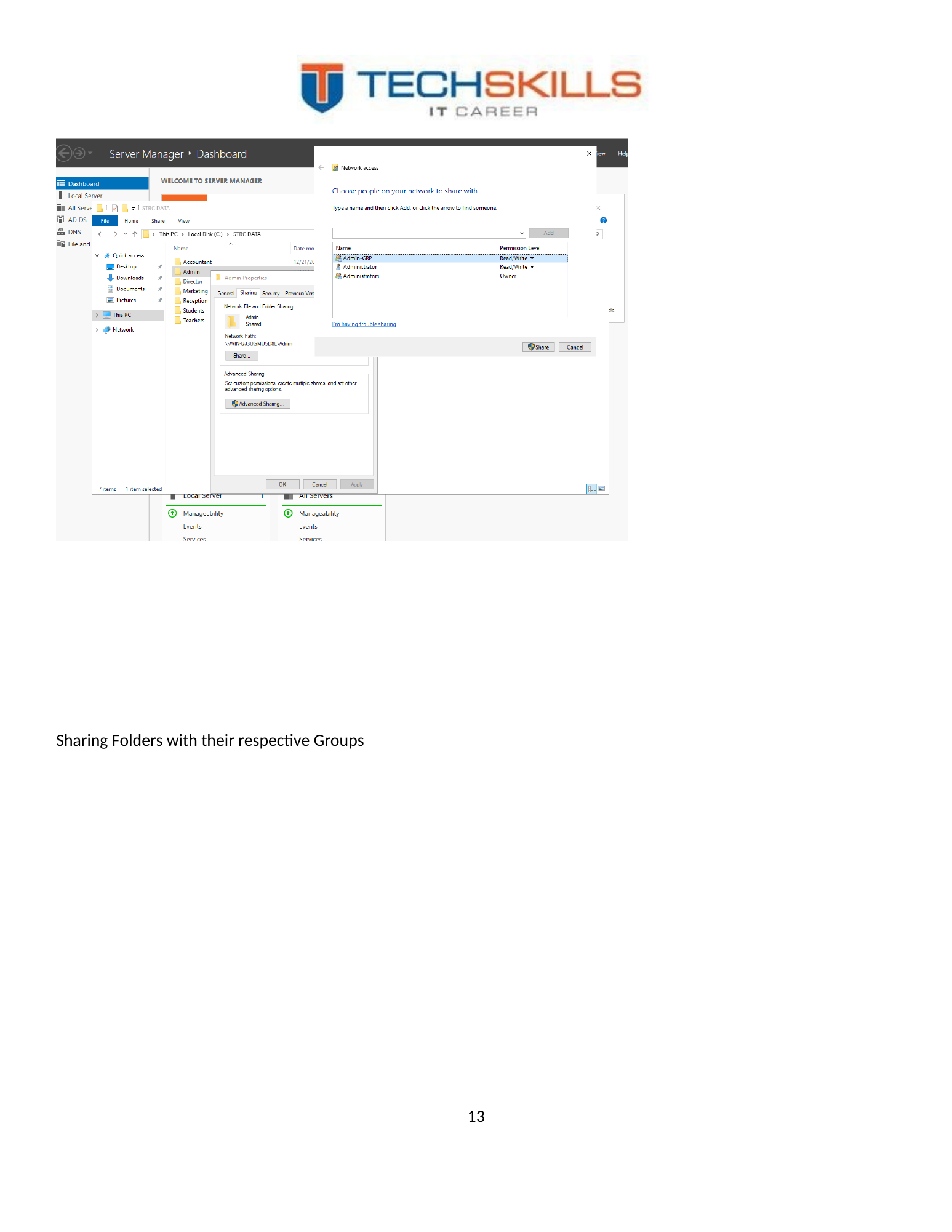
The Admin folder was shared with the Admin-GRP group, and the same pattern was applied to other departmental folders. In Windows file services, effective access is determined by the combined result of share and NTFS permissions. A clear production standard would use broad share permissions and enforce detailed least-privilege controls through NTFS groups, or apply an equivalent documented model consistently.
Figure 17. Sharing the Admin folder with the Admin departmental security group.
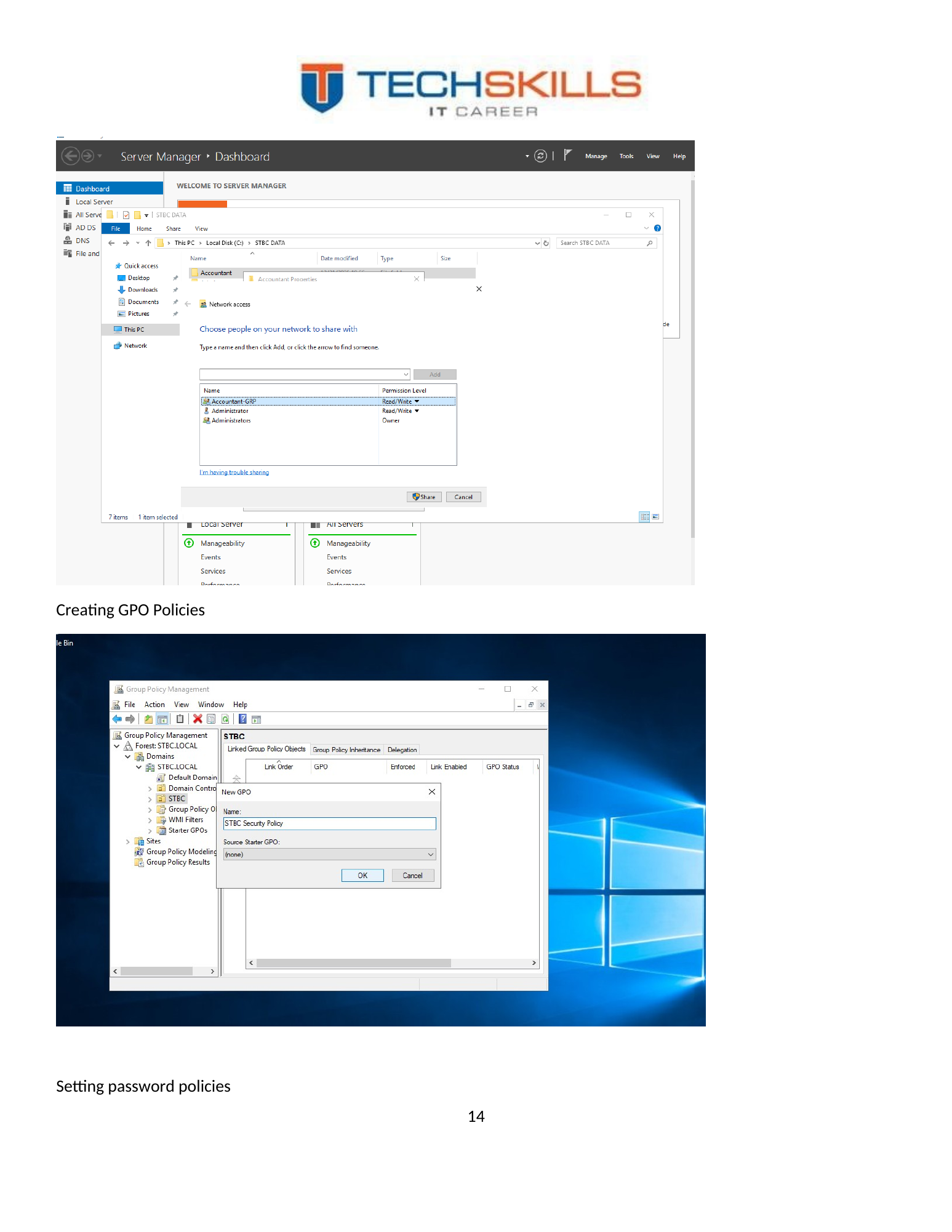
Figure 18. Folder-sharing configuration applied to departmental resources.
8.3 Group Policy
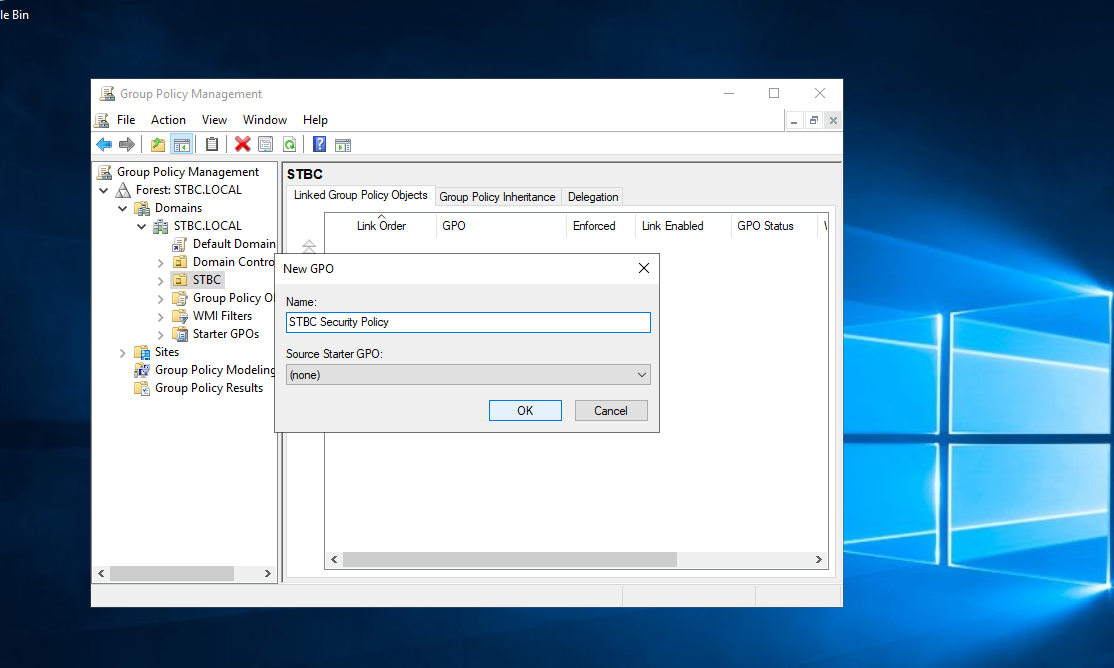
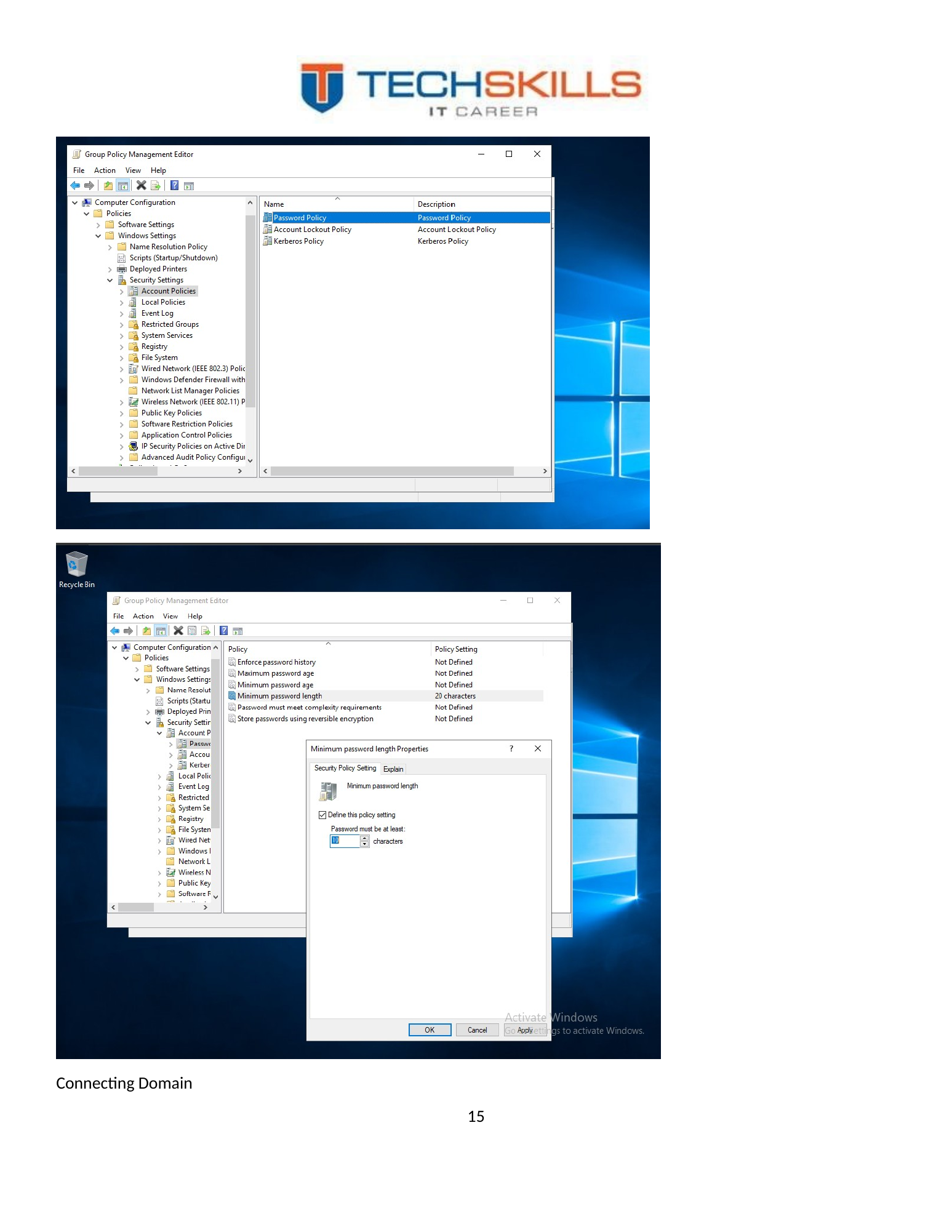
Group Policy was used to centralise configuration and security settings. Microsoft defines Group Policy as a central management capability for operating-system, application and user settings, with GPOs linked to sites, domains and OUs (Microsoft, 2026a). The project created policy objects and configured a domain password standard.
Figure 19. Creation and management of Group Policy Objects for the STBC domain.
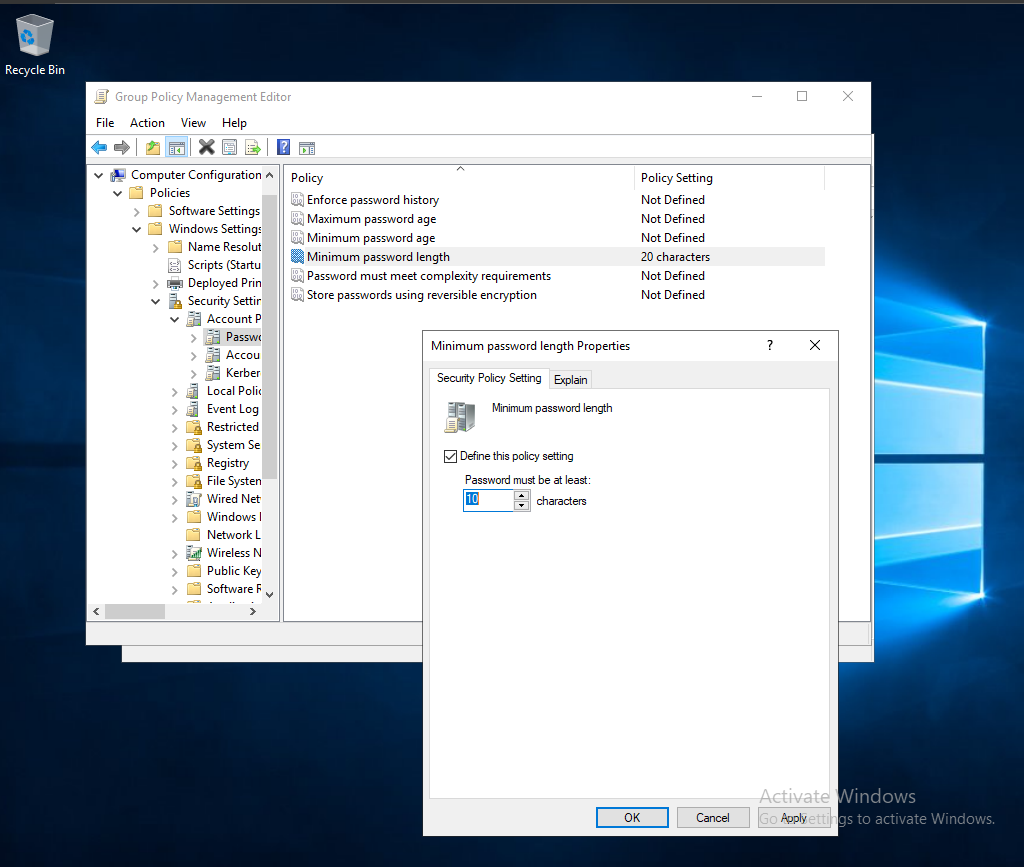
Figure 20. Password policy configured with a minimum length of ten characters.
8.4 Password Policy Evaluation
A minimum length of ten characters was appropriate for demonstrating central policy enforcement. For a modern production environment, password policy should be combined with MFA, banned-password controls, account-lockout design, secure recovery and monitoring. Length remains valuable, but password policy alone cannot address credential theft, phishing or token compromise.
8.5 Access-Control Model
The implementation can be described through a simple RBAC chain: user accounts represent identities; departmental groups represent roles; folders represent resources; and permissions connect roles to resources. This separation is one of the strongest design decisions in the project because it supports repeatable onboarding and creates an auditable explanation for why a user has access.
| Access-control rule Assign permissions to groups, not directly to people. Add people to the correct groups, review group membership regularly, and document exceptional access such as director-level visibility. |
CHAPTER 9
Chapter 18
Client Integration and Functional Validation
9.1 Domain Join
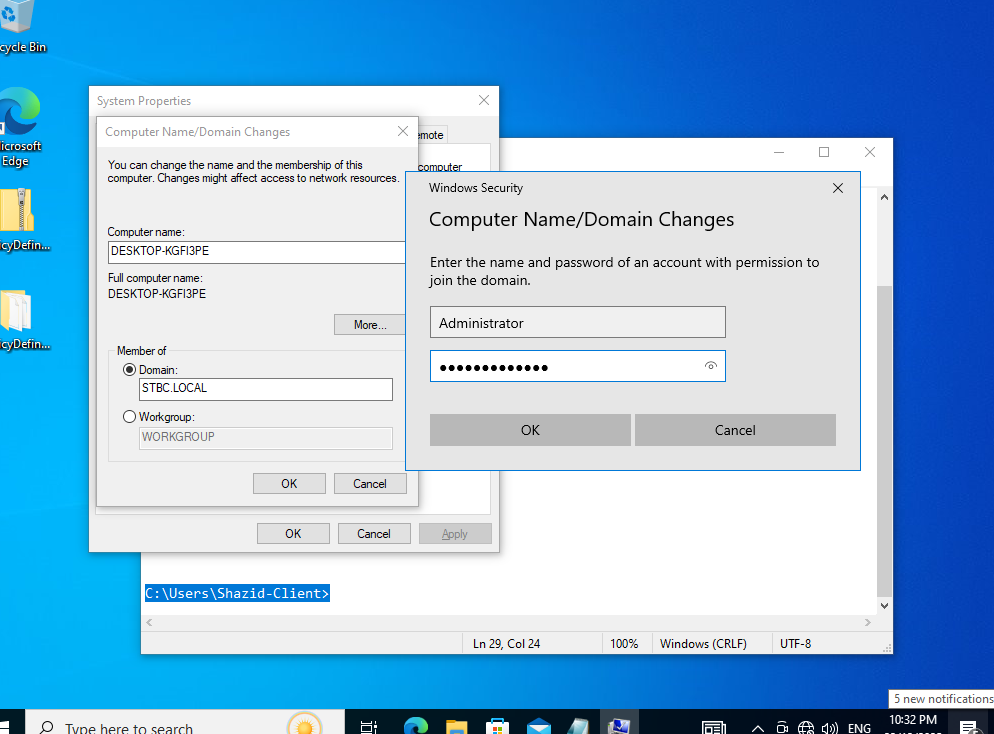
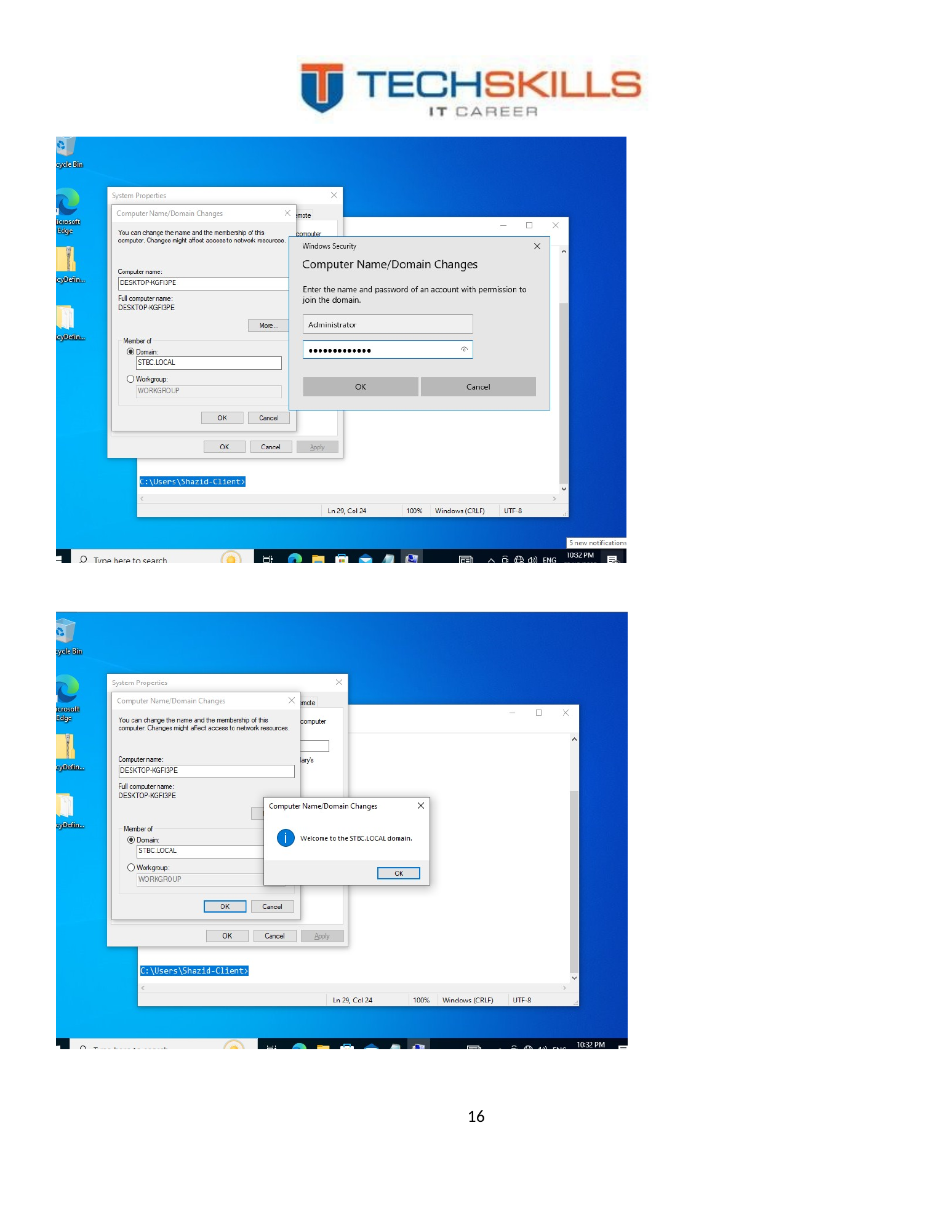
A desktop or laptop was configured to join the STBC domain. Domain joining establishes a trust relationship between the device and the domain, allowing the client to authenticate users, process Group Policy and access domain resources. The successful join confirmed that the client could locate and communicate with the domain environment.
Figure 21. Client device joining the STBC domain.
9.2 Domain User Logon
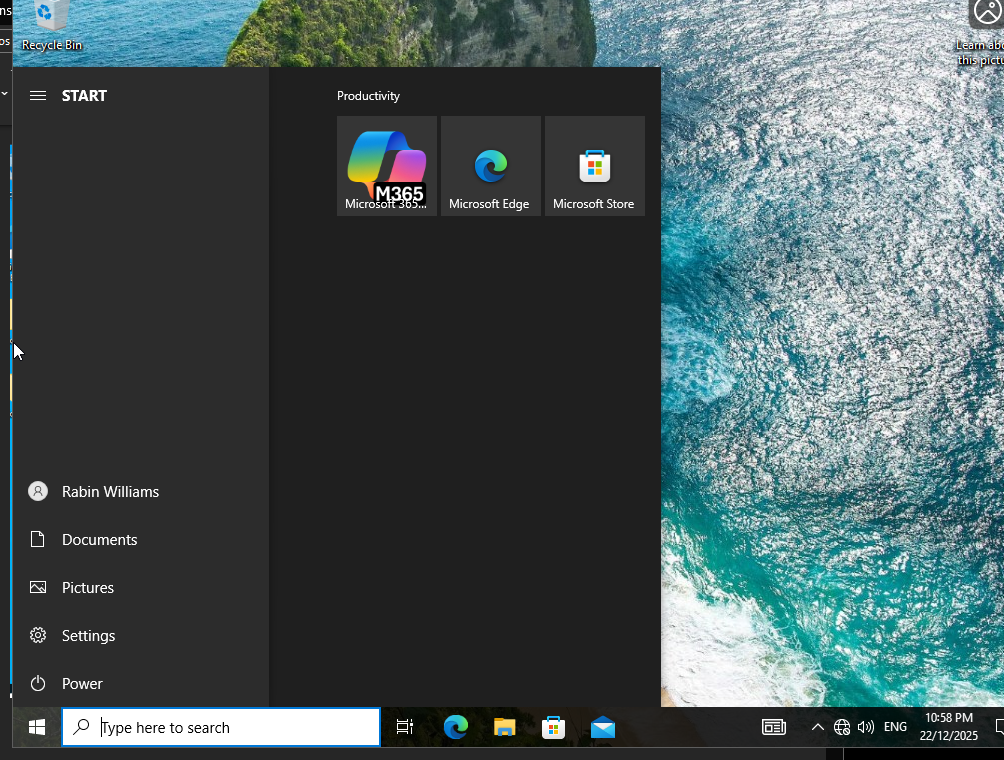
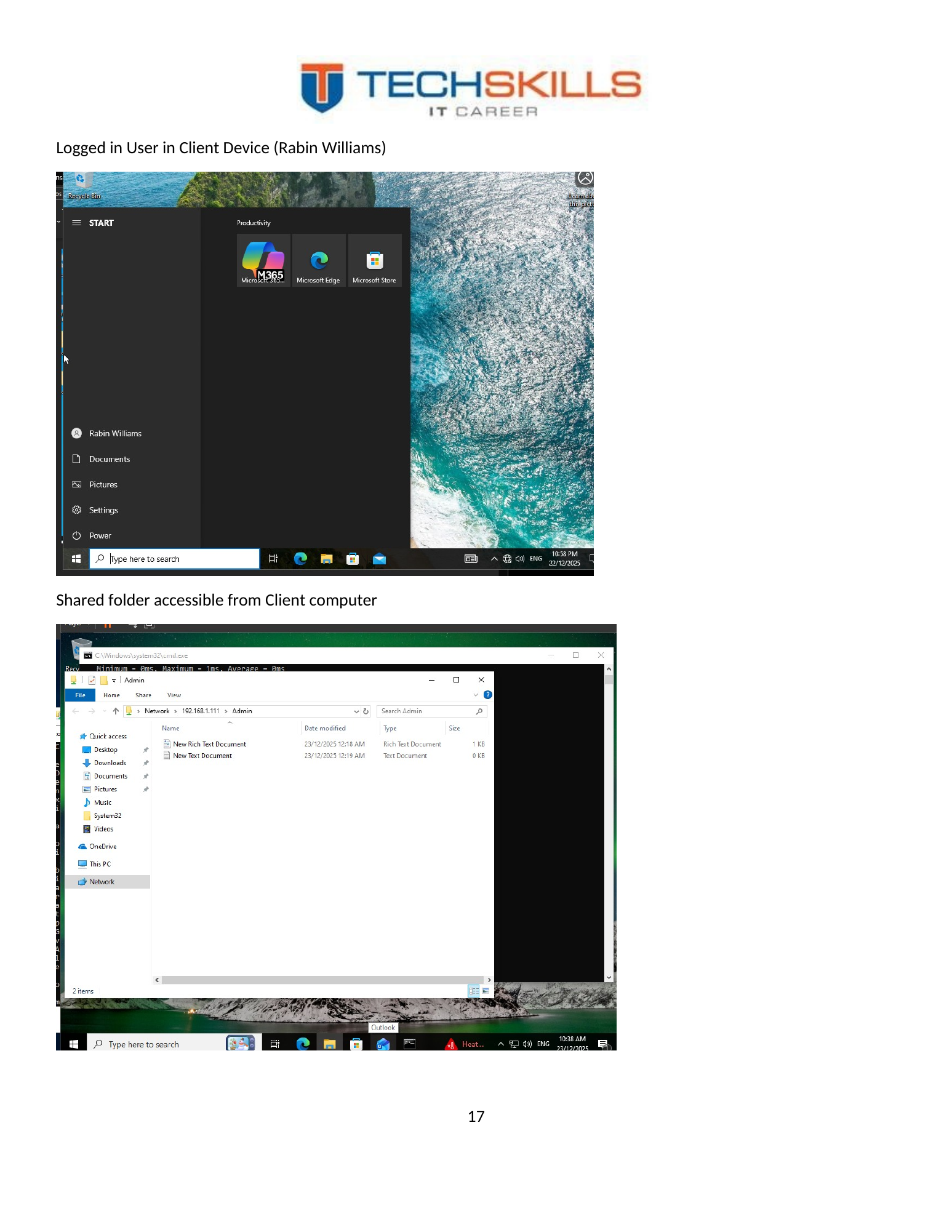
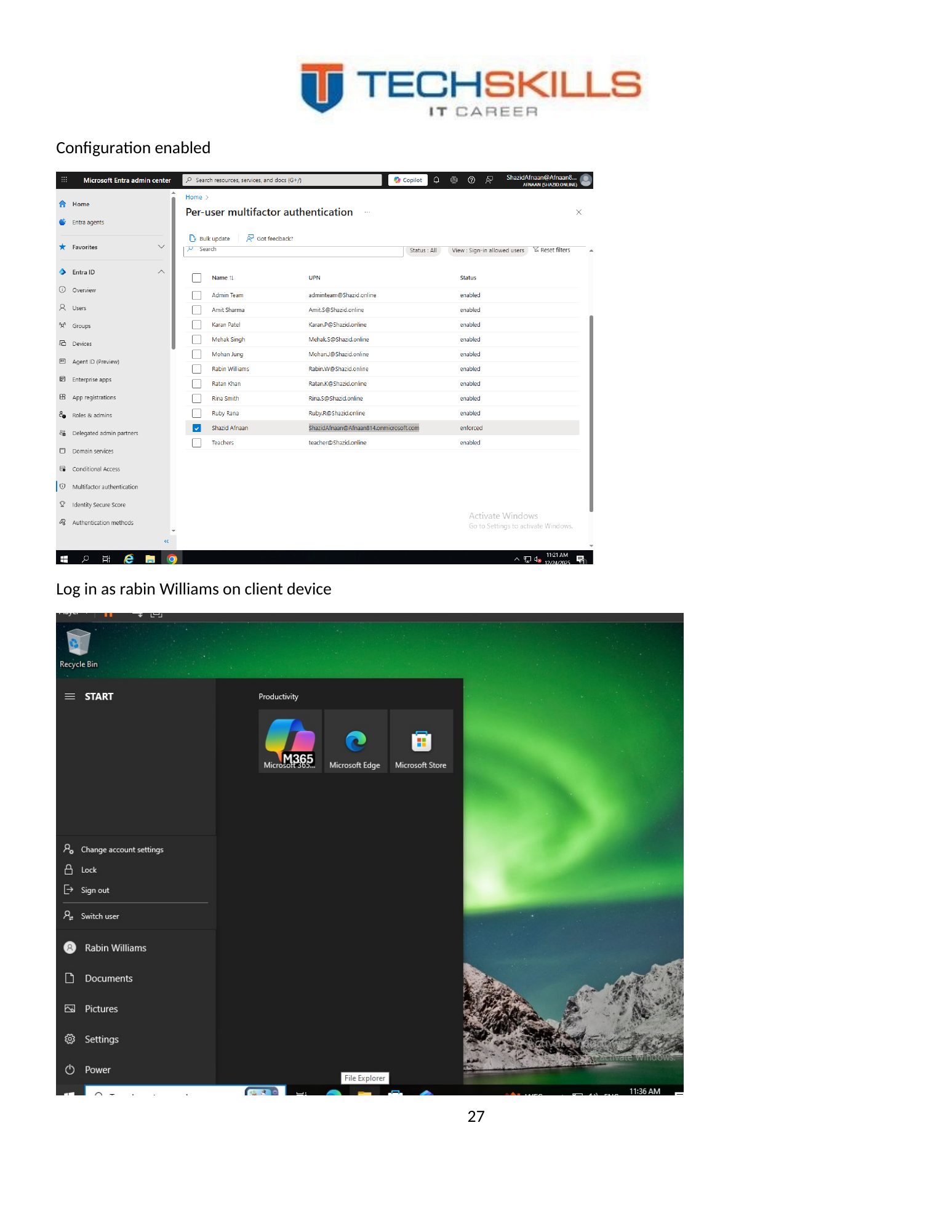
The Rabin Williams account was used to sign in to the client device. This test moved beyond administrative configuration and confirmed the user experience from the endpoint. A working sign-in demonstrated that the account, password, device trust and domain communication were operating together.
Figure 22. Successful sign-in on the client device using the Rabin Williams domain identity.
9.3 Authorised Share Access
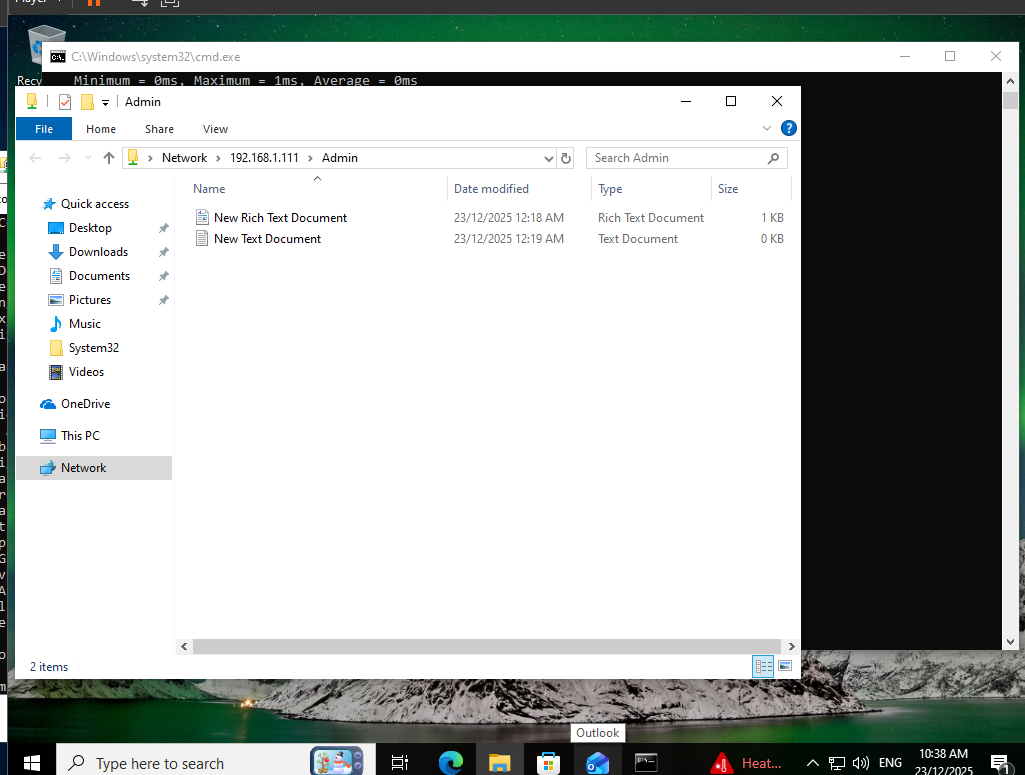
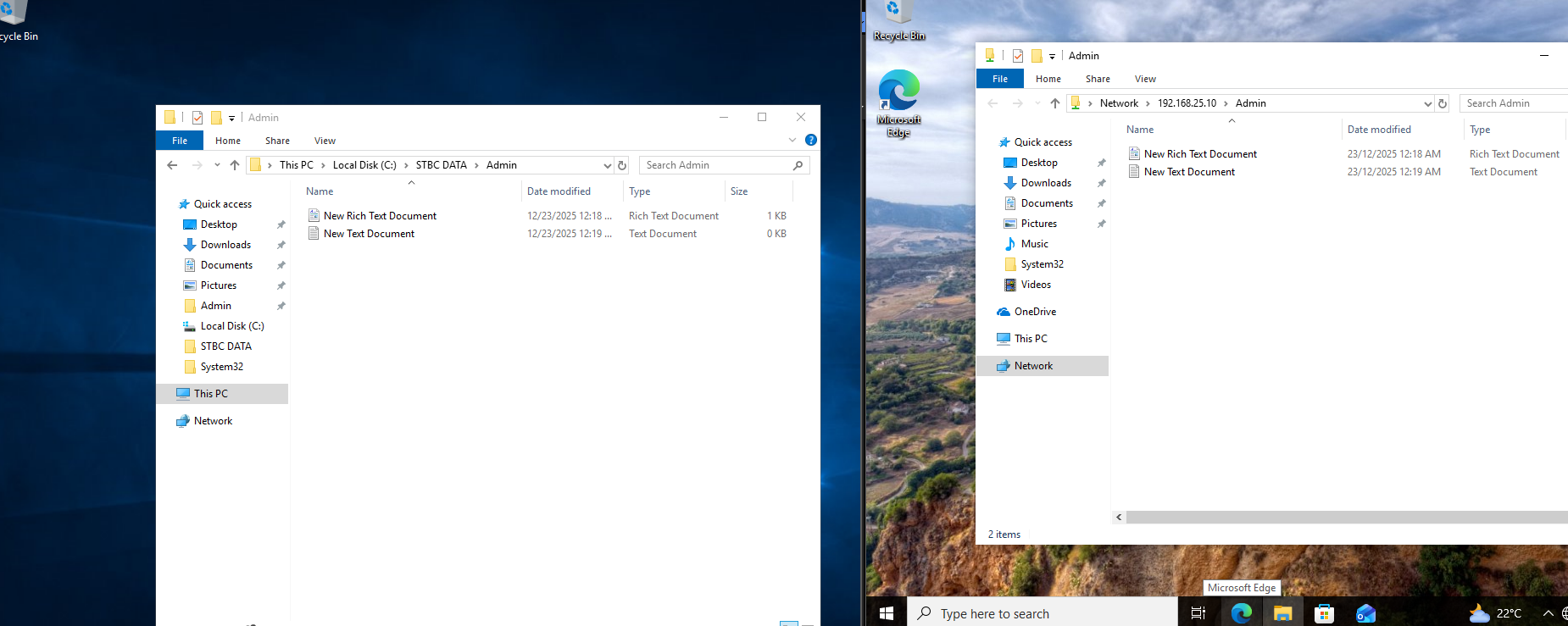
Rabin Williams belonged to the Admin group and was therefore expected to access the Admin share. The client successfully opened the authorised folder and exchanged a file between the server share and the client. This validated the positive path of the permission model.
Figure 23. Authorised departmental share accessible from the domain-joined client.
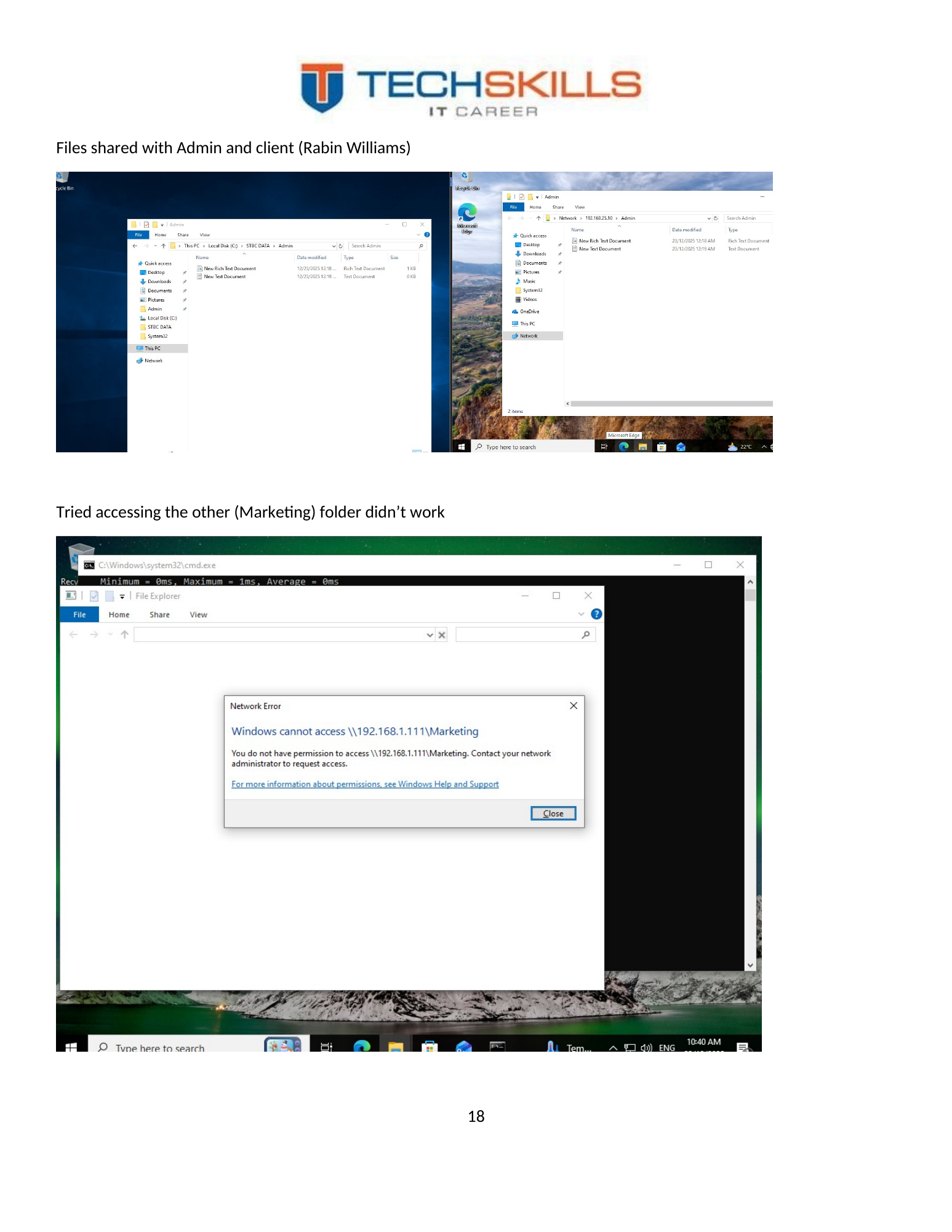
Figure 24. File exchange through the Admin share, demonstrating practical read/write use.
9.4 Unauthorised Access Denial
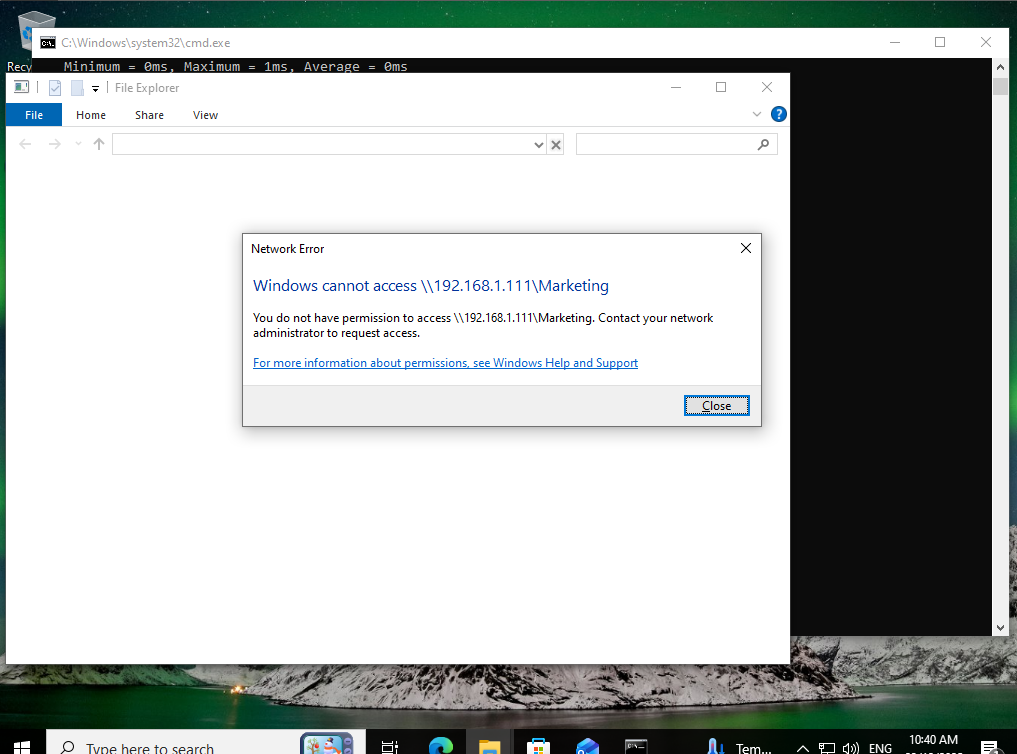
The same user then attempted to open the Marketing folder and was denied. This is the most important security test in the file-services section. A permission system is not fully validated merely because authorised access works; it must also prevent access that the role does not require.
Figure 25. Access to the Marketing folder denied for the Admin user, validating departmental separation.
9.5 Password-Policy Test
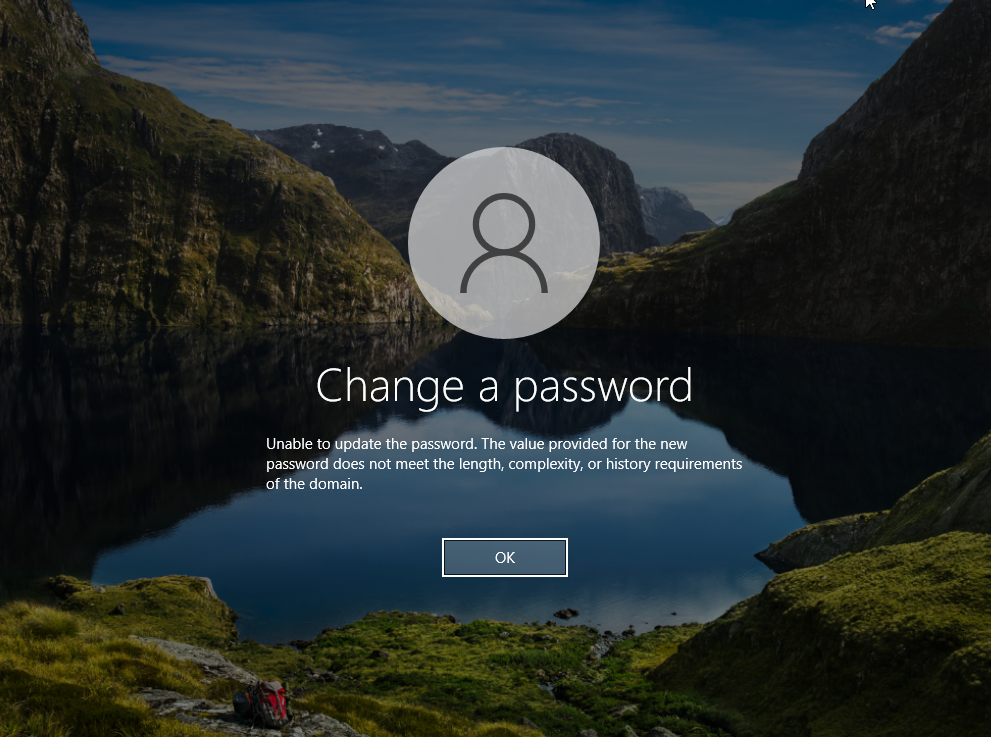
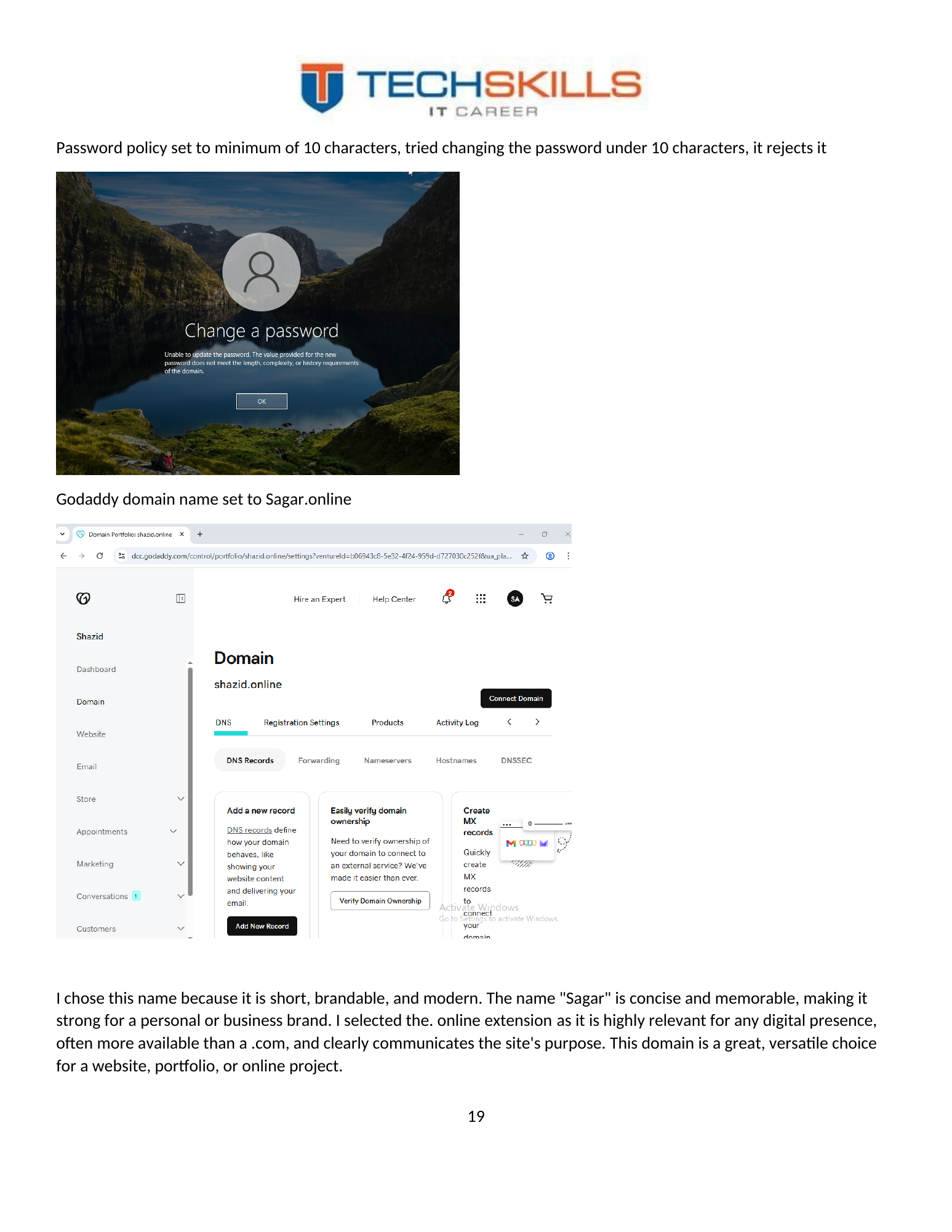
The password was changed using a value shorter than the configured minimum of ten characters. Windows rejected the change, confirming that the domain password setting was applied. This transformed the GPO configuration from an administrative claim into a tested control.
Figure 26. Password change rejected because it did not satisfy the configured minimum length.
9.6 Validation Outcome
The client tests collectively demonstrated authentication, authorised access, data exchange, least-privilege denial and policy enforcement. These results provide a coherent test chain rather than isolated screenshots. They show that the directory, groups, file permissions, Group Policy and client device interacted as designed.
CHAPTER 10
Chapter 19
Microsoft 365 Domain and User Administration
10.1 Hybrid Service Rationale
The on-premises server controlled local identity and file resources, while Microsoft 365 provided cloud productivity, email and stronger sign-in controls. The project did not implement directory synchronisation between AD DS and Microsoft Entra ID; the two environments were administered as related but separate identity stores. This is accurately described as a hybrid service approach rather than a fully synchronised hybrid identity deployment.
10.2 Demonstration Domain
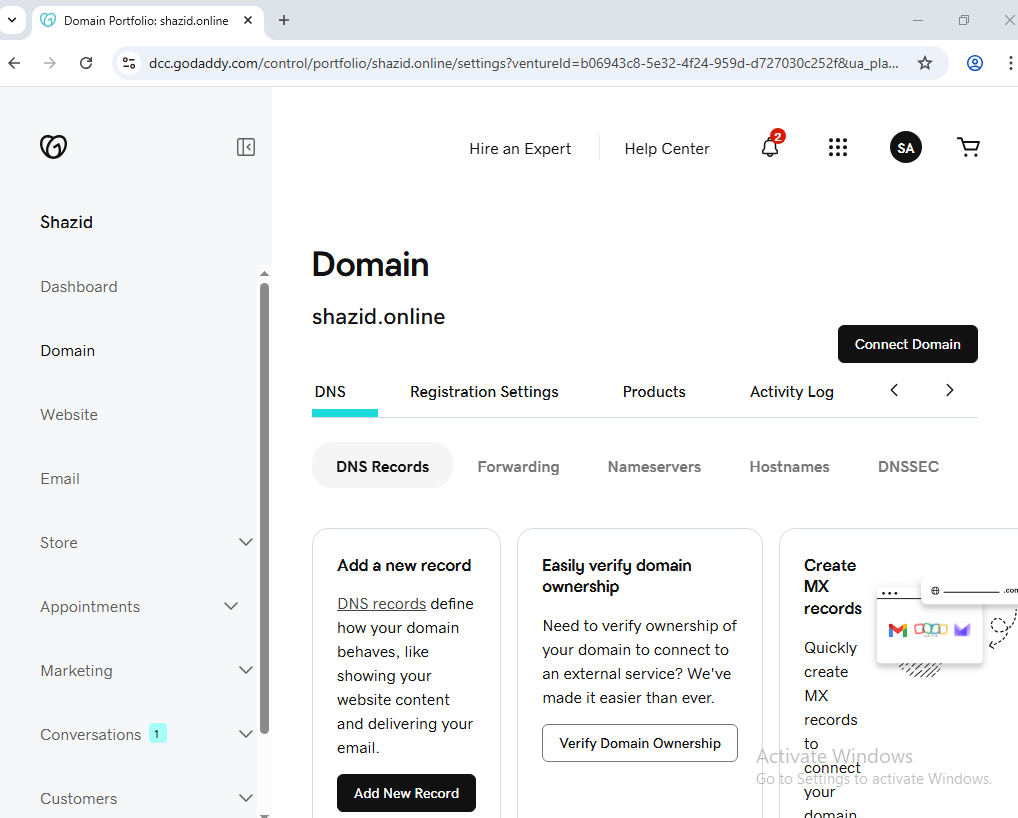
The domain sagar.online was connected through GoDaddy for the Microsoft 365 demonstration. The project selected the name because it was short and usable for the exercise. For the actual college, the production tenant should use the college’s verified business or education domain, with DNS records, ownership and renewal controlled by the organisation.
Figure 27. Demonstration custom domain connected to the Microsoft 365 tenant.
10.3 User Onboarding
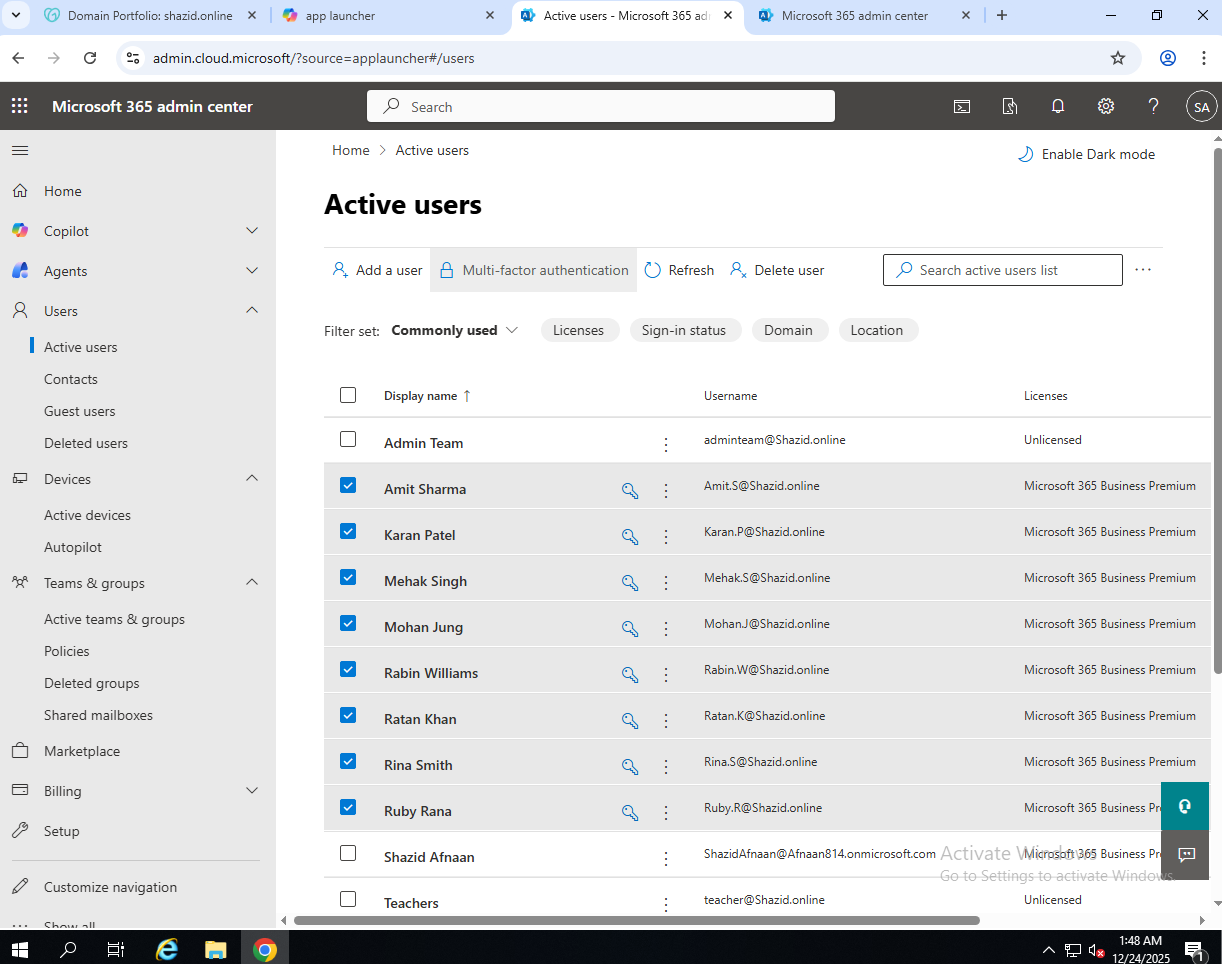
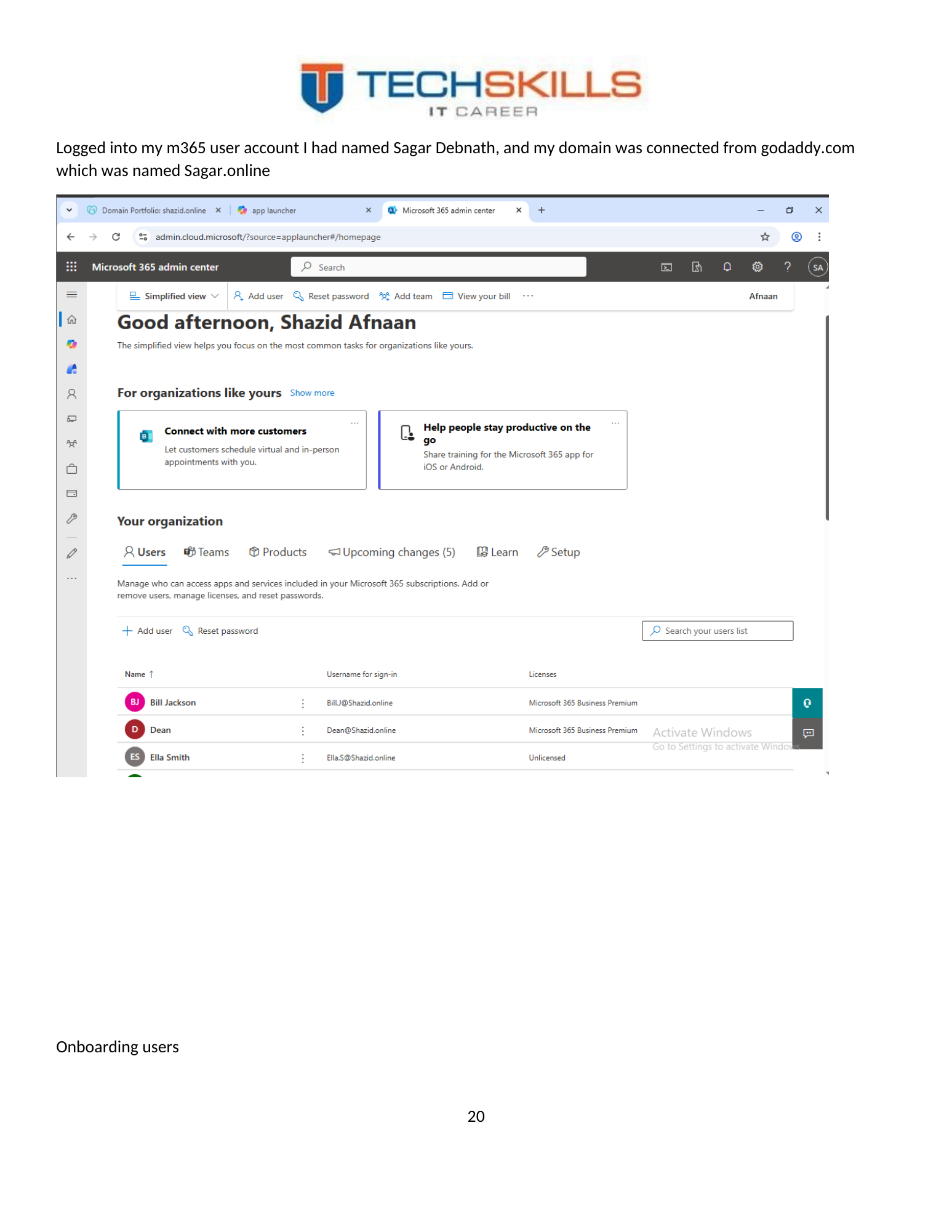
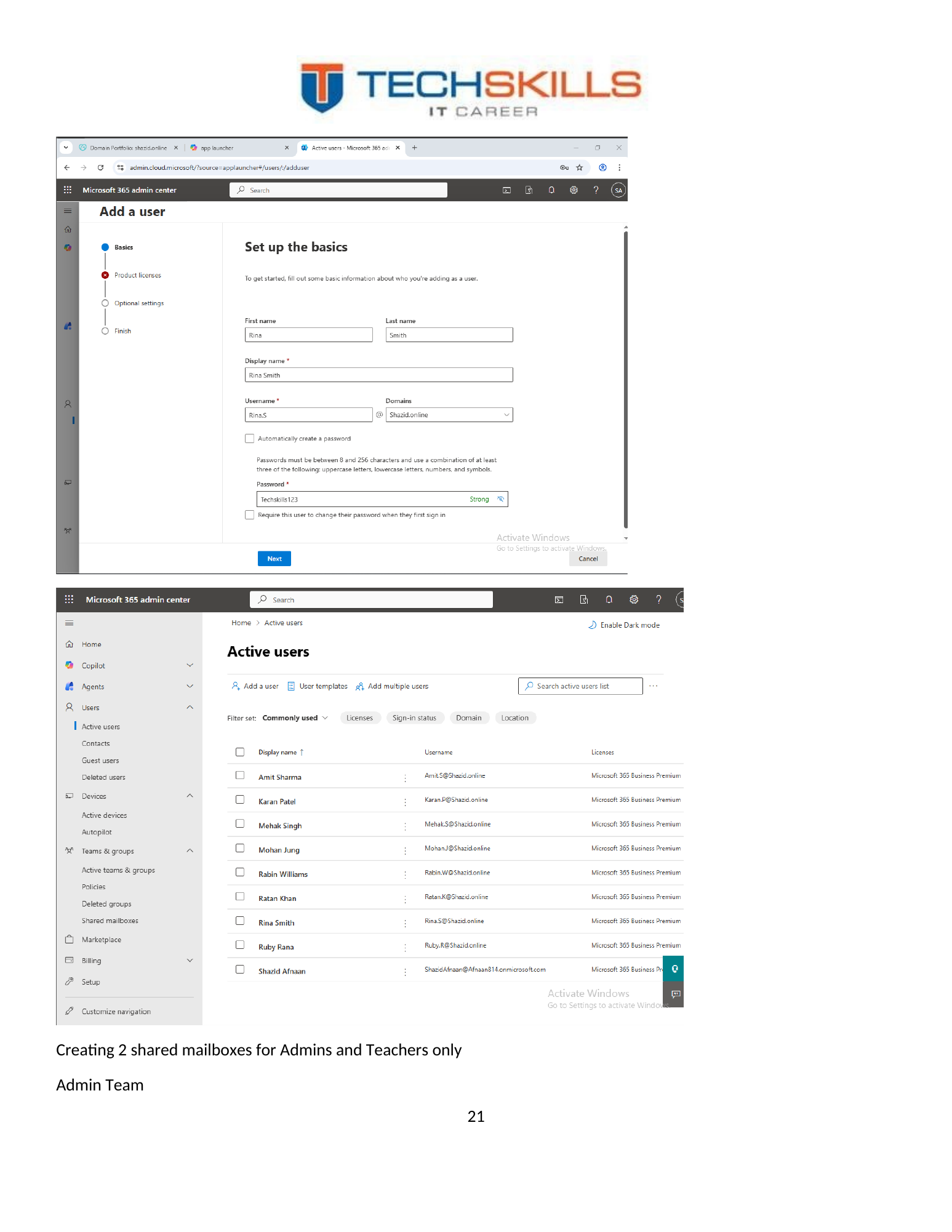
Microsoft 365 users were created for the scenario identities. The onboarding process provided each user with an account that could access cloud services according to licensing and administrative configuration. In production, onboarding should follow an approval workflow and should record manager, department, licence, groups, mailbox permissions, MFA state, device allocation and start date.
Figure 28. Microsoft 365 user administration view used during onboarding.
Figure 29. User creation and service assignment within Microsoft 365.
Figure 30. Microsoft 365 user onboarding confirmation.
10.4 Identity Consistency
The same staff identities appeared in both the Windows domain and Microsoft 365 tenant. A future production design should either synchronise identities through an approved hybrid identity solution or establish a documented naming and lifecycle process that prevents orphaned accounts. The objective is a consistent joiner, mover and leaver workflow across local and cloud services.
CHAPTER 11
Chapter 20
Shared Communication Services in Exchange Online
11.1 Shared Mailboxes
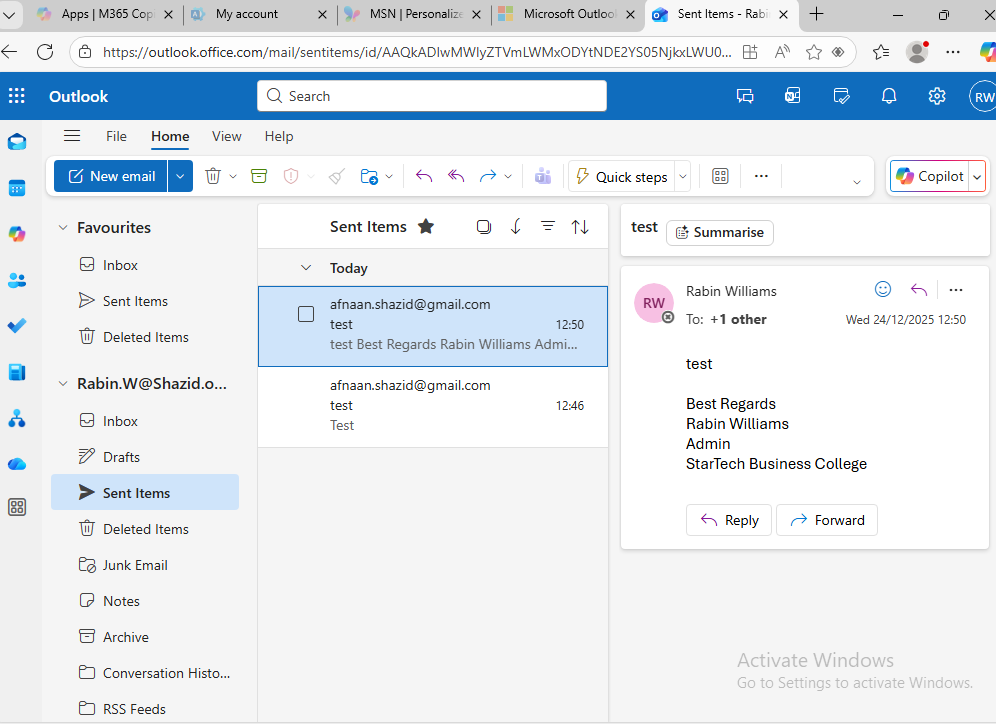
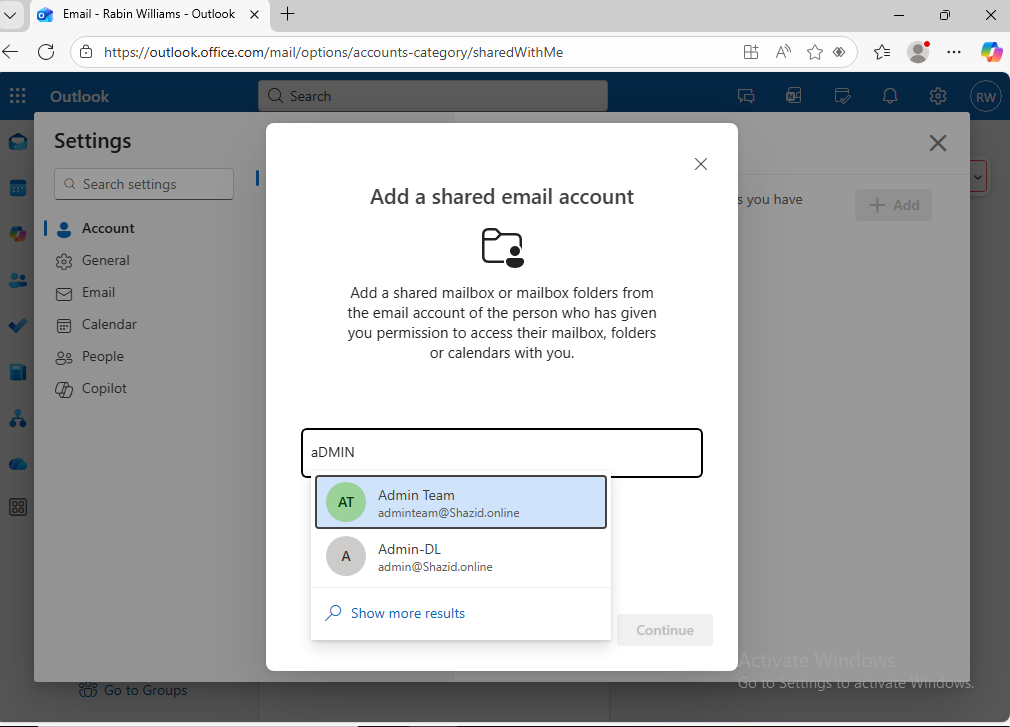
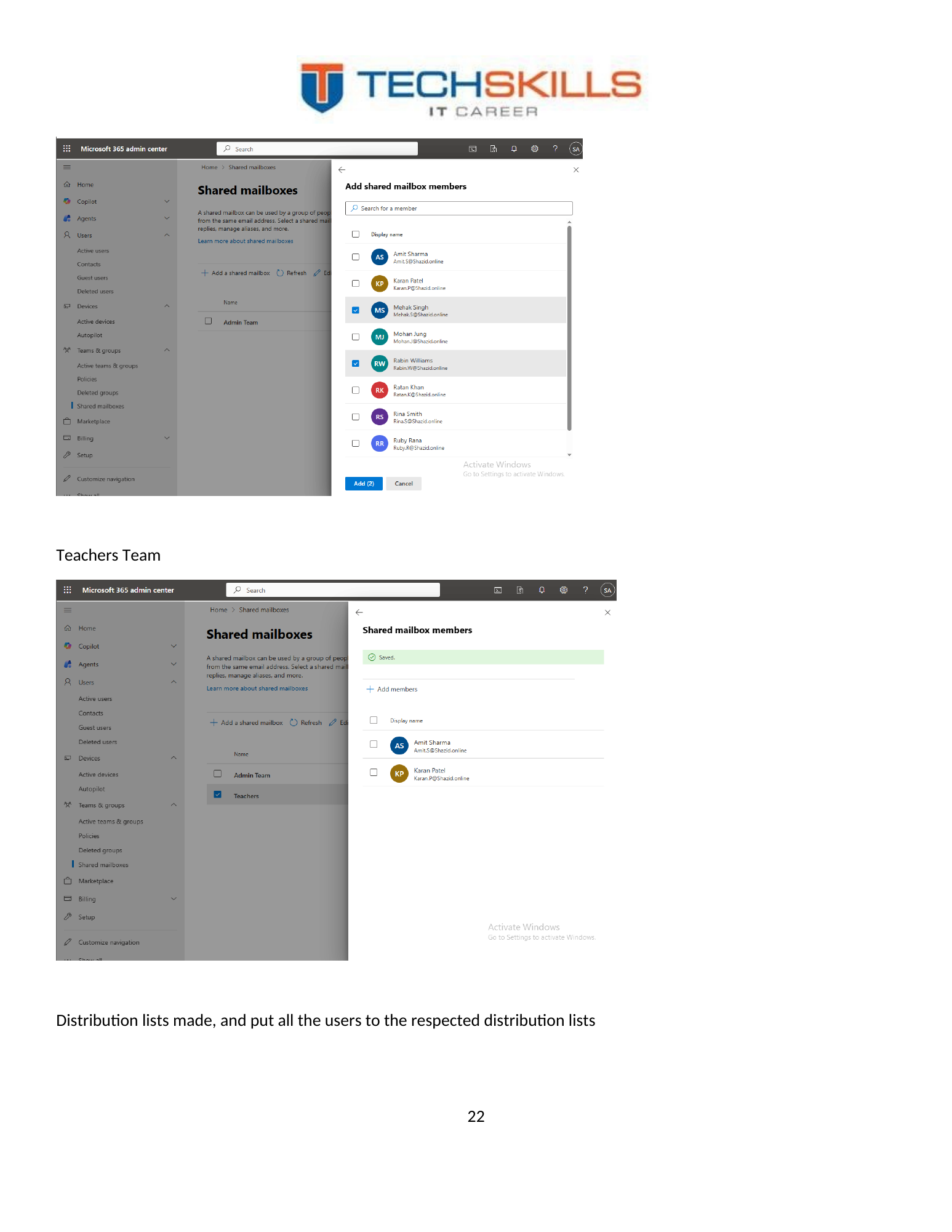
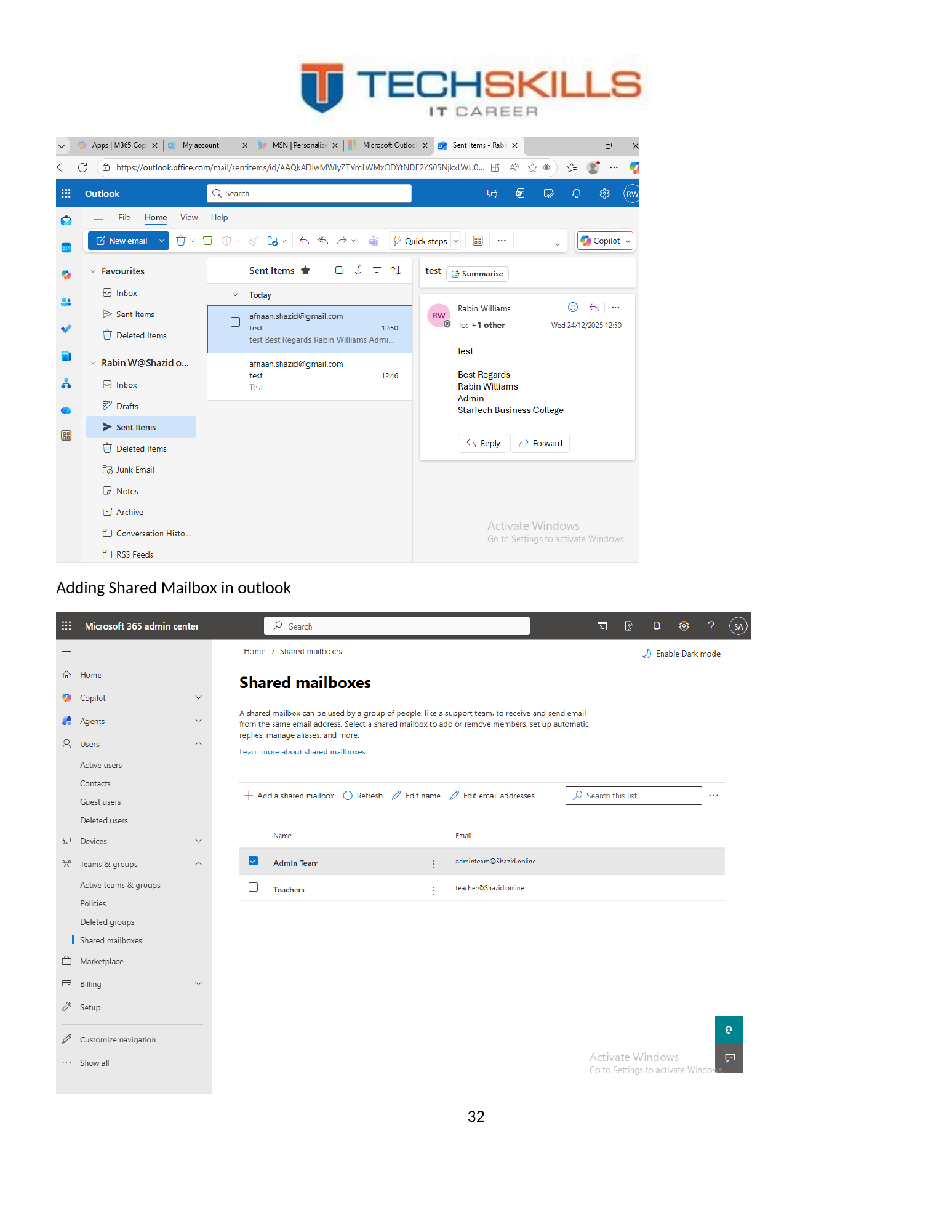
Shared mailboxes were created for the Admin and Teachers teams. Microsoft describes a shared mailbox as a mailbox that multiple designated users can access to read and send messages and share a common calendar (Microsoft, 2025c). This model is appropriate for role-based addresses because users work from their own accounts while accessing the shared resource through delegated permission.
Figure 31. Creation of the Admin shared mailbox in Microsoft 365.
Figure 32. Creation of the Teachers shared mailbox and assignment of members.
11.2 Distribution Lists
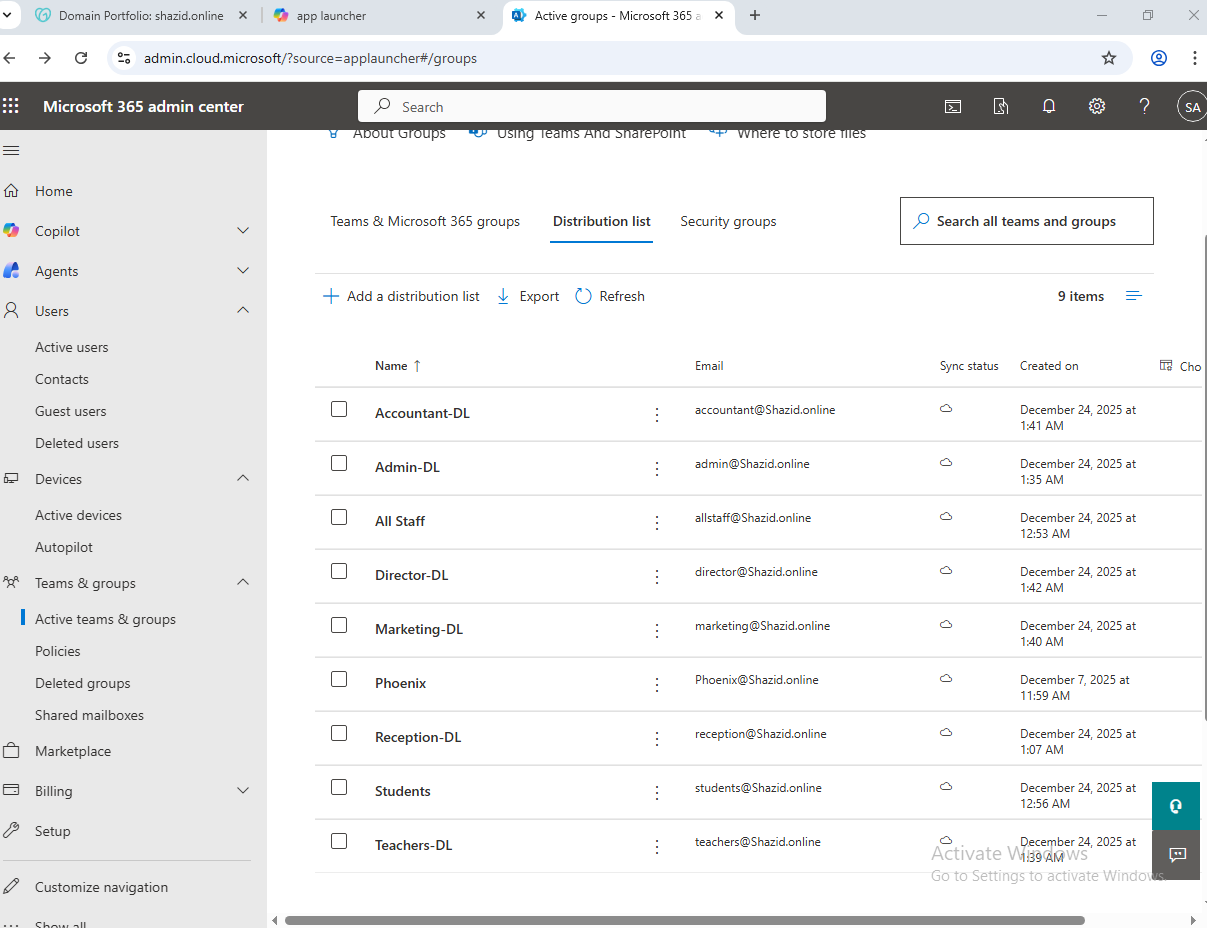
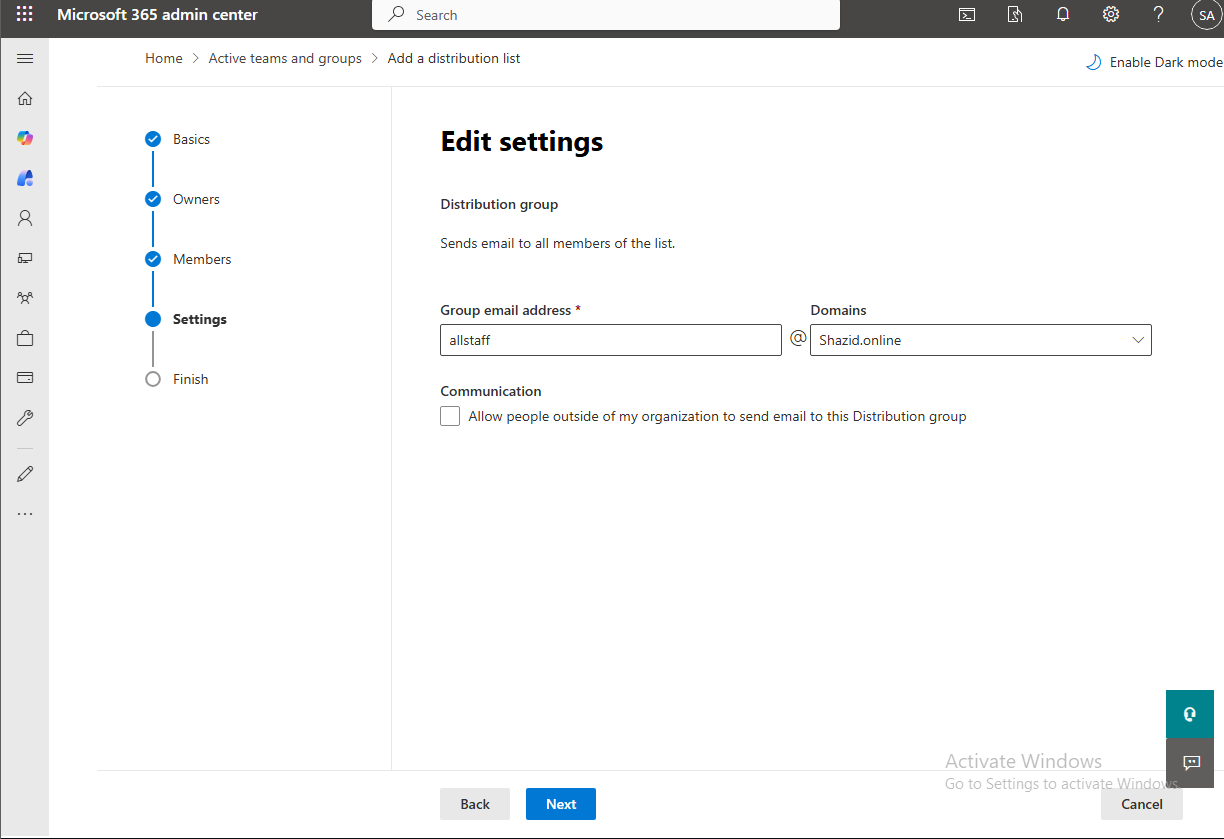
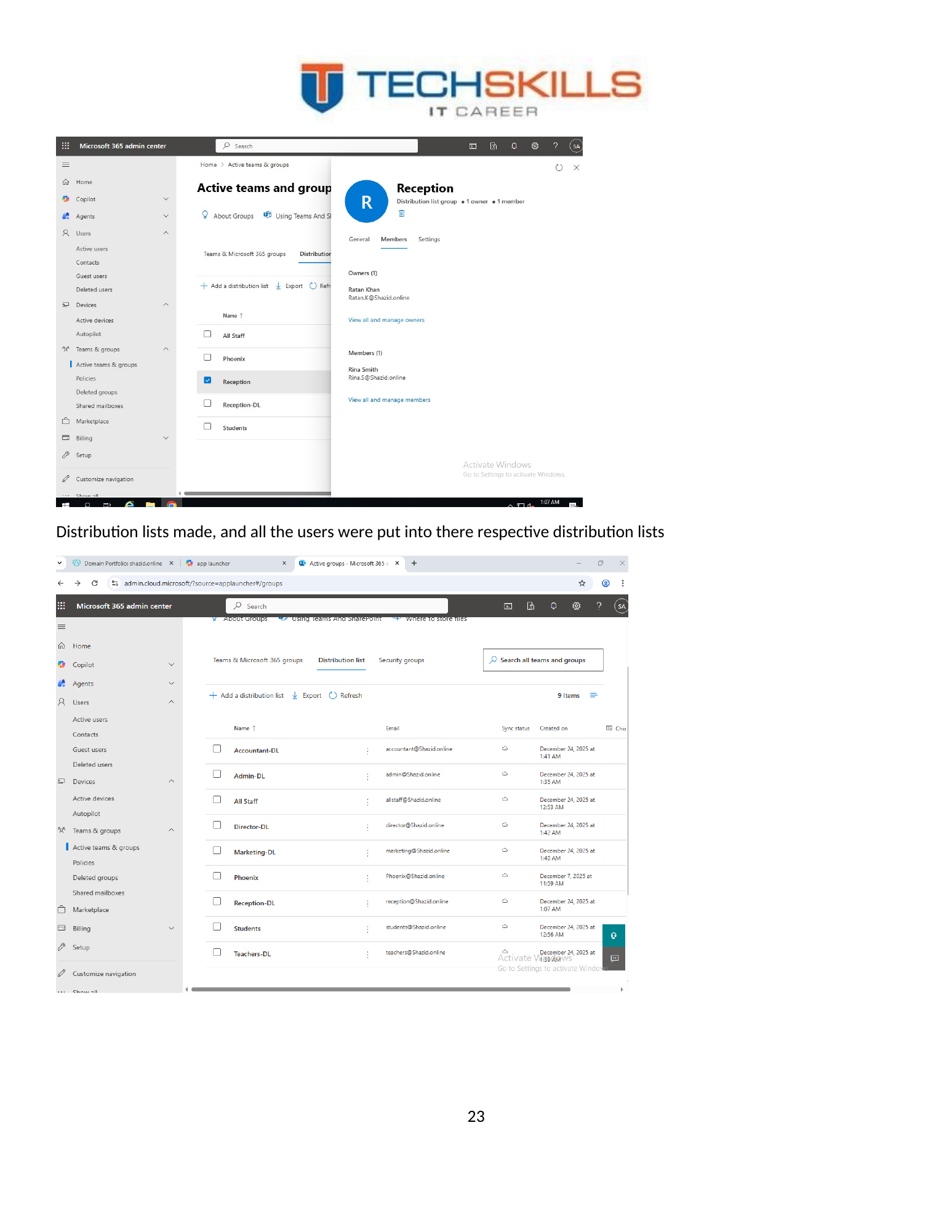
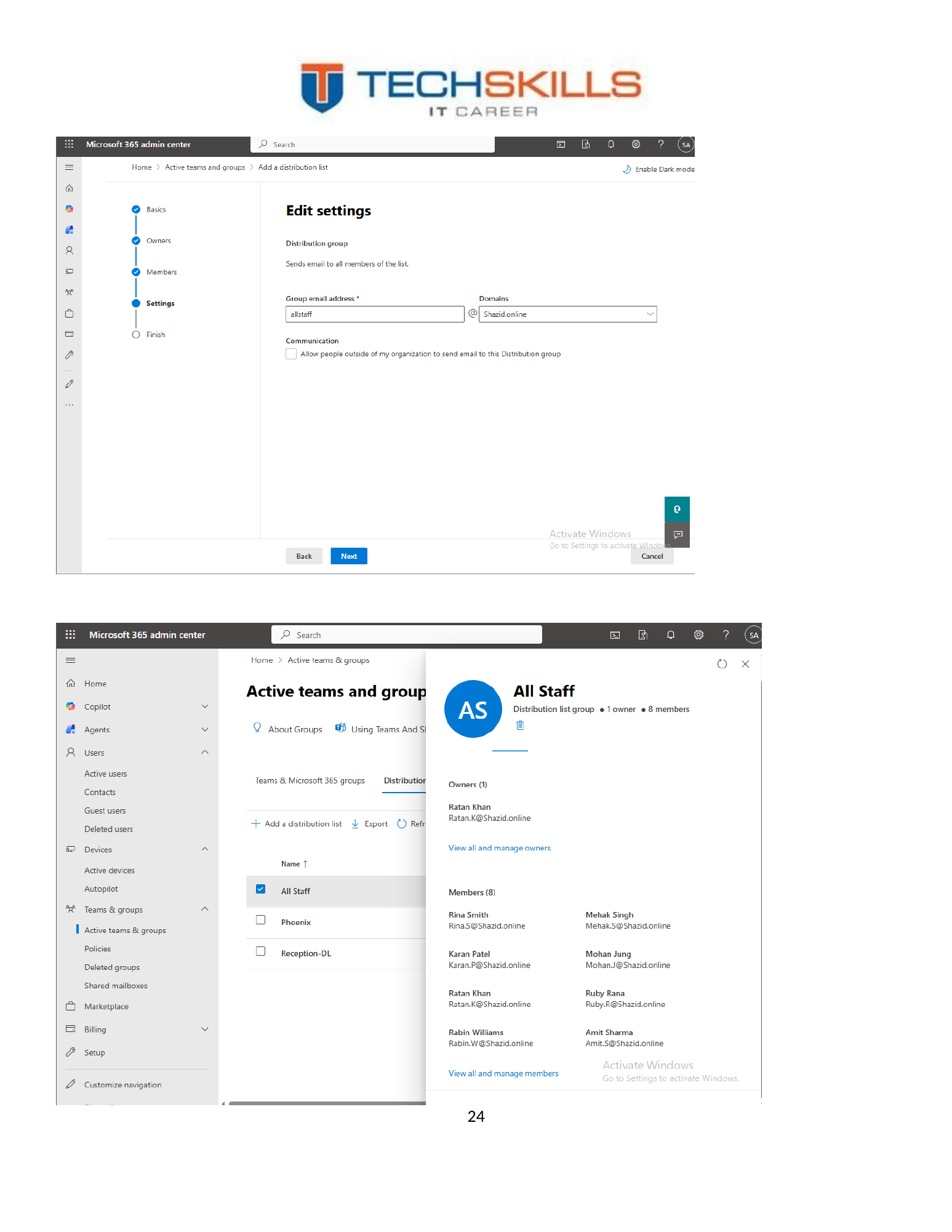
Distribution lists were created and populated with the relevant users. A distribution list provides a simple method of sending one message to a defined audience, while a shared mailbox provides a collaborative mailbox that members can open and use. The project demonstrated both patterns and therefore addressed two different communication requirements.
Figure 33. Distribution lists configured for departmental communication.
11.3 Governance Considerations
- Assign at least two responsible owners for important groups and shared mailboxes.
- Use descriptive addresses linked to business functions rather than individual staff names.
- Review Full Access, Send As and Send on Behalf permissions periodically.
- Document retention, deletion, legal-hold and privacy requirements before production use.
- Remove departing staff promptly while preserving business records according to policy.
CHAPTER 12
Chapter 21
Multifactor Authentication, Office and Outlook
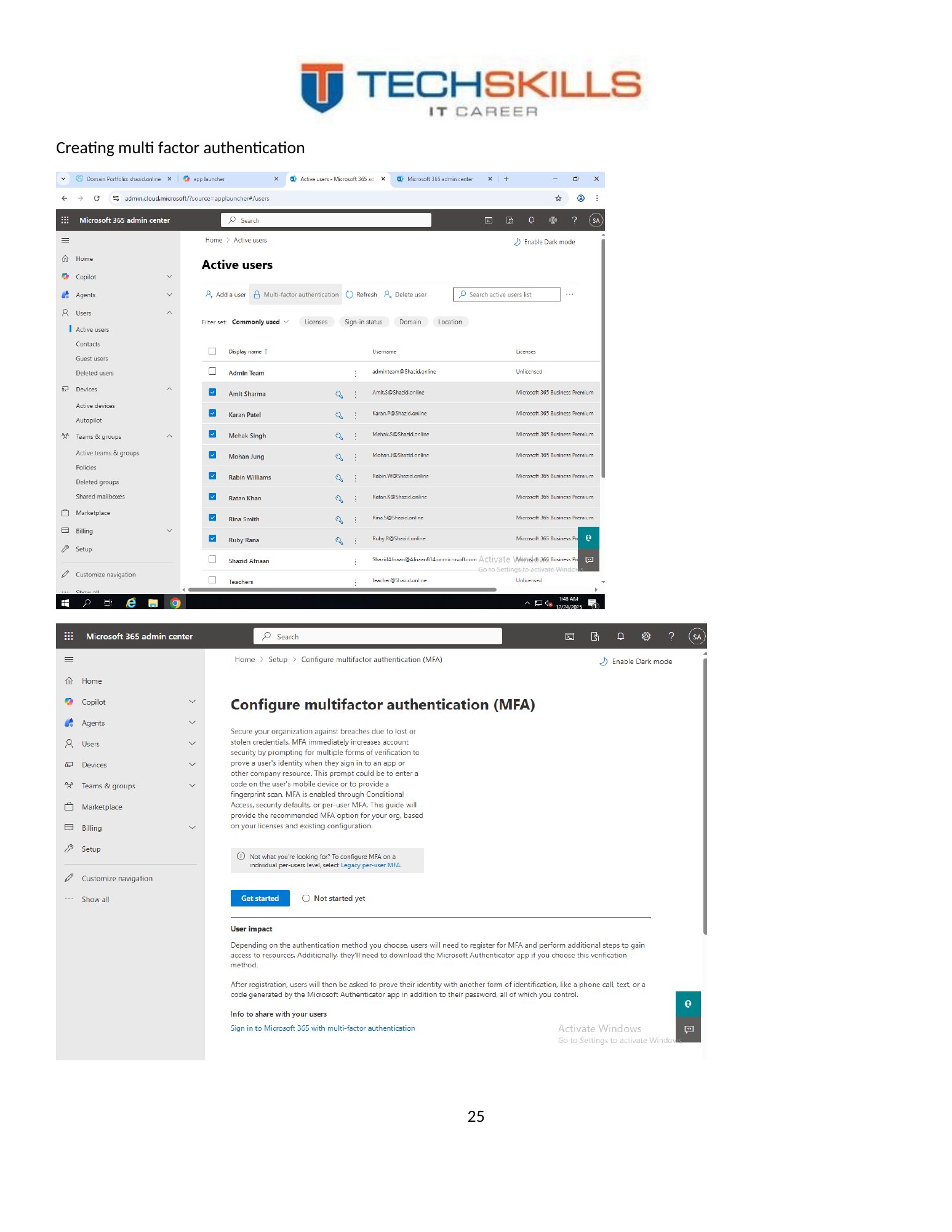
12.1 Multifactor Authentication
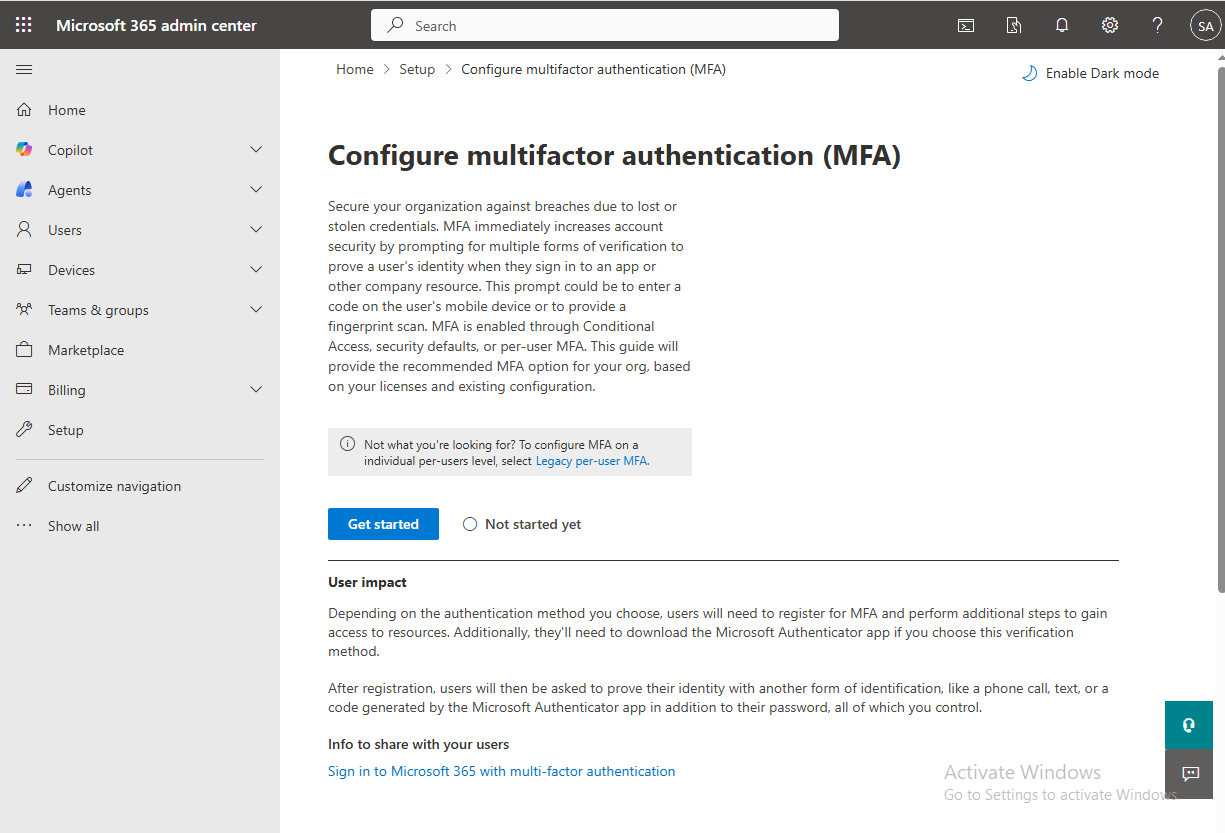
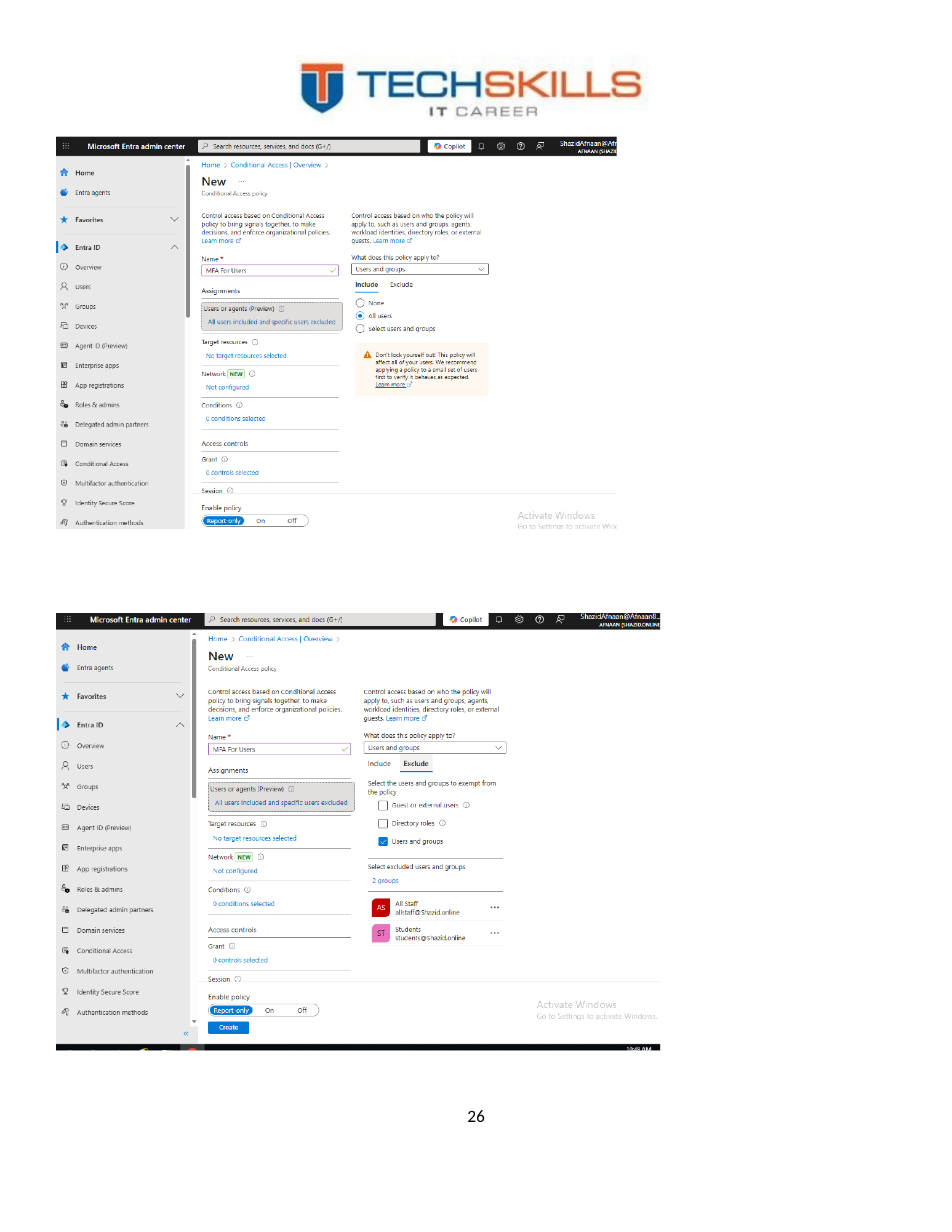
Multifactor authentication was enabled and tested using Microsoft Authenticator. MFA requires an additional verification factor beyond the password and therefore reduces reliance on a single credential. Microsoft explains that MFA combines two or more categories such as something the user knows, possesses or is (Microsoft, 2025d).
Figure 34. Microsoft 365 multifactor-authentication configuration.
12.2 Authenticator Registration and Number Matching
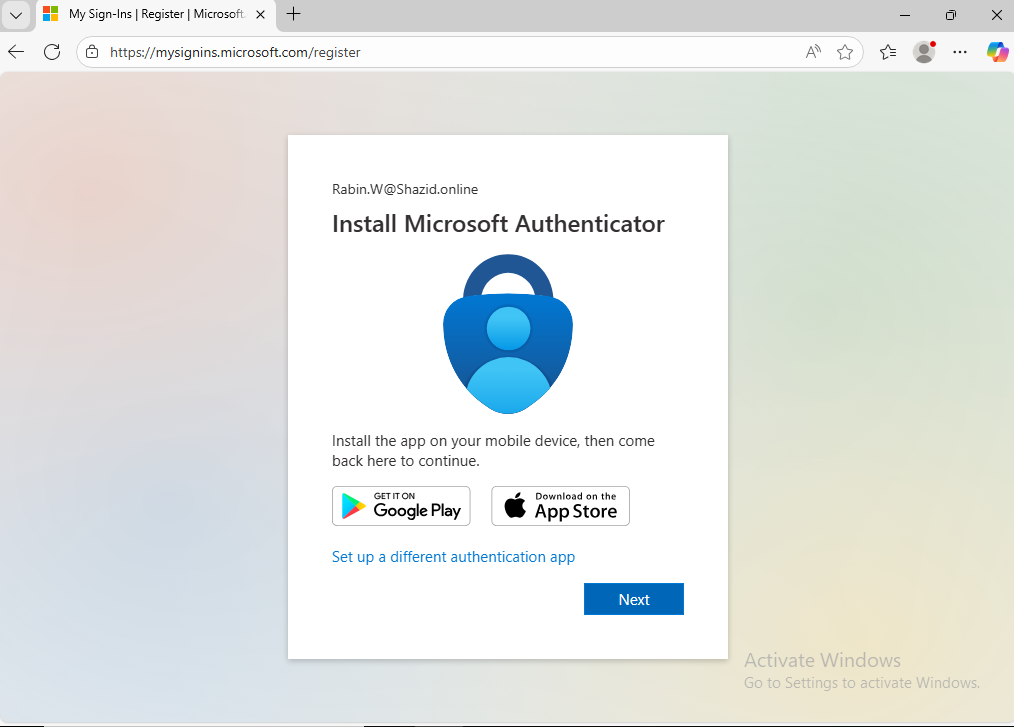
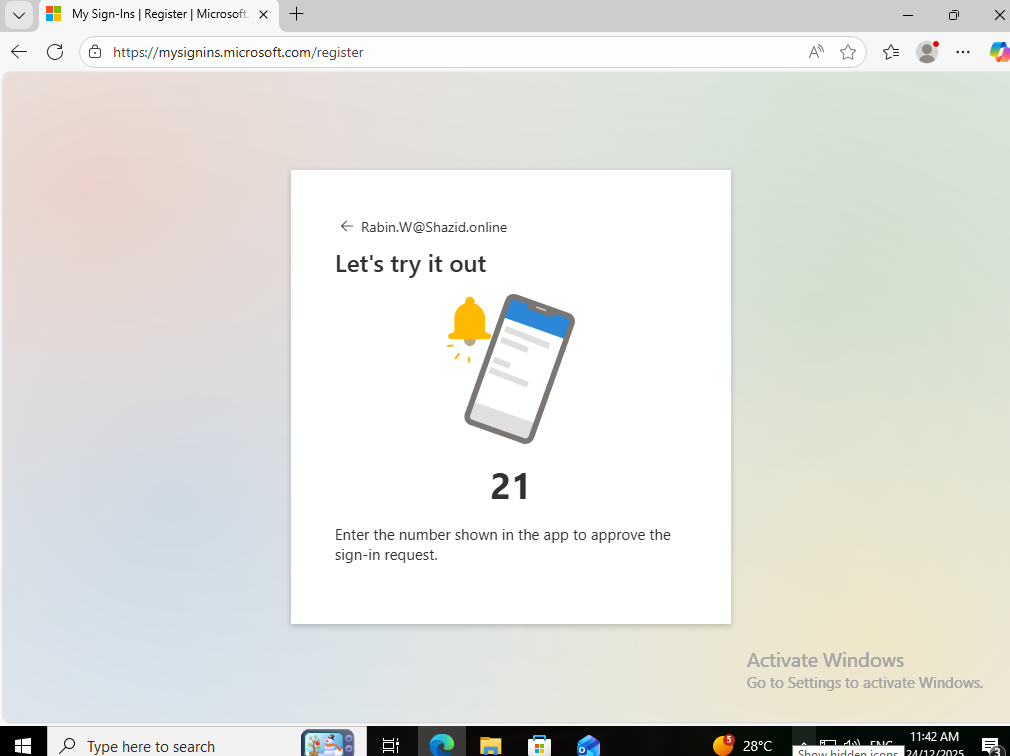
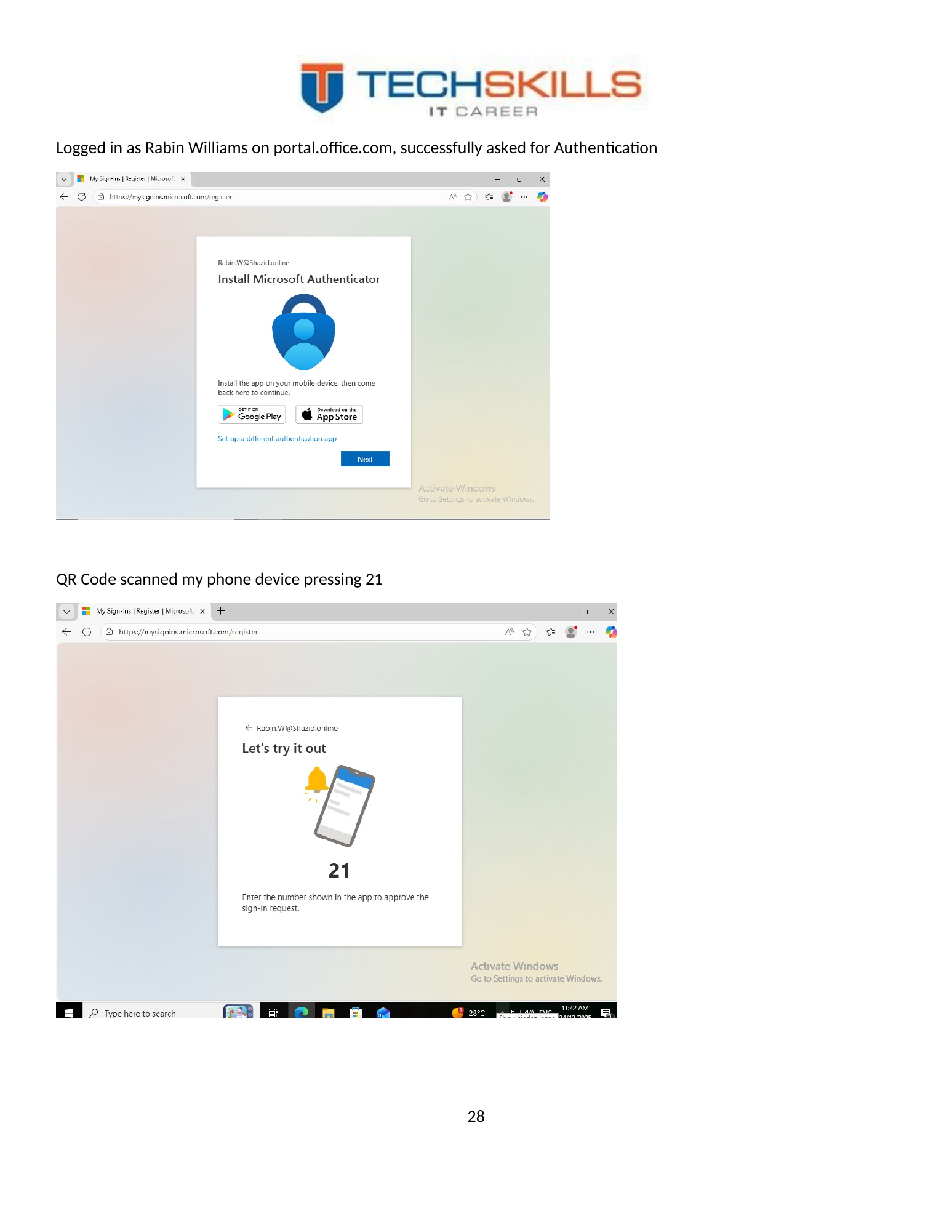
The Rabin Williams account was used to sign in, register Microsoft Authenticator and complete a number-matching challenge. The screenshots show the QR registration flow and a number value of 21 being confirmed on the mobile device. This provided direct evidence that the second factor was not only enabled administratively but used by an end user.
Figure 35. Microsoft Authenticator registration by scanning the account QR code.
Figure 36. Number-matching prompt displayed during the authentication test.
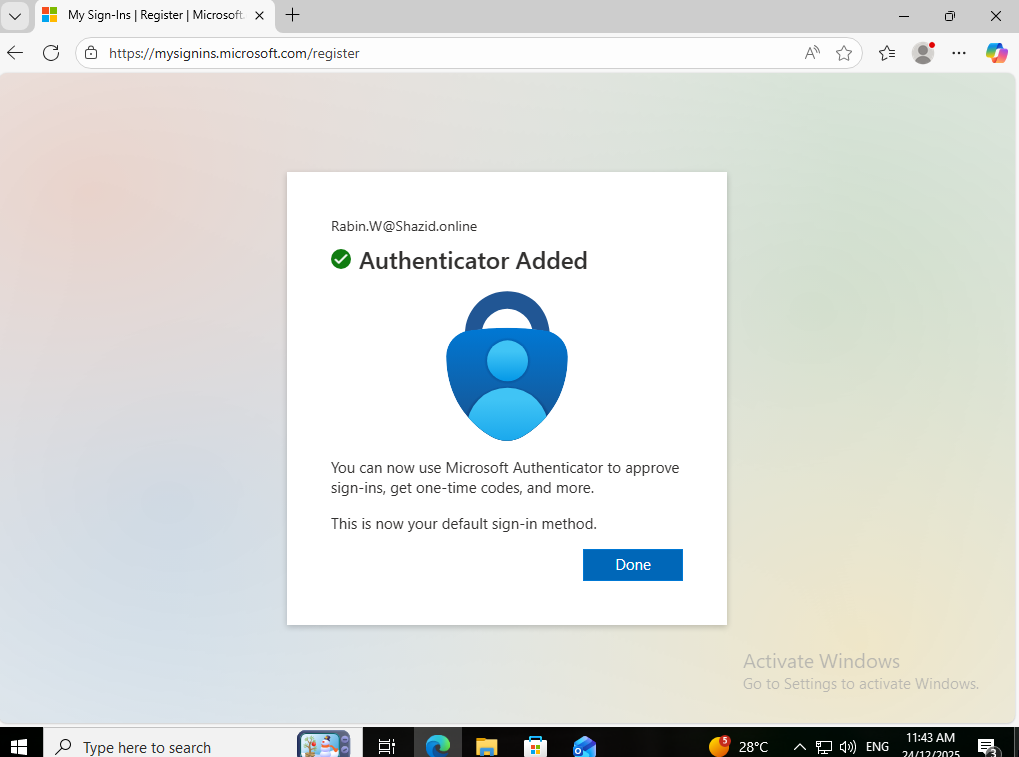
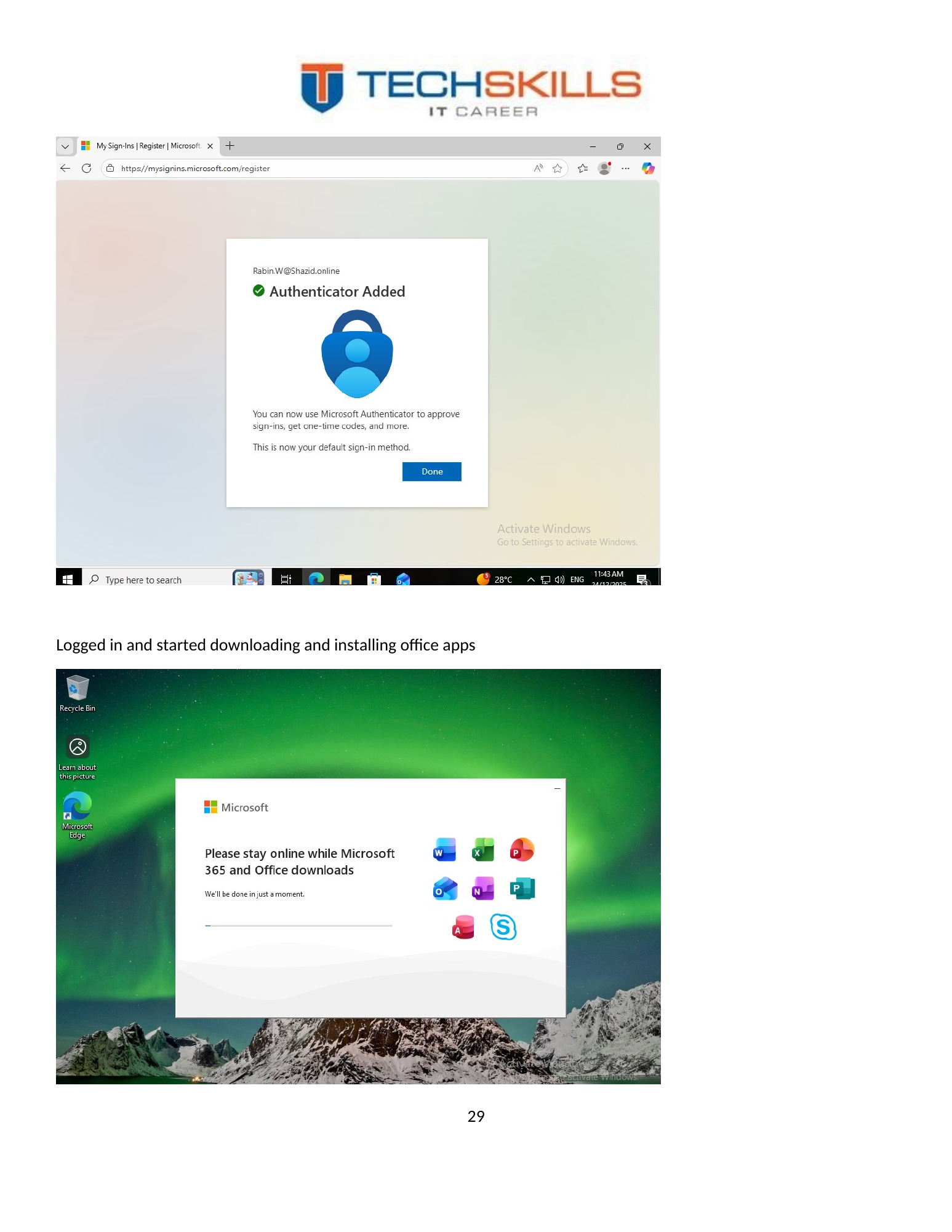
Figure 37. Microsoft Authenticator registration completed successfully.
12.3 Microsoft 365 Apps Installation
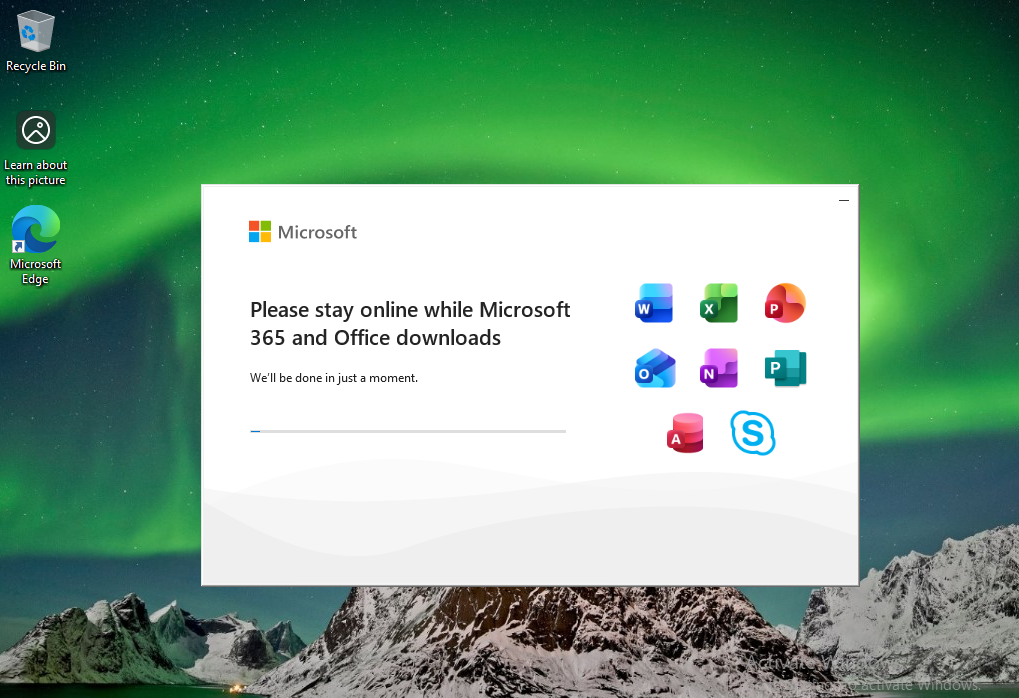
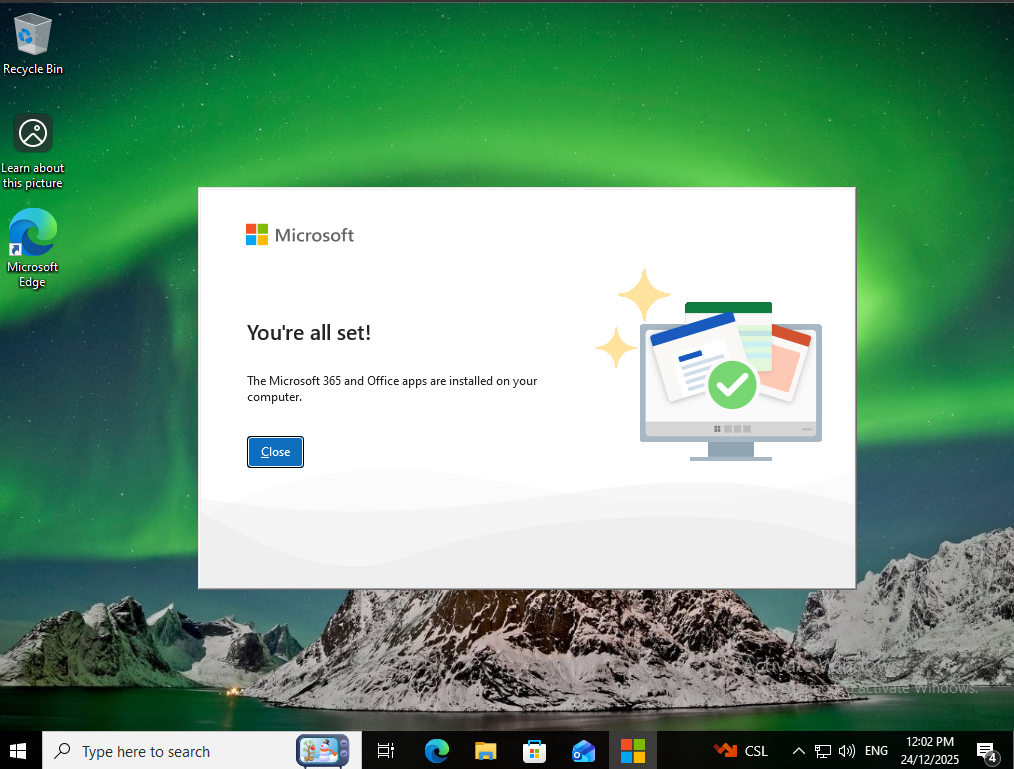
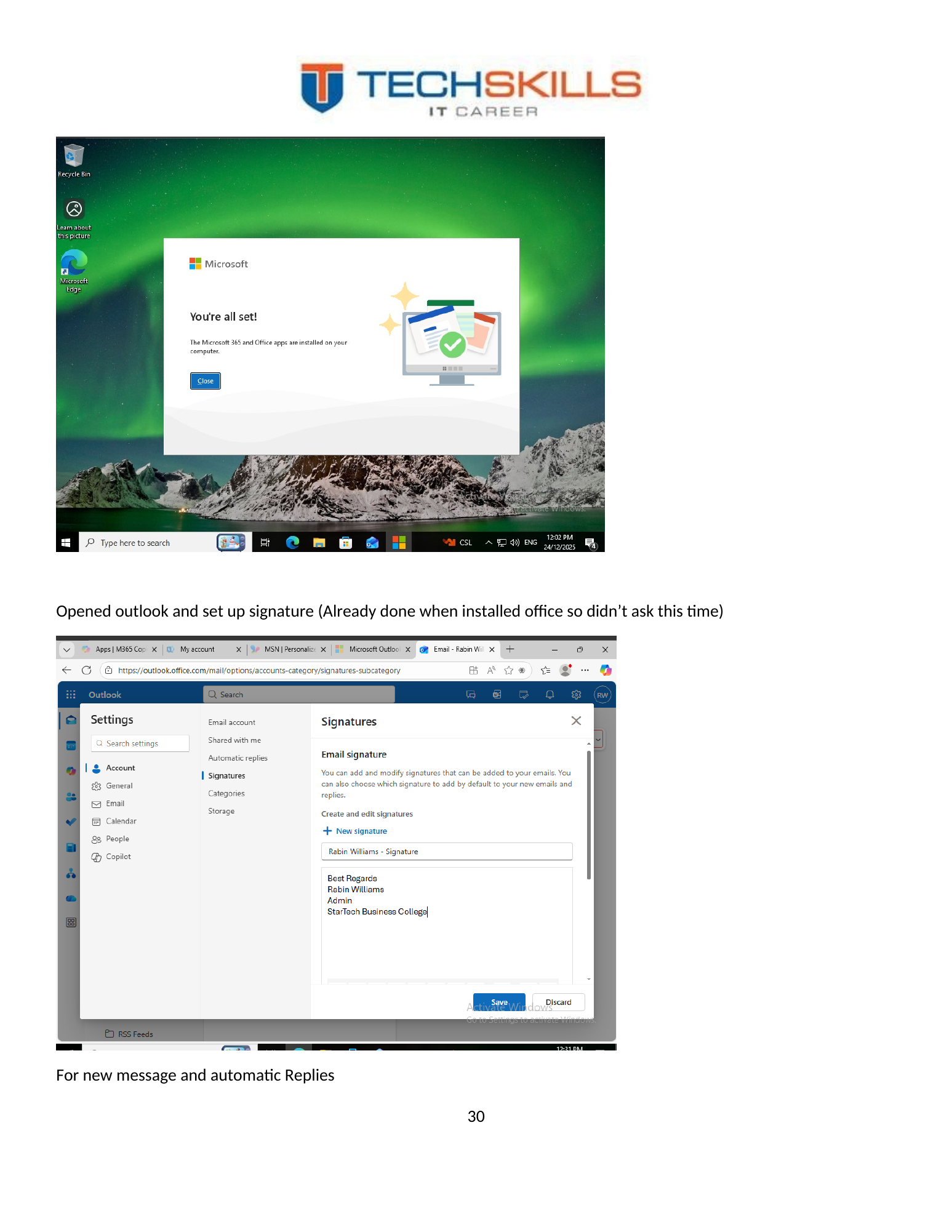
After authentication, Microsoft 365 Apps were downloaded and installed on the client device. This step connected identity and security with the practical productivity environment used by staff.
Figure 38. Microsoft 365 Apps installation process on the client device.
Figure 39. Office installation completion and application readiness.
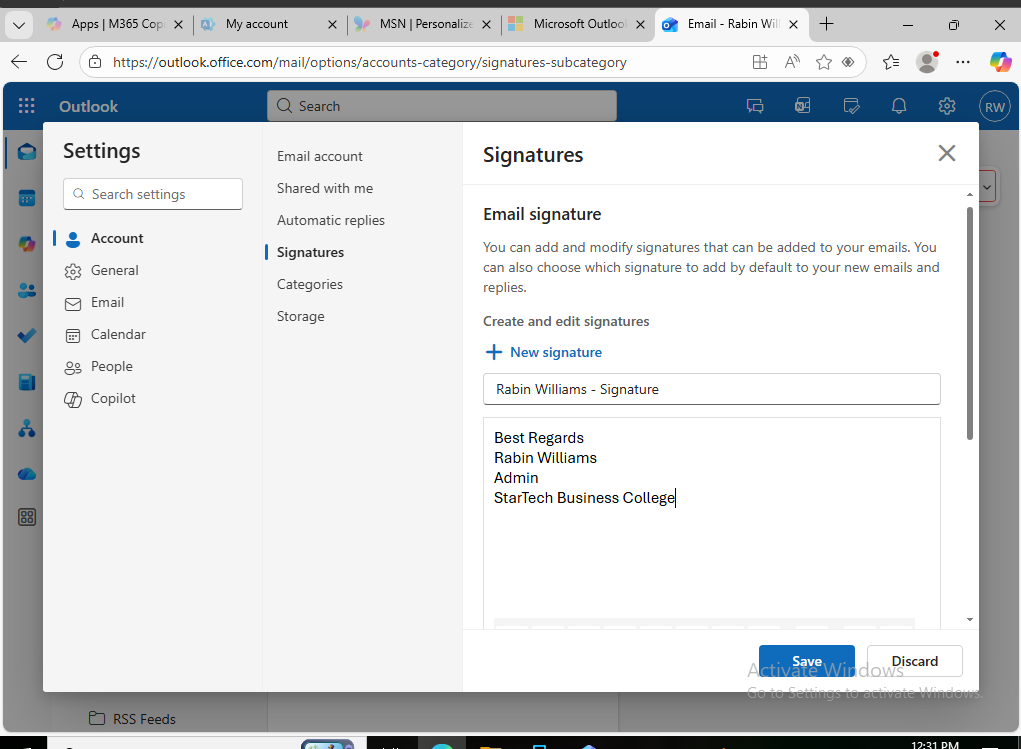
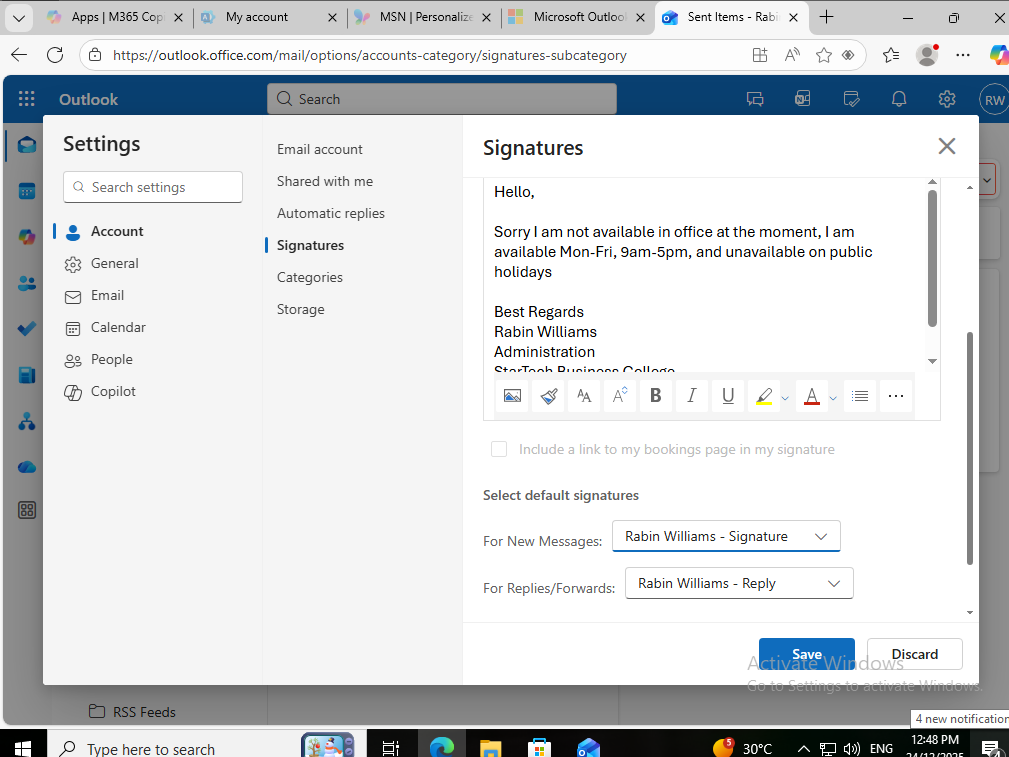
12.4 Outlook Signature
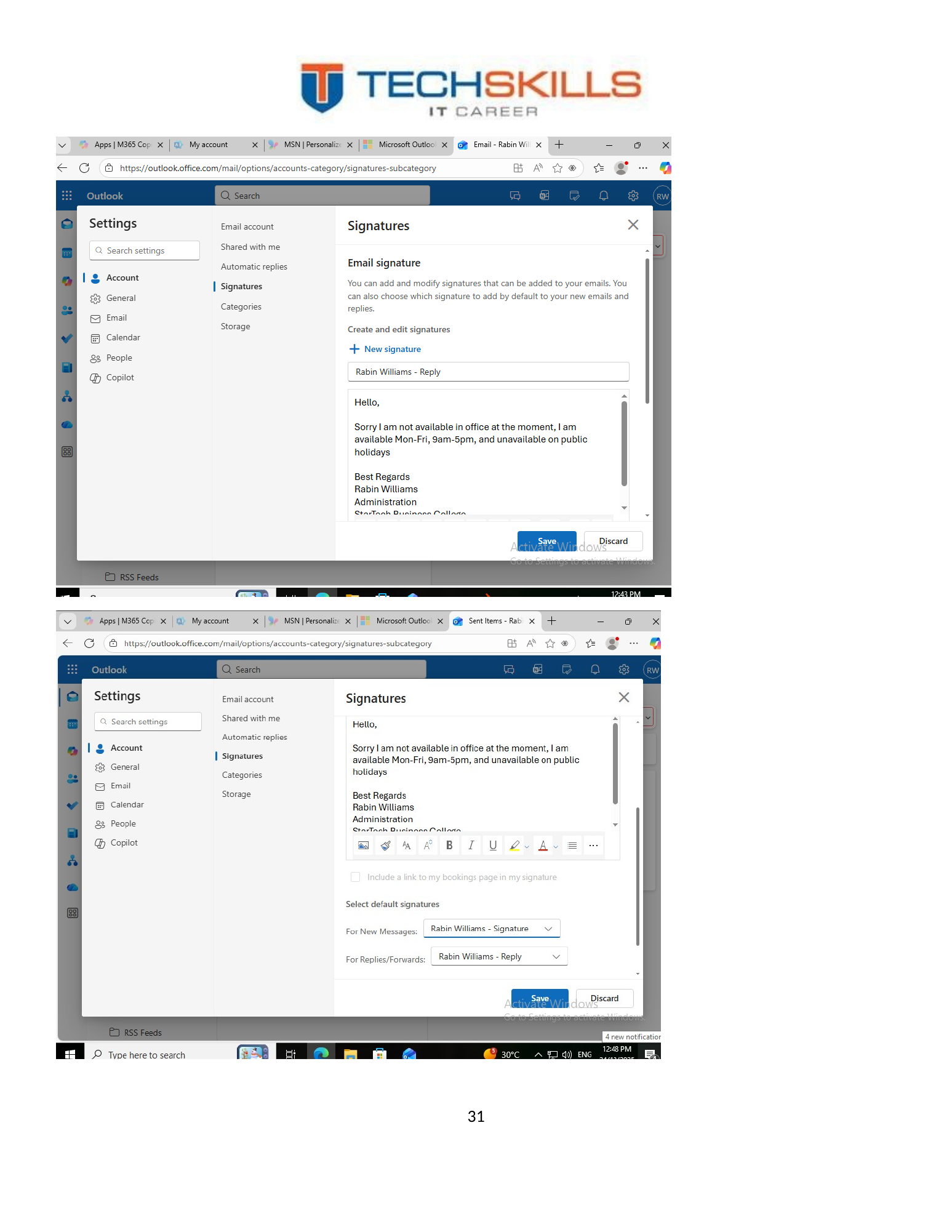
Outlook signatures were configured to standardise professional communication. A production institution should define an approved signature template containing name, role, institution, contact details, legal wording and branding, then deploy it consistently where licensing and management tooling permit.
Figure 40. Outlook signature settings for the user mailbox.
Figure 41. Signature applied to new messages and replies.
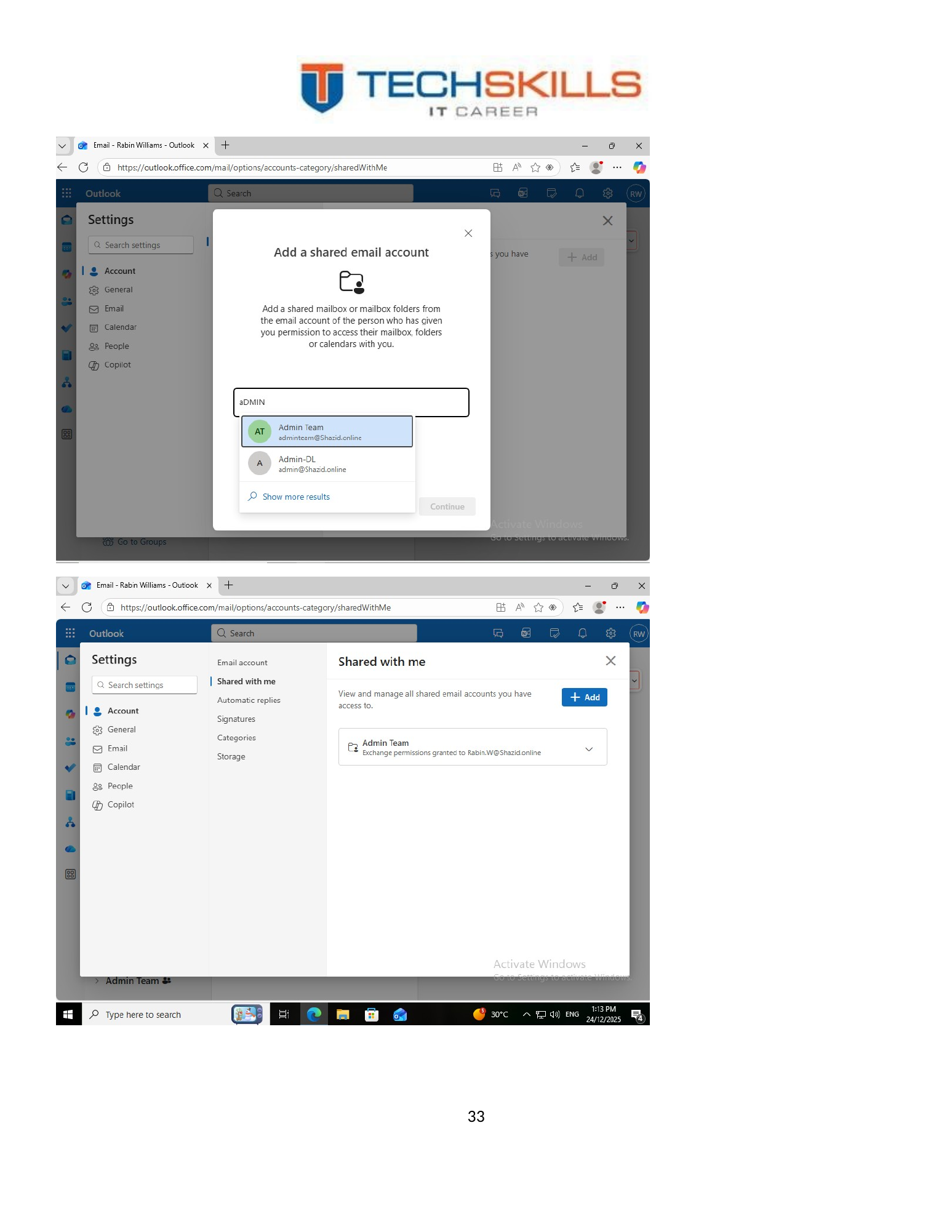
12.5 Shared Mailbox in Outlook
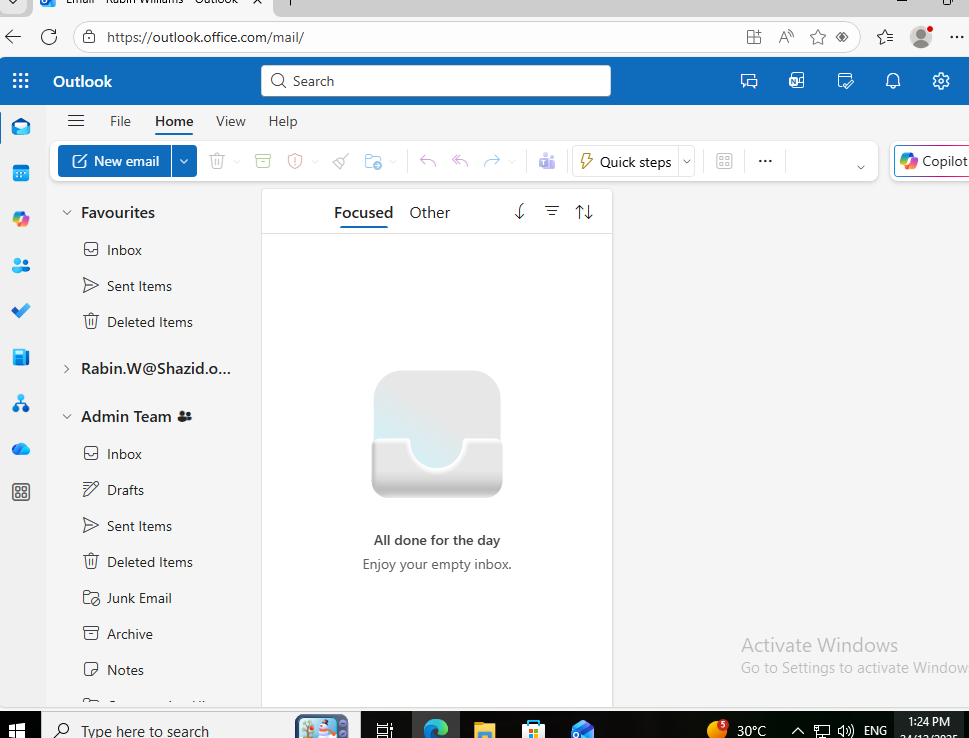
The shared mailbox was added to Outlook so the user could access team correspondence from the desktop client. This validated the relationship between the cloud administrative configuration and the end-user application.
Figure 42. Adding the departmental shared mailbox to Outlook.
12.6 Forwarding and Automatic Replies
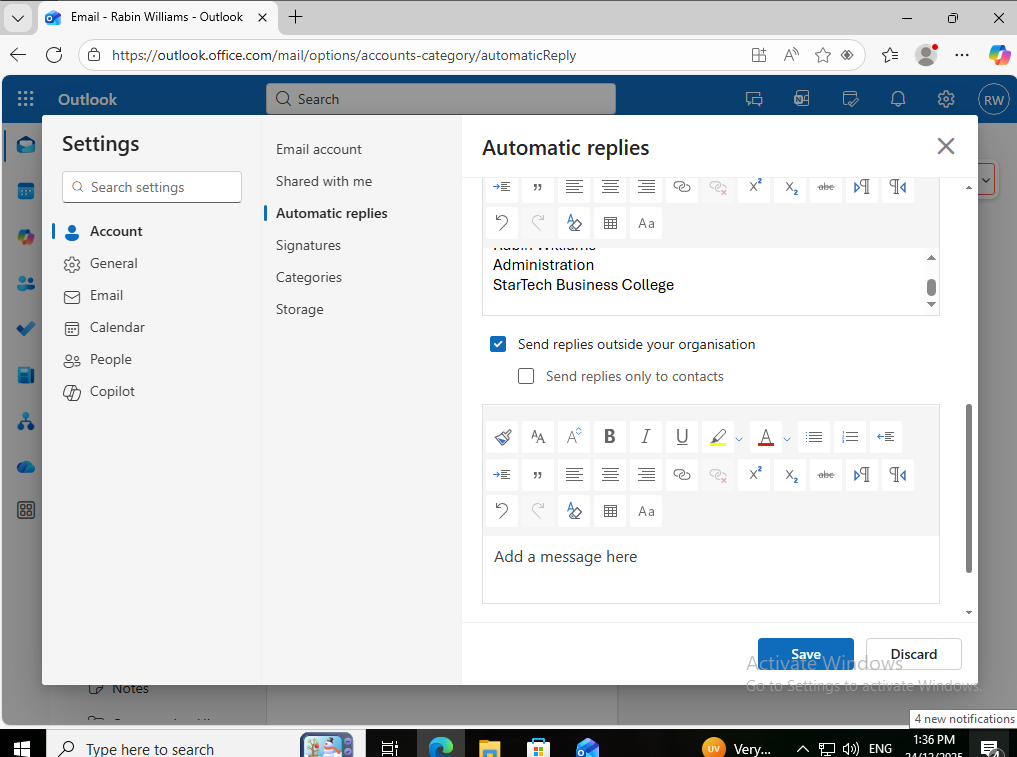
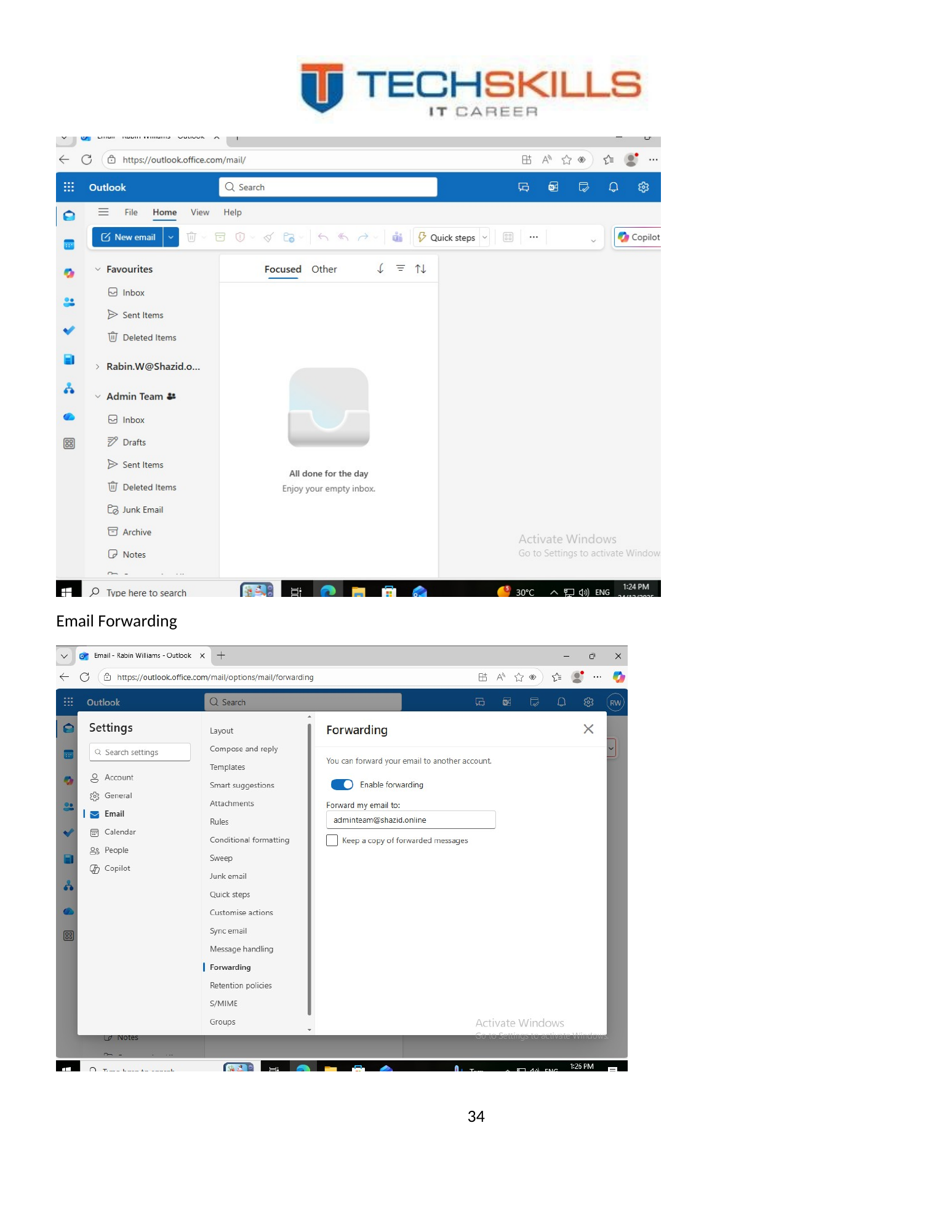
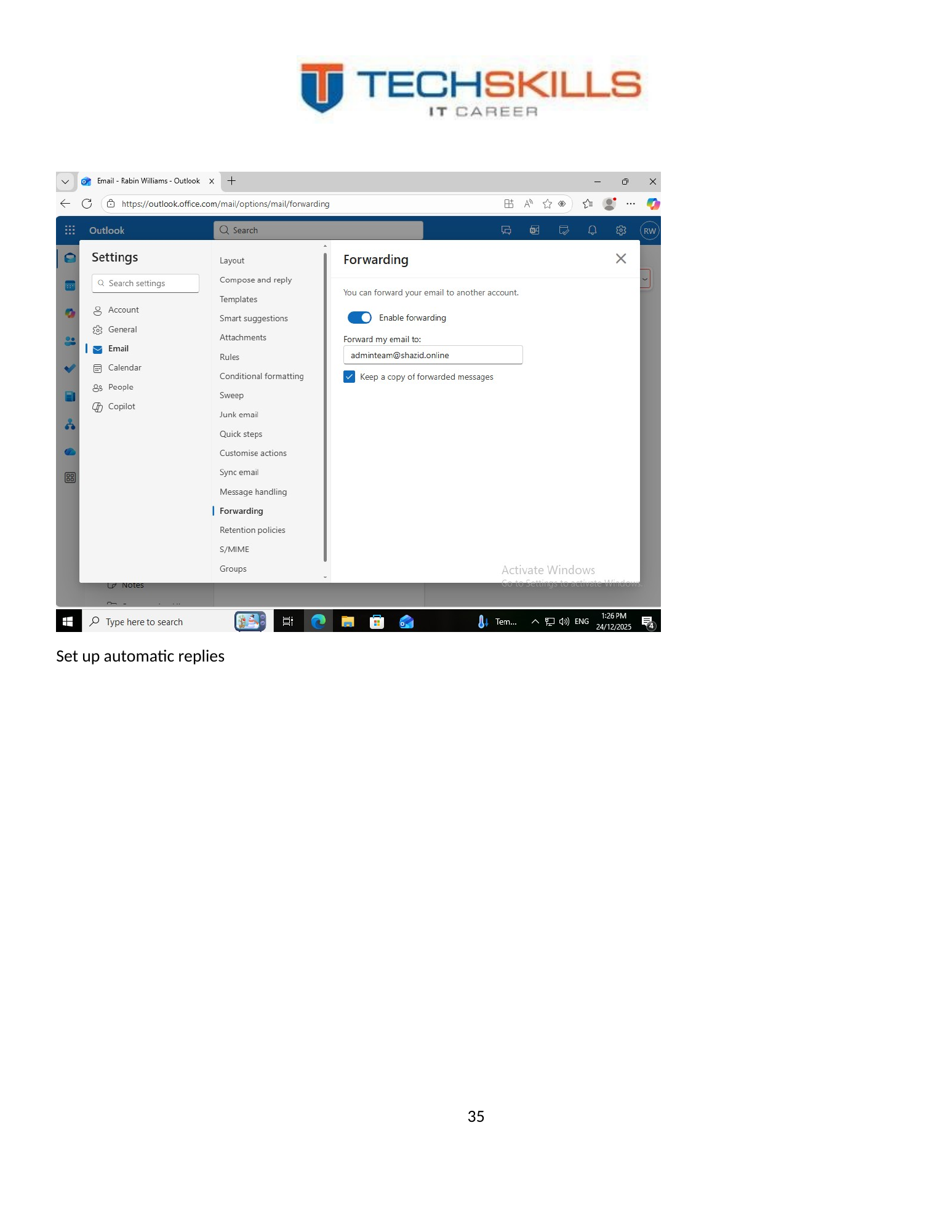
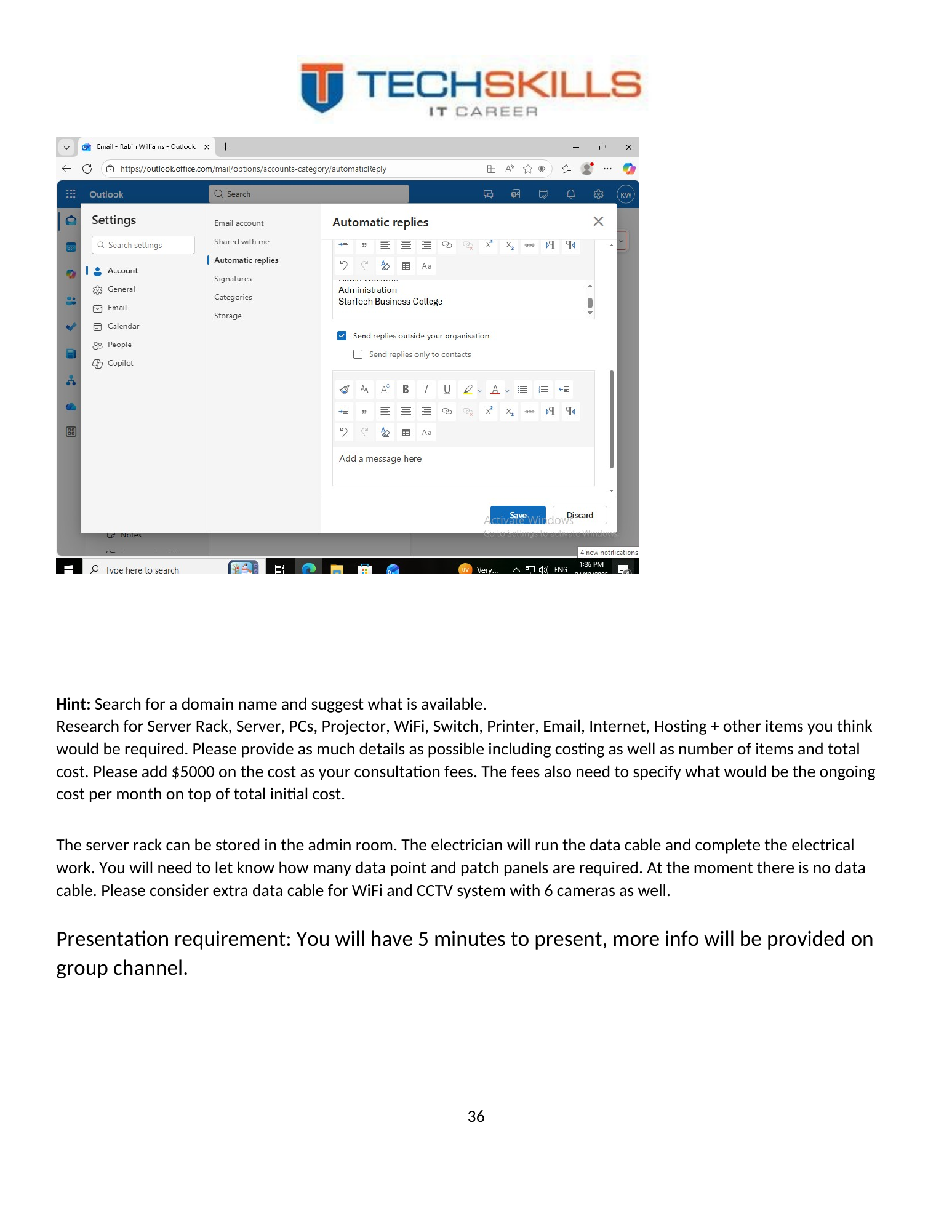
Email forwarding and automatic replies were configured as additional mailbox-management functions. These capabilities are operationally useful but must be governed. Forwarding to external destinations can create data-loss and privacy risks, while automatic replies can reveal absence or organisational information. Production policy should define when each feature is allowed and how it is reviewed.
Figure 43. Mailbox forwarding configuration in Microsoft 365.
Figure 44. Automatic reply configuration in Outlook.
Figure 45. Automatic reply message prepared for the mailbox.
CHAPTER 13
Chapter 22
Security Assessment and Australian Alignment
13.1 Security Controls Demonstrated
The project demonstrated several meaningful security controls: centralised authentication through AD DS, departmental security groups, least-privilege folder permissions, password-policy enforcement, denial testing, Microsoft 365 MFA and role-based shared communication. These controls directly reduce common risks such as unmanaged local accounts, excessive file access and password-only cloud authentication.
13.2 Australian Essential Eight Perspective
The Australian Signals Directorate’s Essential Eight maturity model provides practical mitigation strategies for Australian organisations. The project’s MFA work aligns directly with the multifactor-authentication strategy, while Group Policy and central administration create a foundation for patching, restricting administrative privileges, application control and user-application hardening. Full alignment would require evidence that each control is implemented consistently and operating at the intended maturity level (Australian Signals Directorate, 2023).
| Essential Eight area | Observed project position | Production recommendation |
|---|---|---|
| Multifactor authentication | Implemented for the demonstrated Microsoft 365 user | Extend to all users; use Conditional Access and phishing-resistant methods for privileged accounts |
| Restrict administrative privileges | Partially supported by group-based design | Separate daily and admin accounts; use least privilege, LAPS and privileged-role review |
| Patch applications and operating systems | Not evidenced | Establish Intune/WSUS or managed patching with compliance reporting |
| Application control | Not evidenced | Design an allowlisting approach appropriate to the institution |
| Configure Microsoft Office macro settings | Not evidenced | Apply centrally through Microsoft 365 or Group Policy |
| User application hardening | Not evidenced | Harden browsers, PDF readers and Office; disable unnecessary features |
| Regular backups | Not evidenced | Implement 3-2-1 backups, immutable/offline copy and restoration testing |
| Restrict Microsoft Office macros | Not evidenced | Block macros from internet sources and use trusted locations/signing where required |
13.3 Zero Trust Direction
NIST describes Zero Trust as an approach that removes implicit trust based solely on network location and focuses on users, devices and resources (Rose et al., 2020). The project already contains early Zero Trust characteristics: users are authenticated, resources are separated by role, unauthorised access is denied, and cloud access requires MFA. A mature design would add device compliance, Conditional Access, segmentation, continuous logging and risk-based decisions.
13.4 Key Risks and Treatments
| Risk | Impact | Rating | Treatment |
|---|---|---|---|
| Single domain controller | Loss of authentication and DNS during failure | High | Deploy a second DC; test system-state restore |
| Flat network | Lateral movement between classrooms, staff and CCTV | High | Implement managed switching, VLANs and firewall policy |
| 24-port switch capacity | Insufficient ports for stated endpoint count | High | Replace with correctly sized managed PoE switch stack |
| No documented backup | Data and identity recovery uncertain | High | Implement monitored 3-2-1 backup and restore tests |
| Password-only local access | Credential theft risk | Medium | Harden passwords, use privileged separation and endpoint protection |
| External email forwarding | Potential data leakage | Medium | Restrict, alert and review forwarding rules |
| No central endpoint management | Inconsistent patch and security posture | High | Use Intune or equivalent endpoint management |
| Shared physical rack location | Tampering, heat or accidental damage | Medium | Locked rack, ventilation, UPS and access logging |
13.5 Privacy and Publication Safety
A technical publication should not expose live passwords, private recovery codes, tenant secrets, API keys or reusable QR codes. Screenshots should be reviewed before public release and sensitive values should be redacted. The evidence in this paper is educational and should not be reused as a production credential reference.
CHAPTER 14
Chapter 23
Testing, Results and Engineering Evaluation
14.1 Test Strategy
Testing was organised around observable outcomes. Installation evidence established that services were selected and configured. Directory evidence established the intended identities and groups. Client tests established the actual behaviour experienced by a user. Cloud tests established that Microsoft 365 services and MFA were usable from the endpoint.
| ID | Test | Expected/observed evidence | Result |
|---|---|---|---|
| T01 | AD DS and DNS roles selected | Server Manager shows required roles | Pass |
| T02 | STBC OU and departmental OUs created | Directory hierarchy visible | Pass |
| T03 | Security groups created | Department groups visible | Pass |
| T04 | Users created and placed appropriately | User objects visible in directory | Pass |
| T05 | Department folders created | C:\STBC DATA contains required folders | Pass |
| T06 | Admin share permission assigned | Admin-GRP granted required access | Pass |
| T07 | Client joined to domain | Join workflow completed | Pass |
| T08 | Domain user sign-in | Rabin Williams signs in successfully | Pass |
| T09 | Authorised folder access | Admin folder opens and file can be exchanged | Pass |
| T10 | Unauthorised folder access | Marketing folder denied to Admin user | Pass |
| T11 | Password policy | Password under ten characters rejected | Pass |
| T12 | Custom Microsoft 365 domain | sagar.online shown as connected | Pass |
| T13 | Shared mailboxes | Admin and Teachers shared mailboxes created | Pass |
| T14 | Distribution lists | Department lists populated | Pass |
| T15 | MFA registration | Authenticator QR and number matching completed | Pass |
| T16 | Office and Outlook | Apps installed; signature and mailbox functions configured | Pass |
14.2 Results
All documented functional tests achieved the expected outcome. The most persuasive evidence was the paired access test: the user could open the Admin folder but could not open the Marketing folder. This demonstrated that access was based on role membership rather than broad network availability. The password test similarly proved that the Group Policy setting affected user behaviour.
14.3 Strengths
- The project covered the complete path from planning to user validation.
- The Active Directory structure reflected the college’s departments and future student growth.
- Permissions were group-based and were tested for both success and denial.
- The Microsoft 365 section included practical end-user functions rather than administration screens alone.
- MFA was tested through Microsoft Authenticator number matching.
- The evidence record is extensive and suitable for technical portfolio use.
14.4 Limitations
- The physical network design initially underestimated switch capacity for the stated number of devices.
- The implementation did not evidence VLANs, firewall rules or production wireless coverage testing.
- Only one domain controller was demonstrated.
- No backup, restore, monitoring, patch-compliance or disaster-recovery evidence was included.
- The local and Microsoft 365 identities were not synchronised.
- DHCP was provided by the gateway rather than demonstrated as a Windows Server role.
- The project used a demonstration domain rather than the college’s final verified domain.
14.5 Personal Engineering Reflection
The project strengthened my understanding that successful infrastructure work is defined by relationships and evidence. Creating an OU is easy to demonstrate, but designing an OU that supports permissions and future administration requires deeper thought. Creating a shared folder is simple, but proving that one role can enter while another is denied demonstrates security. Enabling MFA is an administrative task, but completing the Authenticator challenge proves usability.
The production review was equally important. It revealed that a design can be logically correct and still be physically undersized. Sixty classroom computers alone exceed a 24-port switch. Recognising and correcting that mismatch is part of engineering maturity. The lesson is to validate architecture against quantities, failure scenarios, security boundaries and operational support—not only against whether the lab configuration works.
CHAPTER 15
Chapter 24
Production Roadmap and Future Development
15.1 Priority 1: Correct Physical Capacity
The first production priority is a detailed site survey and port schedule. The college should replace the single 24-port concept with a managed PoE switch stack sized for the final endpoint count and growth. Structured cabling should be labelled at both ends, mapped to patch-panel ports and certified. Two wireless access points should be used as an initial design assumption, subject to a predictive and post-installation survey.
15.2 Priority 2: Resilience and Recovery
Deploy a second domain controller on separate hardware or a resilient virtualisation platform. Protect the server, switches, firewall and NVR with a UPS. Implement monitored backups with at least one offline or immutable copy. Document recovery-time and recovery-point objectives, then test restoration of a file, a user object and a domain-controller system state.
15.3 Priority 3: Identity and Endpoint Security
Introduce Microsoft Entra ID governance, Conditional Access, Intune, Defender, BitLocker, Windows LAPS and separate privileged accounts. Require MFA for all users and stronger phishing-resistant methods for administrators where practical. Establish device-compliance policies before allowing access to sensitive cloud services.
15.4 Priority 4: Operational Management
Create an asset register, warranty register, network diagram, IP plan, licence register, knowledge base and change log. Use an IT service-management platform to record incidents, requests, access approvals and recurring maintenance. Monitor backups, security alerts, disk capacity, internet availability, switch health, wireless performance and certificate expiry.
15.5 Priority 5: Student Environment
Before students enrol, define the student identity lifecycle, classroom image, web filtering, printing quota, acceptable-use policy, file storage, account expiration and exam or assessment requirements. Student devices should be separated from staff administration and sensitive financial resources. Shared classroom accounts should be avoided where individual accountability is required.
15.6 Phased Roadmap
| Phase | Key activities |
|---|---|
| 0–30 days | Site survey, final domain ownership, port schedule, supplier quotes, firewall and managed-switch selection |
| 31–60 days | Rack, cabling, switching, VLANs, Wi-Fi, server and secondary domain controller |
| 61–90 days | Microsoft 365 production tenant, identity lifecycle, Intune, Defender, Conditional Access, backup |
| 91–120 days | Classroom deployment, printers, projectors, CCTV, staff training, acceptance testing |
| Ongoing | Patch management, access reviews, backup tests, incident response exercises and continuous improvement |
CHAPTER 16
Chapter 25
Conclusion
This case study documented the transformation of a new educational-business scenario into a working hybrid IT environment. The project began with physical rooms and named roles, then developed into an equipment schedule, network map, Windows Server domain, departmental identity structure, controlled file services, Group Policy, client validation and Microsoft 365 communication environment.
The implemented results were meaningful because they were tested. Rabin Williams could authenticate to a domain-joined client, access the Admin share, exchange a file and was denied access to the Marketing share. A password shorter than ten characters was rejected. Microsoft 365 users, shared mailboxes, distribution lists, Authenticator MFA, Office, signatures, forwarding and automatic replies were configured and demonstrated. These outcomes show practical competence across server administration, identity, cloud services and end-user support.
The project also revealed the importance of engineering review. The initial 24-port switch and 80-point cabling proposal did not fully match the endpoint count, and the laboratory environment contained single points of failure and unimplemented security controls. Rather than weakening the project, identifying these limitations strengthens the final paper. It shows the ability to move from “the lab works” to “the production design is supportable, secure and scalable.”
The final contribution is therefore both technical and professional. Technically, the project demonstrates a functioning core enterprise environment. Professionally, it demonstrates a method: understand the business, design the relationships, configure carefully, validate the user experience, record the evidence and improve the design through honest review. That method is transferable to service desk, systems administration, network engineering, cloud support and infrastructure roles.
| Author’s closing statement This project reflects the knowledge, technical skill and practical confidence I developed through hands-on implementation. It is not presented as a perfect production system; it is presented as real work, tested evidence and a clear foundation for the next stage of my career in enterprise IT. — Sagar Debnath |
Chapter 26
References
Australian Signals Directorate. (2023). Essential Eight maturity model. Australian Cyber Security Centre. https://www.cyber.gov.au/business-government/asds-cyber-security-frameworks/essential-eight/essential-eight-maturity-model
Debnath, S. (2025). Mini project: StarTech Business College IT infrastructure [Unpublished technical project]. Techskill Institution.
Microsoft. (2025a). Active Directory Domain Services overview. Microsoft Learn. https://learn.microsoft.com/windows-server/identity/ad-ds/get-started/virtual-dc/active-directory-domain-services-overview
Microsoft. (2025b). DNS and Active Directory Domain Services. Microsoft Learn. https://learn.microsoft.com/windows-server/identity/ad-ds/plan/dns-and-ad-ds
Microsoft. (2025c). About shared mailboxes in Microsoft 365. Microsoft Learn. https://learn.microsoft.com/microsoft-365/admin/email/about-shared-mailboxes
Microsoft. (2025d). How Microsoft Entra multifactor authentication works. Microsoft Learn. https://learn.microsoft.com/entra/identity/authentication/concept-mfa-howitworks
Microsoft. (2025e). Domain Name System (DNS) in Windows and Windows Server. Microsoft Learn. https://learn.microsoft.com/windows-server/networking/dns/dns-overview
Microsoft. (2025f). Understanding the Active Directory logical model. Microsoft Learn. https://learn.microsoft.com/windows-server/identity/ad-ds/plan/understanding-the-active-directory-logical-model
Microsoft. (2026a). Group Policy overview for Windows Server. Microsoft Learn. https://learn.microsoft.com/windows-server/identity/ad-ds/manage/group-policy/group-policy-overview
Microsoft. (2026b). Microsoft Entra Conditional Access: Zero Trust policy engine. Microsoft Learn. https://learn.microsoft.com/entra/identity/conditional-access/overview
Microsoft. (2026c). What is Microsoft Entra? Microsoft Learn. https://learn.microsoft.com/entra/fundamentals/what-is-entra
Rose, S., Borchert, O., Mitchell, S., & Connelly, S. (2020). Zero trust architecture (NIST Special Publication 800-207). National Institute of Standards and Technology. https://doi.org/10.6028/NIST.SP.800-207
Chapter 27
Appendix A — Original Equipment and Cost Schedule
The following table reproduces the equipment and estimated costs recorded in the original mini project. Prices were project-period estimates and must be revalidated before procurement.
| Item | Provider / model | Description | Recorded cost | Vendor |
|---|---|---|---|---|
| Internet | SpinTel NBN 500/50 Mbps | Local support and static-IP requirement | AUD 149/month | SpinTel |
| Server hardware | Lenovo ThinkSystem ST550 | Performance and scalability | AUD 7,500–8,500 | Lenovo |
| Wi-Fi | TP-Link Omada EAP670 | Centralised controller ecosystem | AUD 250 | TP-Link |
| Router | TP-Link Omada | SDN-based gateway management | AUD 300 | TP-Link |
| B&W printers | Canon ImageClass MF462dw | Six departmental printers | AUD 6,000 total | Canon |
| Phones | Grandstream GRP2600 | Wi-Fi, Bluetooth, HD audio, Gigabit | AUD 100 | Grandstream |
| Desktops | HP EliteDesk | Business desktop platform | AUD 2,000 | HP |
| Laptops | HP EliteBook | Business laptop platform | AUD 2,500 | HP |
| Additional monitors | HP 524pu Series 5 Pro | USB-C, Ethernet and ergonomic stand | AUD 450 | HP |
| Domain name | GoDaddy / sagar.online | Demonstration domain; college domain recommended | AUD 0 during project | GoDaddy |
| Network switch | TP-Link TL-SG1024D | 24-port Gigabit switch | AUD 129 | TP-Link |
| CCTV | Swann 8-channel 4K NVR kit | Six cameras and recorder | AUD 1,299 | Swann |
| Structured cabling | Cat6, 80 points | Installed by electrician | Approx. AUD 9,600 | Electrician |
| Colour printer | Canon PIXMA GX4050 | Reception colour printer | AUD 399 | Canon |
| Plastic ID printer | Evolis Primacy | Student/staff card printing | Approx. AUD 1,200 | Evolis |
| Camera | Logitech C920e | Student photographs | AUD 99 | Logitech |
| Projectors | Epson EB-E01, two | One per classroom | AUD 1,098 total | Epson |
| IT consultation | Project planning and deployment | Planning, configuration, training | AUD 5,000 | IT team |
Chapter 28
Appendix B — User, Group and Access Matrix
| User | OU / role | Security group | Intended access |
|---|---|---|---|
| Rina Smith | Reception | Reception-GRP | Reception share; approved common resources |
| Mehak Singh | Admin | Admin-GRP | Admin share; approved common resources |
| Rabin Williams | Admin | Admin-GRP | Admin share; validated in client test |
| Amit Sharma | Teachers | Teachers-GRP | Teachers share and Teachers shared mailbox |
| Karan Patel | Teachers | Teachers-GRP | Teachers share and Teachers shared mailbox |
| Mohan Jung | Marketing | Marketing-GRP | Marketing share |
| Ruby Rana | Accounts | Accounts-GRP | Accounts share |
| Ratan Khan | Director | Director/approved nested groups | All departmental shares as required by brief |
| Future student | Students | Students-GRP | Student share and approved classroom resources |
Note: Passwords are deliberately omitted. In a production environment, temporary credentials should be generated securely, communicated through an approved channel, changed at first sign-in and stored only in an authorised password-management system where required.
Chapter 29
Appendix C — Validation Test Register
| Test ID | Control area | Procedure | Evidence | Outcome |
|---|---|---|---|---|
| T01 | Server roles | Open Server Manager and verify AD DS and DNS selection | Role-selection screenshot | Pass |
| T02 | OU structure | Open AD Users and Computers and inspect STBC hierarchy | STBC and departmental OU screenshots | Pass |
| T03 | Groups | Inspect departmental group objects | Group screenshots | Pass |
| T04 | Users | Inspect staff accounts and membership | User screenshots | Pass |
| T05 | File services | Open C:\STBC DATA and inspect departmental folders | Folder screenshot | Pass |
| T06 | Permissions | Inspect Admin share security and sharing settings | Permission screenshots | Pass |
| T07 | Domain join | Join client to domain and restart | Domain-join screenshot | Pass |
| T08 | Authentication | Sign in as Rabin Williams | Client sign-in screenshot | Pass |
| T09 | Positive authorisation | Open Admin share and exchange file | Share and file screenshots | Pass |
| T10 | Negative authorisation | Attempt Marketing share as Admin user | Access-denied screenshot | Pass |
| T11 | GPO password standard | Attempt password shorter than ten characters | Password rejection screenshot | Pass |
| T12 | Cloud domain | Verify custom domain status | Microsoft 365 domain screenshot | Pass |
| T13 | Shared mailboxes | Create Admin and Teachers shared mailboxes | Mailbox screenshots | Pass |
| T14 | Distribution lists | Create lists and add users | Distribution-list screenshot | Pass |
| T15 | MFA | Register Authenticator and complete number matching | QR, number and completion screenshots | Pass |
| T16 | Outlook functions | Configure signature, shared mailbox, forwarding and auto reply | Outlook and admin screenshots | Pass |
Chapter 30
Appendix D — Complete Original Project and Screenshot Evidence
This appendix reproduces every page of the uploaded original mini-project document. It is included to preserve the complete project brief, equipment schedule, diagrams, screenshots and implementation sequence. The main chapters interpret and evaluate selected evidence; this appendix provides the full source record.
Original project evidence — page 1 of 36
Original project evidence — page 2 of 36
Original project evidence — page 3 of 36
Original project evidence — page 4 of 36
Original project evidence — page 5 of 36
Original project evidence — page 6 of 36
Original project evidence — page 7 of 36
Original project evidence — page 8 of 36
Original project evidence — page 9 of 36
Original project evidence — page 10 of 36
Original project evidence — page 11 of 36
Original project evidence — page 12 of 36
Original project evidence — page 13 of 36
Original project evidence — page 14 of 36
Original project evidence — page 15 of 36
Original project evidence — page 16 of 36
Original project evidence — page 17 of 36
Original project evidence — page 18 of 36
Original project evidence — page 19 of 36
Original project evidence — page 20 of 36
Original project evidence — page 21 of 36
Original project evidence — page 22 of 36
Original project evidence — page 23 of 36
Original project evidence — page 24 of 36
Original project evidence — page 25 of 36
Original project evidence — page 26 of 36
Original project evidence — page 27 of 36
Original project evidence — page 28 of 36
Original project evidence — page 29 of 36
Original project evidence — page 30 of 36
Original project evidence — page 31 of 36
Original project evidence — page 32 of 36
Original project evidence — page 33 of 36
Original project evidence — page 34 of 36
Original project evidence — page 35 of 36
Original project evidence — page 36 of 36
Chapter 31
About the Author
Sagar Debnath is an IT support and infrastructure professional with postgraduate study in networking, cybersecurity and forensic computing. His practical interests include Windows Server, Active Directory, Microsoft 365, cloud identity, endpoint support, network design, cybersecurity, technical documentation and the development of software tools that improve operational workflows.
This publication represents his commitment to converting practical implementation into clear engineering evidence. The project began as a mini project and was developed into a complete technical case study to demonstrate planning, configuration, validation, honest self-evaluation and a production-focused improvement mindset.
Copyright © 2026 Sagar Debnath — All Rights Reserved